Hcpl sitesdefaultHarris County Public Library Card Application - HCPL 2026

Get Form
texas public library card Preview on Page 1

Here's how it works

01. Edit your texas public library card online
Type text, add images, blackout confidential details, add comments, highlights and more.
02. Sign it in a few clicks
Draw your signature, type it, upload its image, or use your mobile device as a signature pad.
03. Share your form with others
Send library card application form via email, link, or fax. You can also download it, export it or print it out.

How to use or fill out hcpl sitesdefaultHarris County Public Library Card Application - HCPL with Our Platform

Form edit decoration
9.5
Ease of Setup
DocHub User Ratings on G2
9.0
Ease of Use
DocHub User Ratings on G2
  1. Click ‘Get Form’ to open it in the editor.
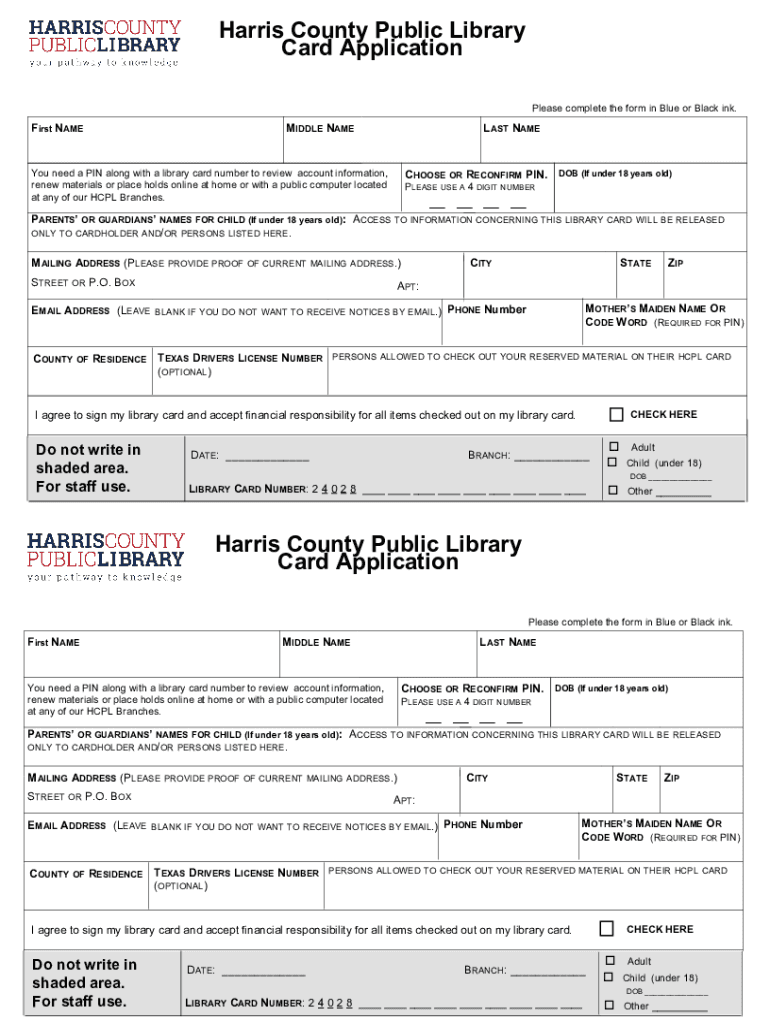
  2. Begin by entering your First Name, Middle Name, and Last Name in the designated fields. Ensure accuracy for a smooth application process.
  3. Choose or reconfirm your PIN, which is essential for accessing your account online. Remember to use a 4-digit number.
  4. If you are under 18, provide your Date of Birth and the names of your parents or guardians. This information is crucial for account access.
  5. Fill in your Mailing Address, including Street or P.O. Box, City, State, and ZIP code. Proof of current mailing address may be required.
  6. Optionally provide an Email Address if you wish to receive notices via email. Also include your Phone Number for contact purposes.
  7. Complete the section regarding Mother’s Maiden Name or Code Word, which is required for your PIN setup.
  8. Indicate the County of Residence and Texas Driver's License Number if applicable.
  9. If desired, list persons allowed to check out materials on your card in the optional section provided.
  10. Finally, agree to sign your library card and accept financial responsibility by checking the box before submitting the form.

Start using our platform today to easily fill out your Harris County Public Library Card Application for free!

See more hcpl sitesdefaultHarris County Public Library Card Application - HCPL versions

We've got more versions of the hcpl sitesdefaultHarris County Public Library Card Application - HCPL form. Select the right hcpl sitesdefaultHarris County Public Library Card Application - HCPL version from the list and start editing it straight away!
Versions Form popularity Fillable & printable
2019 4.6 Satisfied (30 Votes)
2003 4.7 Satisfied (30 Votes)
be ready to get more

Complete this form in 5 minutes or less

Get form

Got questions?

We have answers to the most popular questions from our customers. If you can't find an answer to your question, please contact us.
Contact us
To renew your library card, please bring the following to any Hawaii State Public Library branch: Your library card. Your current ID. Proof of your current mailing address.
You can do that right in the Libby app. Just do a search for any library and you get all the info youll need. If it can be done online, youll get your library card number in less than a minute. If you cant, youd need to apply in person. I have 11 cards, most acquired online.
To join please bring photo ID and proof of address (e.g. a bill for gas, electricity, telephone, mobile phone; a bank statement, issued within the past 6 months) with you. If you register online you will have one month to visit a branch - bringing photo ID and proof of address - and get your library card.
Applying For a Library Card Find an employee to talk to. Once at the library, find a person who works there to ask about library accounts. Ask to apply for a library card. Fill out all necessary paper work. Sign your library card.

Security and compliance

At DocHub, your data security is our priority. We follow HIPAA, SOC2, GDPR, and other standards, so you can work on your documents with confidence.

Learn more
ccpa2
pci-dss
gdpr-compliance
hipaa
soc-compliance