



Here's how it works



How to use or fill out Nottingham Trent University Research Degree Application Form

- Click ‘Get Form’ to open it in the editor.
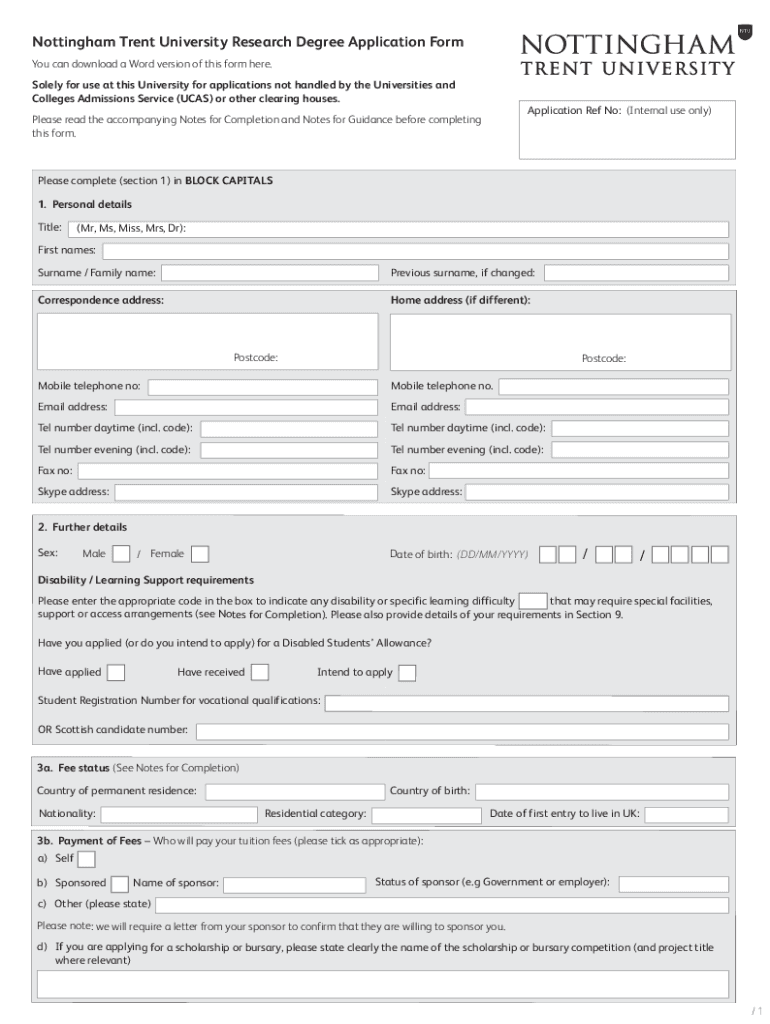
- Begin with Section 1: Personal Details. Fill in your title, first names, surname, and previous surname if applicable. Ensure all information is in BLOCK CAPITALS for clarity.
- Provide your correspondence and home addresses, including postcodes. Enter your mobile number and email address accurately to ensure effective communication.
- In Section 2: Further Details, indicate your sex, date of birth, and any disability or learning support requirements. Be sure to check the accompanying Notes for guidance on this section.
- Proceed to Section 3a: Fee Status. Specify your country of permanent residence and nationality. In Section 3b, clarify who will pay your tuition fees by ticking the appropriate box.
- Continue through Sections 4 to 10 by providing details about your qualifications, work experience, personal statement, referees, and any special needs you may have.
- Finally, review all sections for accuracy before signing the declaration in Section 11 and submitting your application.
Start using our platform today to complete your Nottingham Trent University Research Degree Application Form online for free!
It's free
See more Nottingham Trent University Research Degree... versions
Got questions?
How can I sign my Nottingham Trent University Research Degree... on iOS?
With DocHub, you can easily sign your Nottingham Trent University Research Degree... or any other document on iOS, even without setting up extra applications. You can access your DocHub account from any web-connected browser and complete and sign your form in any preferred method with just a couple of clicks.
How do you create an e-signature for the Nottingham Trent University Research Degree... on iOS?
Apart from a comprehensive toolset for editing PDFs on mobile devices, DocHub enables you to sign your Nottingham Trent University Research Degree... along the way. Open our editor in your browser, make modifications using DocHub’s toolset, and complete your editing by eSigning the completed form.
What is the difference between PhD taught and PhD research?
Why is NTU so popular?
What is a research PhD?
Security and compliance
At DocHub, your data security is our priority. We follow HIPAA, SOC2, GDPR, and other standards, so you can work on your documents with confidence.
Learn more


Related forms