



Here's how it works



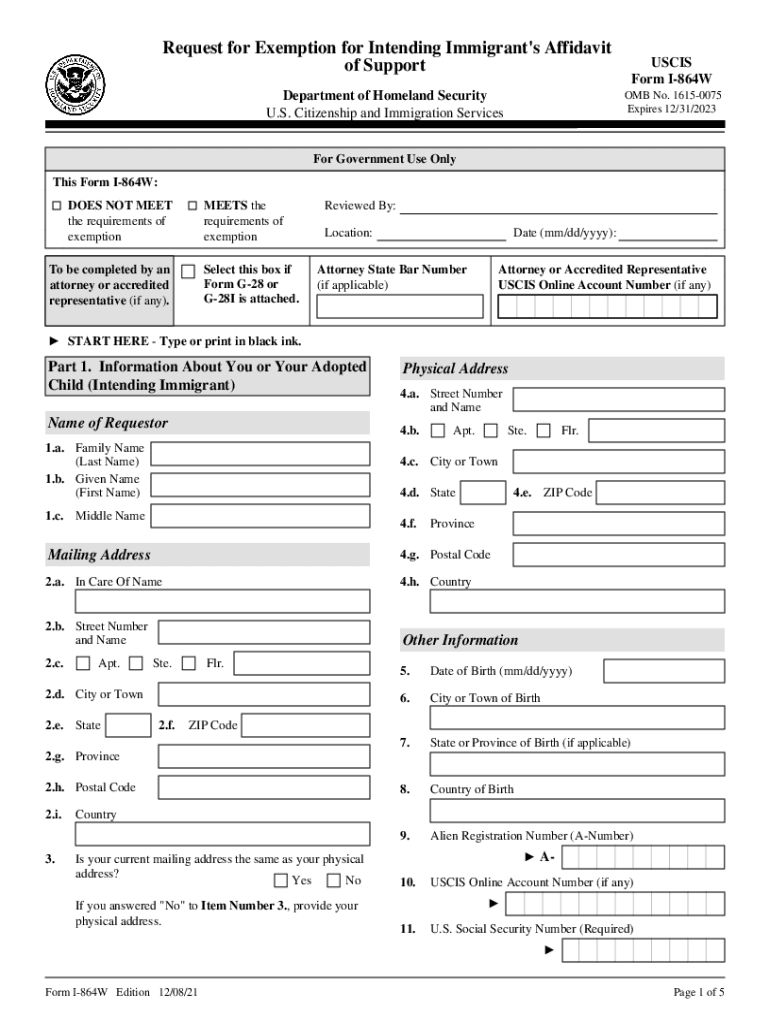
How to use or fill out form 864w with our platform

- Click ‘Get Form’ to open it in the editor.
- Begin with Part 1, entering your personal information. Fill in your name, physical address, and date of birth accurately. Ensure all fields are completed using black ink.
- In Part 2, select the reason for exemption by checking the appropriate box. If applicable, provide your contact information including phone numbers and email address.
- Proceed to Part 3 where you will declare and certify that all information provided is true. Sign and date this section.
- If an interpreter assisted you, complete Part 4 with their details and signature.
- Finally, if someone else prepared the request on your behalf, fill out Part 5 with their information and signature.
Start using our platform today to fill out form I-864W online for free!
It's free
See more form 864w versions
Got questions?
How do I sign my i 864w pdf without printing?
Electronic signatures are an excellent alternative to traditional signing, as they save time, effort, and costs people spend on printing, scanning, and paper delivery. You can electronically sign your i 864w pdf utilizing a reliable and powerful online document processing tool like DocHub. It complies with major eSignature standards (ESIGN and UETA), so all forms approved there are legally binding and have the same validity as manually signed ones.
Can I edit uscis form i 864w on my phone?
As a comprehensive document modifying platform, DocHub is accessible on smart phones. Open DocHub in your choice of mobile browser and employ our intelligent mobile-friendly toolset to complete your uscis form i 864w.
Security and compliance
At DocHub, your data security is our priority. We follow HIPAA, SOC2, GDPR, and other standards, so you can work on your documents with confidence.
Learn more