




Here's how it works

01. Edit your dochub com fillable form online
Type text, add images, blackout confidential details, add comments, highlights and more.

02. Sign it in a few clicks
Draw your signature, type it, upload its image, or use your mobile device as a signature pad.

03. Share your form with others
Send country of origin declaration via email, link, or fax. You can also download it, export it or print it out.
How to use or fill out declaration of origin template with our platform

- Click ‘Get Form’ to open the declaration of origin template in the editor.
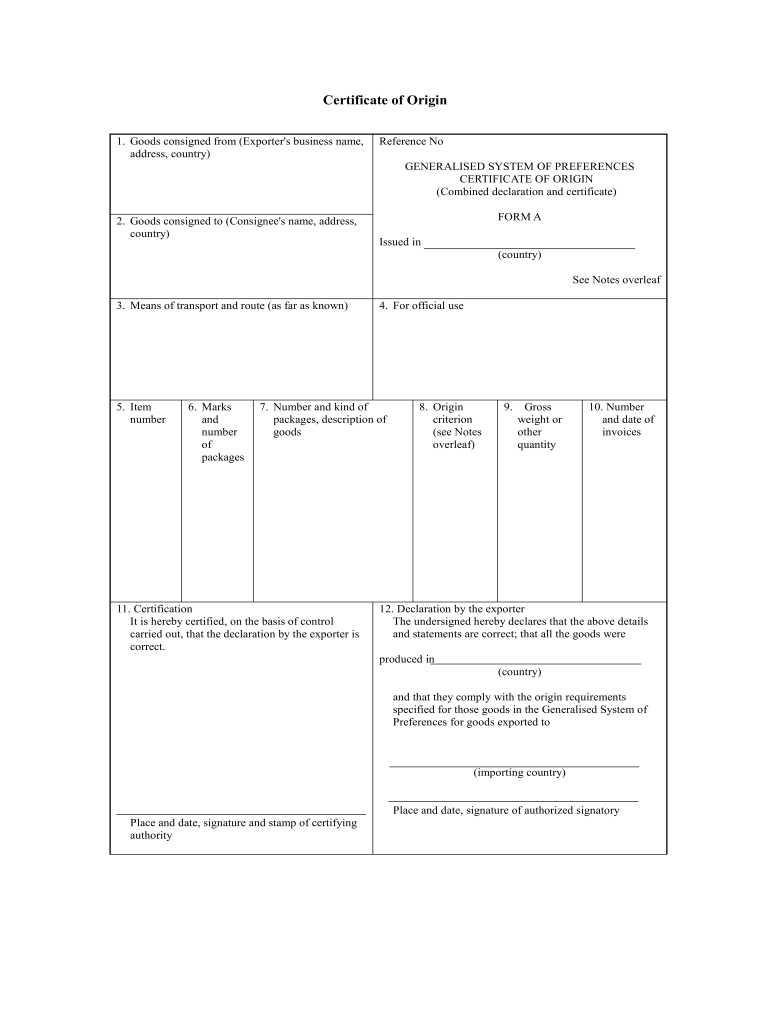
- Begin by filling in the 'Goods consigned from' section with the exporter's business name, address, and country. This information is crucial for identifying the source of the goods.
- Next, complete the 'Goods consigned to' field with the consignee's name, address, and country. Ensure accuracy to avoid delivery issues.
- In the 'Means of transport and route' section, provide details about how the goods will be transported. This helps in tracking and logistics.
- Fill in item numbers and package details under 'Marks and number of packages' as well as 'Number and kind of packages, description of goods'. Be specific to facilitate customs clearance.
- Complete the certification section by confirming that all details are correct. This includes signing off on compliance with origin requirements.
- Finally, review all entries for accuracy before saving or exporting your completed document for submission.
Start using our platform today to streamline your document editing process for free!
Fill out declaration of origin template online
It's free
It's free
Security and compliance
At DocHub, your data security is our priority. We follow HIPAA, SOC2, GDPR, and other standards, so you can work on your documents with confidence.
Learn more


Related forms
Self help group registration form 2024
The document is an application form for the registration of Self-Help Groups or Community Projects under the Ministry of ...
PRINCE WARRIORS
The document is a guided reading resource for 'Prince Warriors' by Priscilla Shirer and Gina Detwiller, focusing on Ephe ...
Separation Common Law Agreement Template
The Separation Common Law Agreement outlines the terms of separation between two parties who have been in a common law r ...