




Here's how it works

01. Edit your form online
Type text, add images, blackout confidential details, add comments, highlights and more.

02. Sign it in a few clicks
Draw your signature, type it, upload its image, or use your mobile device as a signature pad.

03. Share your form with others
Send it via email, link, or fax. You can also download it, export it or print it out.
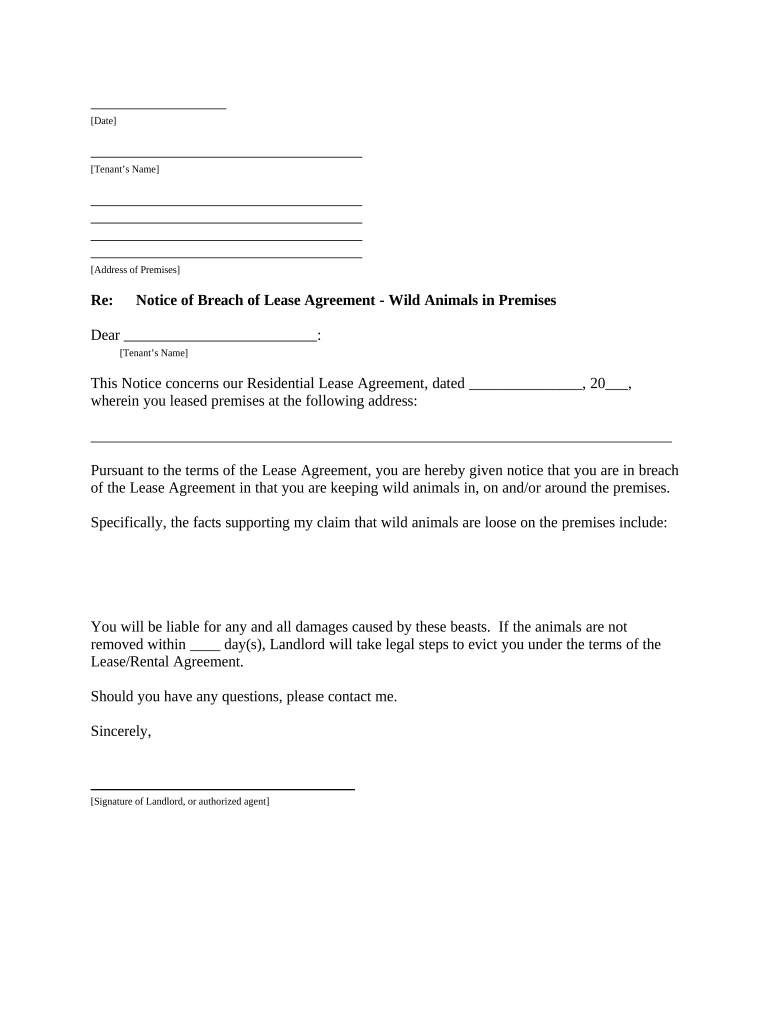
How to use or fill out letter tenant notice with our platform

- Click ‘Get Form’ to open the letter tenant notice in the editor.
- Begin by entering the date at the top of the document. This sets the official record for your notice.
- Fill in the tenant’s name and their address in the designated fields. Ensure accuracy to avoid any confusion.
- In the body of the notice, specify the breach of lease agreement regarding wild animals. Clearly state your concerns and observations.
- Indicate how many days you are allowing for compliance before taking further action. This is crucial for legal clarity.
- Sign off with your name and title, ensuring that it reflects your authority as a landlord or authorized agent.
- Finally, complete the proof of delivery section by selecting how you delivered this notice to the tenant and signing it.
Start using our platform today to streamline your document editing and ensure effective communication!
Fill out letter tenant notice online
It's free
It's free
Security and compliance
At DocHub, your data security is our priority. We follow HIPAA, SOC2, GDPR, and other standards, so you can work on your documents with confidence.
Learn more


Related forms
US Export to Mexico Bill of Lading
The document is a Bill of Lading for U.S. exports to Mexico, detailing shipping information including shipper and consig ...
7 things in Car Mechanic Simulator that will make a real
The document is a Physical Education Activity Restriction Form used by Clarence Middle School to outline specific physic ...

Wisconsin Judicial Commission Complaint Form -
The document is a Request for Investigation Form from the Wisconsin Judicial Commission, outlining the process for indiv ...

BATS DATA CORRECTION FORM - Sturbridge Police Department - sturbridgepd
The document is a BATS Data Correction Form intended for submission to the Driver Control Unit of the Registry of Motor ...
DHRD Childcare Block Grant Application - Confederated Salish and - cskt
The document outlines the requirements and procedures for the Childcare Block Grant Program administered by the Departme ...

Form 13711 (Rev 12-2017) Request for Appeal of Offer in Compromise
The document is Form 13711, a Request for Appeal of Offer in Compromise from the Internal Revenue Service (IRS). It prov ...

Report Documentation Page: OMB Number 0704-0188FTA
The document is a DD Form 1692, an Engineering Change Proposal (ECP) form used by the Department of Defense. It outlines ...

Sf 1112
The document is a formal application for a towing service to be included on the Tennessee Highway Patrol's Rotating Towi ...