Texas firearm bill of sale 2026

Get Form
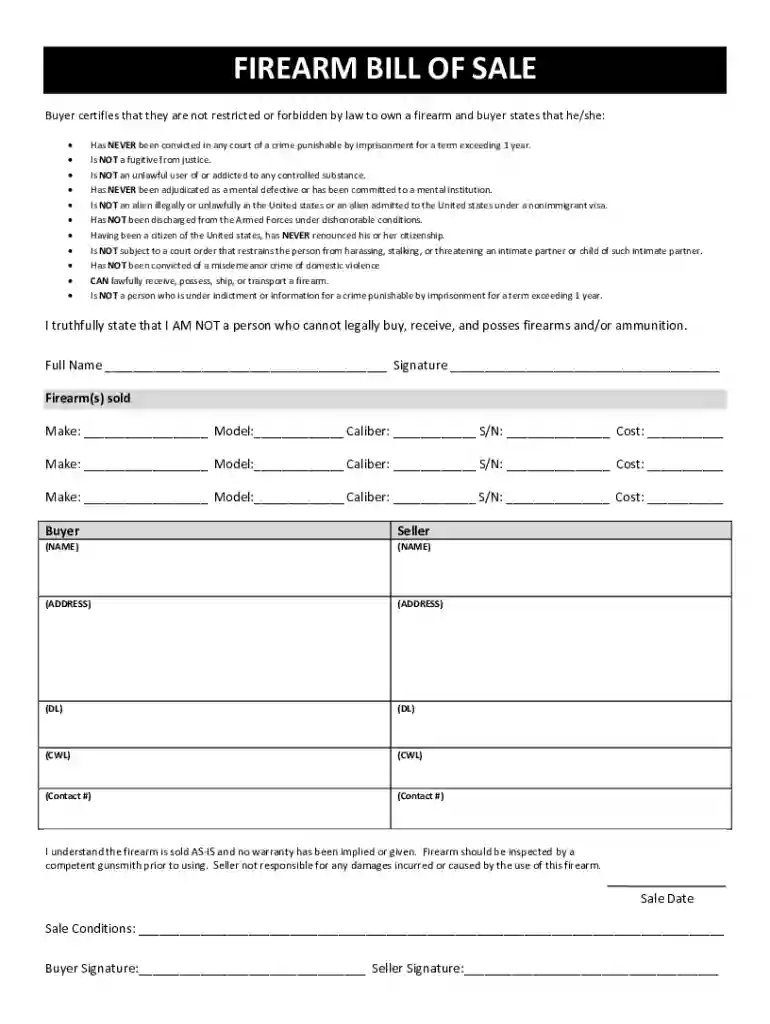
printable bill of sale Preview on Page 1

Here's how it works

01. Edit your printable bill of sale online
Type text, add images, blackout confidential details, add comments, highlights and more.

02. Sign it in a few clicks
Draw your signature, type it, upload its image, or use your mobile device as a signature pad.

03. Share your form with others
Send bill of firearms sale via email, link, or fax. You can also download it, export it or print it out.

How to use or fill out Texas Firearm Bill of Sale with DocHub

Form edit decoration
9.5
Ease of Setup
DocHub User Ratings on G2
9.0
Ease of Use
DocHub User Ratings on G2
  1. Click ‘Get Form’ to open the Texas Firearm Bill of Sale in our editor.
  2. Begin by filling in the buyer's full name and signature at the designated fields. Ensure that the name matches the identification provided.
  3. Next, complete the firearm details section. For each firearm sold, input the make, model, caliber, serial number (S/N), and cost. This information is crucial for legal documentation.
  4. Fill in both buyer and seller information, including names, addresses, driver's license numbers (DL), concealed weapon licenses (CWL), and contact numbers.
  5. Review the certification statements carefully. The buyer must confirm they meet all legal requirements to own a firearm by checking each applicable statement.
  6. Finally, include the sale date and any specific sale conditions before obtaining signatures from both parties to finalize the transaction.

Start using our platform today to easily fill out your Texas Firearm Bill of Sale for free!

be ready to get more

Complete this form in 5 minutes or less

Get form

Got questions?

We have answers to the most popular questions from our customers. If you can't find an answer to your question, please contact us.
Contact us

Yes, you can use DocHub for signing any business and personal paperwork, including your bill of sale form firearm. All eSignatures you create with our service are legally binding and court-admissible, as DocHub complies with criteria required by ESIGN and UETA. Save your accomplished document with a detailed Audit Trail if necessary.

You need only an internet connection and a web browser to fill out your bill of sale gun by using an iOS phone. Open the DocHub website and authenticate. Then, add your file or choose it from the list in your dashboard. Then use our editing tools to fill out your form and save all your changes. You can also send it to a specified recipient straight away.

Can I use a handwritten bill of sale in Texas? Yes, Texas recognizes handwritten bills of sale as valid, as long as they contain all the necessary information and are signed by both the buyer and the seller.
✅ Required: In states that mandate docHubd Bills of Sale, especially for high-value or titled assets. When transferring ownership of boats or trailers, depending on the registering authority (e.g., the California DMV or the Department of Fish and Wildlife).
While you dont have to get a bill of sale docHubd, you should do so anyway for the following key reasons: Notarizing it helps ensure a smoother and quicker transfer of ownership. A docHubd bill of sale is important as it protects both the seller and buyer from scams or fraud.

Security and compliance

At DocHub, your data security is our priority. We follow HIPAA, SOC2, GDPR, and other standards, so you can work on your documents with confidence.

Learn more
ccpa2
pci-dss
gdpr-compliance
hipaa
soc-compliance