Notice copyright 2026

Get Form
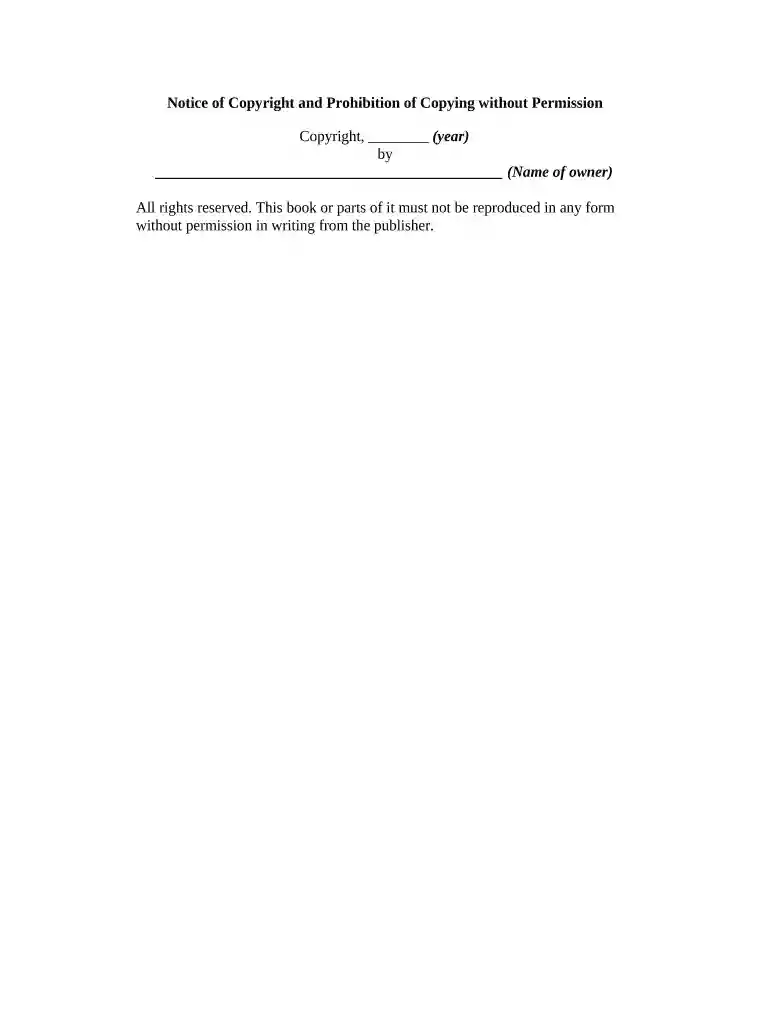
notice copyright Preview on Page 1

Here's how it works

01. Edit your form online
Type text, add images, blackout confidential details, add comments, highlights and more.

02. Sign it in a few clicks
Draw your signature, type it, upload its image, or use your mobile device as a signature pad.

03. Share your form with others
Send it via email, link, or fax. You can also download it, export it or print it out.

How to use or fill out notice copyright with our platform

Form edit decoration
9.5
Ease of Setup
DocHub User Ratings on G2
9.0
Ease of Use
DocHub User Ratings on G2
  1. Click ‘Get Form’ to open the Notice of Copyright in the editor.
  2. In the first field, enter the year of copyright. This is crucial as it establishes the timeline for your rights.
  3. Next, fill in the name of the copyright owner in the designated space. Ensure that this is accurate to avoid any legal issues.
  4. Review the statement regarding reproduction rights. This section emphasizes that no part of the work can be copied without written permission from the publisher.
  5. Once all fields are completed, utilize our platform’s features to save or export your document for distribution or filing.

Start using our platform today to effortlessly complete your Notice of Copyright for free!

be ready to get more

Complete this form in 5 minutes or less

Get form

Got questions?

We have answers to the most popular questions from our customers. If you can't find an answer to your question, please contact us.
Contact us
Examples of Copyright Notices in Presentations While there can be some variety to the specific structuring and details in a copyright notice, the standard structure has 4 components: The copyright symbol or word, the date, the copyright owners name, and the rights being reserved.
Copyrights Are Quick and Easy To Make The copyright symbol or the word copyright The name of the copyright owner or author of the work. The year the content was published, which can be different from the year of creation. Your statement of the rights youre reserving over the materials.
There are only four simple components you need to include: The copyright symbol or the word copyright The name of the copyright owner or author of the work. The year the content was published, which can be different from the year of creation. Your statement of the rights youre reserving over the materials.
Subject: Copyright Infringement Notice As a service provider, you are required to expeditiously remove or disable access to the infringing material. I am the author and the copyright owner of the work(s) listed above. This/these work(s) has/have been posted to your service without my permission.
A copyright notice is an indicator that informs others that a work which bears the notice is protected by copyright and identifies the owner of the work. A copyrighted work does not need to include a copyright notice for the work to be protected under the law, but that was not always the case.

Security and compliance

At DocHub, your data security is our priority. We follow HIPAA, SOC2, GDPR, and other standards, so you can work on your documents with confidence.


Learn more
ccpa2
pci-dss
gdpr-compliance
hipaa
soc-compliance