



Here's how it works



How to use or fill out BYUH Off Campus Housing

- Click 'Get Form' to open it in the editor.
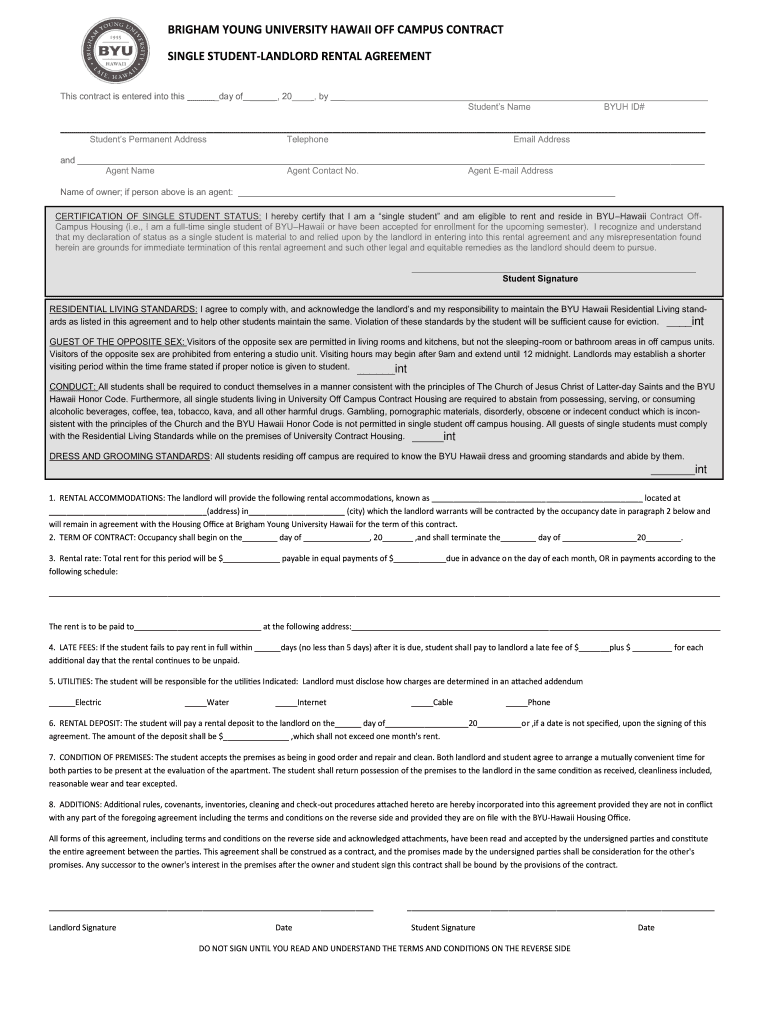
- Begin by entering your name, BYUH ID#, and permanent address in the designated fields. Ensure all information is accurate for processing.
- Provide your contact details, including telephone and email address, along with the agent's name and contact information if applicable.
- Certify your single student status by checking the box and signing where indicated. This declaration is crucial for your eligibility.
- Review the Residential Living Standards and conduct guidelines. Acknowledge your understanding by initialing each section as required.
- Fill in the rental accommodations details, including address and rental rate. Specify payment terms clearly to avoid confusion.
- Complete sections on utilities responsibility, rental deposit amount, and condition of premises. Ensure you understand these obligations before signing.
- Finally, review all terms carefully before signing at both student and landlord signature lines. Do not sign until you fully understand the agreement.
Start filling out your BYUH Off Campus Housing form today using our platform for a seamless experience!
It's free
Got questions?
Can I sign my housing portal byuh in electronic format?
As outlined by eSignature regulations, documents signed digitally have the same validity as those approved with pen and paper. You can electronically sign almost any business and private documentation. Four types of paperwork still demand handwritten signatures only - wills and testamentary trusts, court orders and other court forms, state statutes governing divorce, adoption, or other family law, and notice of cancellation of utility services. If you adhere to the guidelines and use a reliable and compliant software solution, like DocHub, you can eSign your housing portal byuh without printing it.
How do you complete byu hawaii off campus housing online?
You can complete and eSign your byu hawaii off campus housing on the internet, even on a tight deadline. All you need to access top-notch editing tools on any device is a DocHub account, that you can register in just a couple of moments. When you sign up, upload your document or find what you are searching for in our catalog, complete it utilizing the editing tools you want, and place your electronic signature on it at the end.
Do you have to live on campus at BYU Hawaii?
Why should I go to BYU-Hawaii?
What is unique about BYU Hawaii?
Security and compliance
At DocHub, your data security is our priority. We follow HIPAA, SOC2, GDPR, and other standards, so you can work on your documents with confidence.
Learn more


Related forms