




Here's how it works



How to use or fill out If you have already completed an application entitled 'APPLICATION - ssa'

- Click ‘Get Form’ to open it in the editor.
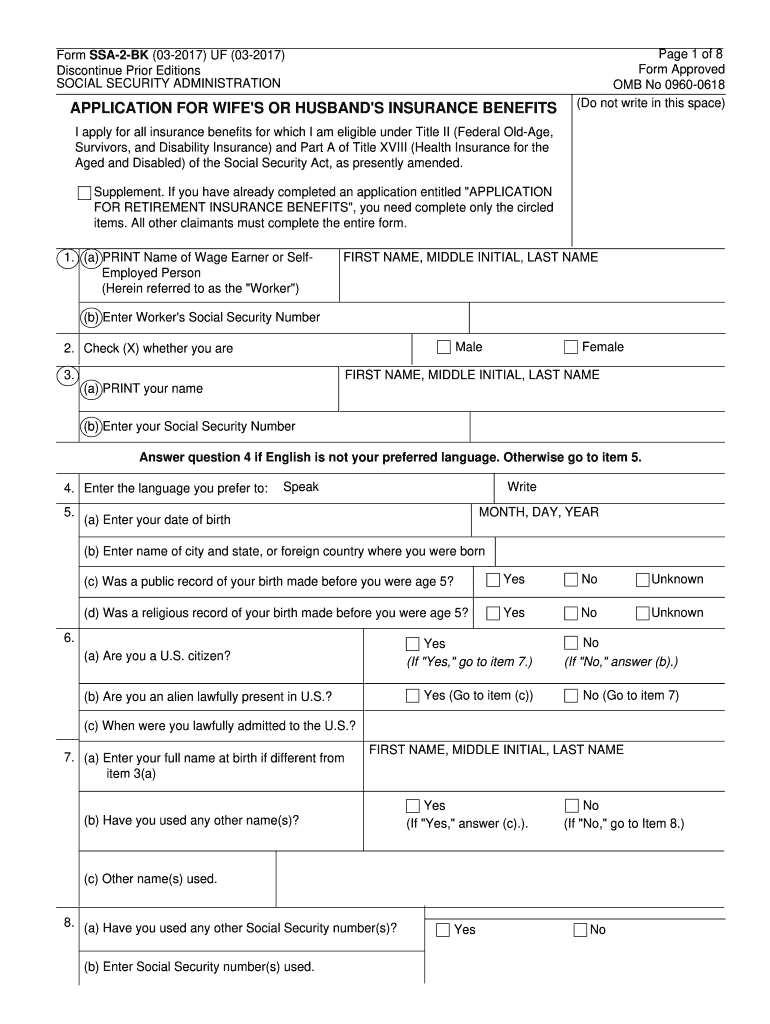
- Begin by entering the name of the wage earner or self-employed person in the designated field. Ensure that you print clearly and include the first name, middle initial, and last name.
- Next, input the worker's Social Security Number. This is crucial for processing your application.
- Indicate your gender by checking the appropriate box (Male or Female) and then enter your own name and Social Security Number in the following fields.
- Proceed to fill out your date of birth, place of birth, and answer questions regarding citizenship status. Be sure to check all applicable boxes as instructed.
- Continue through each section methodically, providing information about any previous marriages, military service, and employment history as required.
- Finally, review all entered information for accuracy before submitting your application. Utilize our platform’s features to save or print a copy for your records.
Start using our platform today to complete your application effortlessly!
It's free
See more If you have already completed an application entitled "APPLICATION - ssa versions
Got questions?
Can I sign my If you have already completed an application entitled "APPLICATION - ssa on a mobile?
Sure, you’ll find many different applications for this on the web. Nevertheless, if you need to eSign your If you have already completed an application entitled "APPLICATION - ssa without installing additional software, DocHub is the optimum choice you can make. This powerful editor works on mobile devices just like on desktops. Open our editor in your preferred internet browser, register or sign in to your account, and start processing your forms.
How do you edit If you have already completed an application entitled "APPLICATION - ssa on iOS?
You can easily edit fill out your If you have already completed an application entitled "APPLICATION - ssa on any iOS gadget. Open an internet browser of your choice, visit the DocHub website, authorize or create a new account, add your file for editing, and make your required adjustments. Our service is mobile-friendly, so using its features on your smartphone will be a no-brainer, even on the first try.
Security and compliance
At DocHub, your data security is our priority. We follow HIPAA, SOC2, GDPR, and other standards, so you can work on your documents with confidence.
Learn more


