




Here's how it works

01. Edit your sunbelt rentals credit application online
Type text, add images, blackout confidential details, add comments, highlights and more.

02. Sign it in a few clicks
Draw your signature, type it, upload its image, or use your mobile device as a signature pad.

03. Share your form with others
Send sunbelt credit application online via email, link, or fax. You can also download it, export it or print it out.
How to use or fill out sunbelt rentals credit application with our platform

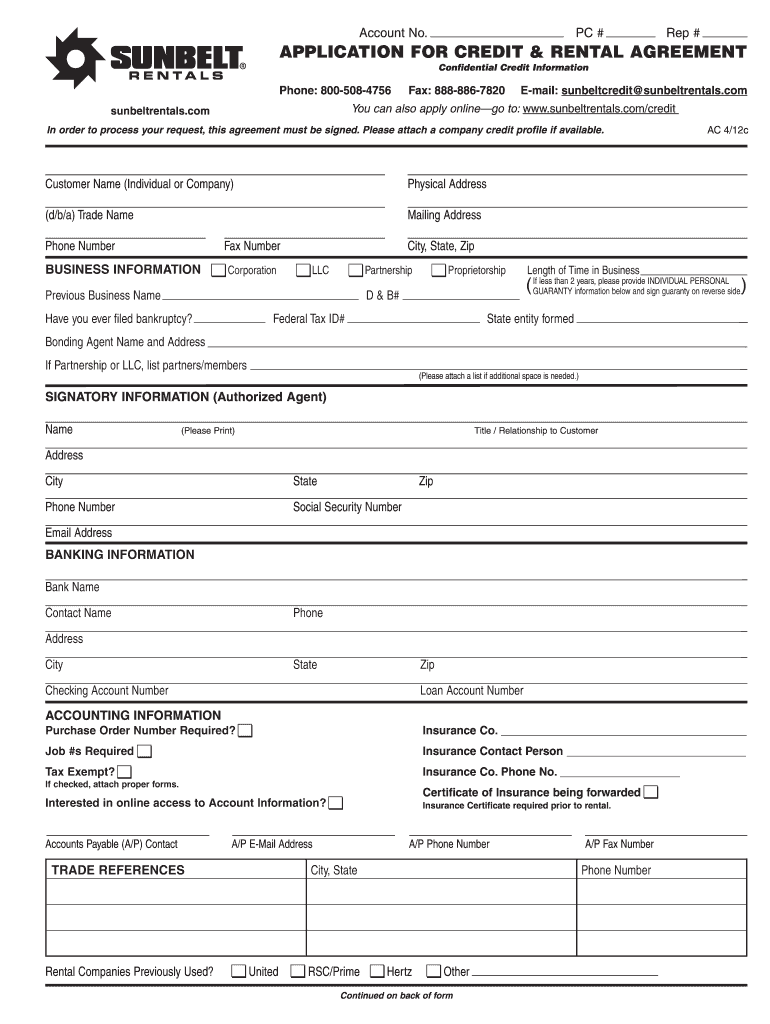
- Click ‘Get Form’ to open the sunbelt rentals credit application in the editor.
- Begin by entering your Account Number, PC #, and Rep # at the top of the form. This information helps identify your application.
- Fill in the Customer Name (Individual or Company), Physical Address, Mailing Address, and contact details including Phone and Fax Numbers.
- In the BUSINESS INFORMATION section, select your business type (Corporation, LLC, Partnership, etc.) and provide additional details such as Federal Tax ID# and Length of Time in Business.
- Complete the SIGNATORY INFORMATION section with the Authorized Agent's name, title, address, phone number, social security number, and email address.
- Provide BANKING INFORMATION by filling in your Bank Name, Contact Name, Phone Number, and Account Numbers.
- In ACCOUNTING INFORMATION, indicate if a Purchase Order Number is required and provide Insurance Company details if applicable.
- Review all sections for accuracy before signing at the bottom of the form. Ensure that you attach any necessary documents like a company credit profile.
Start using our platform today to easily complete your sunbelt rentals credit application online for free!
Fill out sunbelt rentals credit application online
It's free
It's free
Security and compliance
At DocHub, your data security is our priority. We follow HIPAA, SOC2, GDPR, and other standards, so you can work on your documents with confidence.
Learn more


Related forms
Tceq attachment d annual sludge summary report form
The document is an Annual Sludge Summary Report Form for water treatment plants, requiring operators to report sludge ap ...

DPS Identification Supplies Order Form (PDF) - dps texas
The document is a supply order form for the Texas Department of Public Safety, specifically for requesting various ident ...

Certification of School Building Compliance with fire Safety
The document outlines the certification requirements for fire safety provisions in child care centers located within sch ...

Company-profile-sample docx
Creative Minds Public Relations Company, established in 2009 by Paul Stevens, is a leading PR firm in the U.S. specializ ...

Ocsop
The document is the Standard Operating Procedures (SOP) for the Officer Candidate School (OCS) of the Army National Guar ...

SHC Medical Records Request 2019
The document is a Medical Records Request and Release Form from CSU-Dominguez Hills Student Health Services. It requires ...

Stark state college transcript request
The document is an official transcript request form from Stark State College, requiring students to provide personal inf ...

SSA-1199-OP39 Direct Deposit Sign-Up Form (South Korea)
The document is the Direct Deposit Sign-Up Form (SSA-1199-OP39) for U.S. Social Security monthly benefits to be deposite ...