




Here's how it works



How to use or fill out City of Aspen Electrical Permit Application (3) with our platform

- Click ‘Get Form’ to open the City of Aspen Electrical Permit Application in the editor.
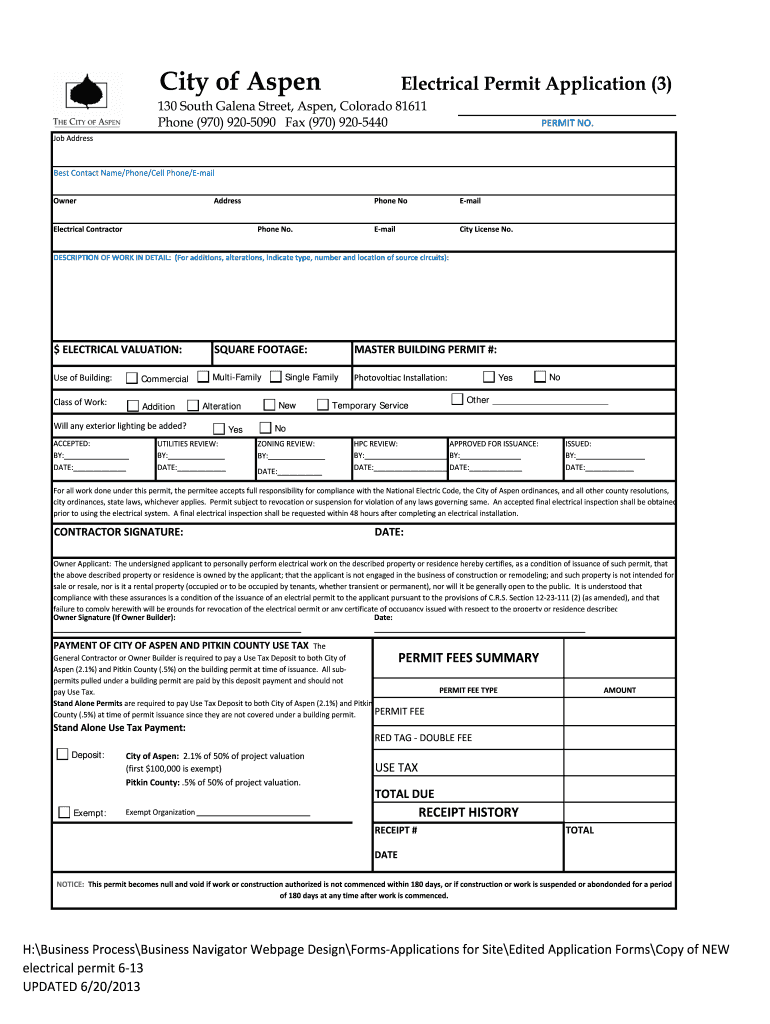
- Begin by filling in the 'Job Address' field with the location where the electrical work will be performed.
- Provide your contact information, including 'Best Contact Name', 'Phone', 'Cell Phone', and 'E-mail'. This ensures that you can be reached for any follow-up questions.
- Enter details about the 'Owner' and their address. This section is crucial for identifying who is responsible for the permit.
- Fill in the 'Electrical Contractor' information, including their phone number and email. Ensure accuracy to facilitate communication.
- In the 'DESCRIPTION OF WORK IN DETAIL' section, describe the nature of your electrical work clearly, including specifics about circuits and installations.
- Complete sections regarding valuation, type of work (e.g., addition, alteration), and square footage as applicable to your project.
- Review all entries for accuracy before submitting. Use our platform's features to save your progress or make edits as needed.
Start using our platform today to easily complete your City of Aspen Electrical Permit Application online for free!
It's free
See more City of Aspen Electrical Permit Application (3) 130 South Galena Street, Aspen, Colorado 81611 Phone (970) 9205090 Fax (970) 9205440 PERMITNO versions
Got questions?
How can I eSign my City of Aspen Electrical Permit Application (3) 130 South Galena Street, Aspen, Colorado 81611 Phone (970) 9205090 Fax (970) 9205440 PERMITNO from Gmail?
With DocHub, it’s pretty simple. The service offers users an add-on called DocHub for Gmail, which you can find in the Google Workspace Marketplace without being charged. Set it up and give it access to your Google account. Open your email with your City of Aspen Electrical Permit Application (3) 130 South Galena Street, Aspen, Colorado 81611 Phone (970) 9205090 Fax (970) 9205440 PERMITNO attached and click on the add-on button in the right-side panel. Sign in to your DocHub account, and import the file to our editor, where you can complete it and sign.
How do you complete City of Aspen Electrical Permit Application (3) 130 South Galena Street, Aspen, Colorado 81611 Phone (970) 9205090 Fax (970) 9205440 PERMITNO online?
You can complete and eSign your City of Aspen Electrical Permit Application (3) 130 South Galena Street, Aspen, Colorado 81611 Phone (970) 9205090 Fax (970) 9205440 PERMITNO on the internet, even on a tight deadline. All you need to access high quality editing tools on any device is a DocHub account, that you can register within a couple of moments. When you register, upload your file or find what you are searching for in our catalog, complete it utilizing the editing tools you need, and place your electronic signature on it at the end.
Security and compliance
At DocHub, your data security is our priority. We follow HIPAA, SOC2, GDPR, and other standards, so you can work on your documents with confidence.
Learn more


