Last day of business: 2026

Get Form
Last day of business: Preview on Page 1

Here's how it works

01. Edit your form online
Type text, add images, blackout confidential details, add comments, highlights and more.
02. Sign it in a few clicks
Draw your signature, type it, upload its image, or use your mobile device as a signature pad.
03. Share your form with others
Send it via email, link, or fax. You can also download it, export it or print it out.

How to use or fill out Last day of business: with DocHub

Form edit decoration
9.5
Ease of Setup
DocHub User Ratings on G2
9.0
Ease of Use
DocHub User Ratings on G2
  1. Click ‘Get Form’ to open the Last day of business: document in our editor.
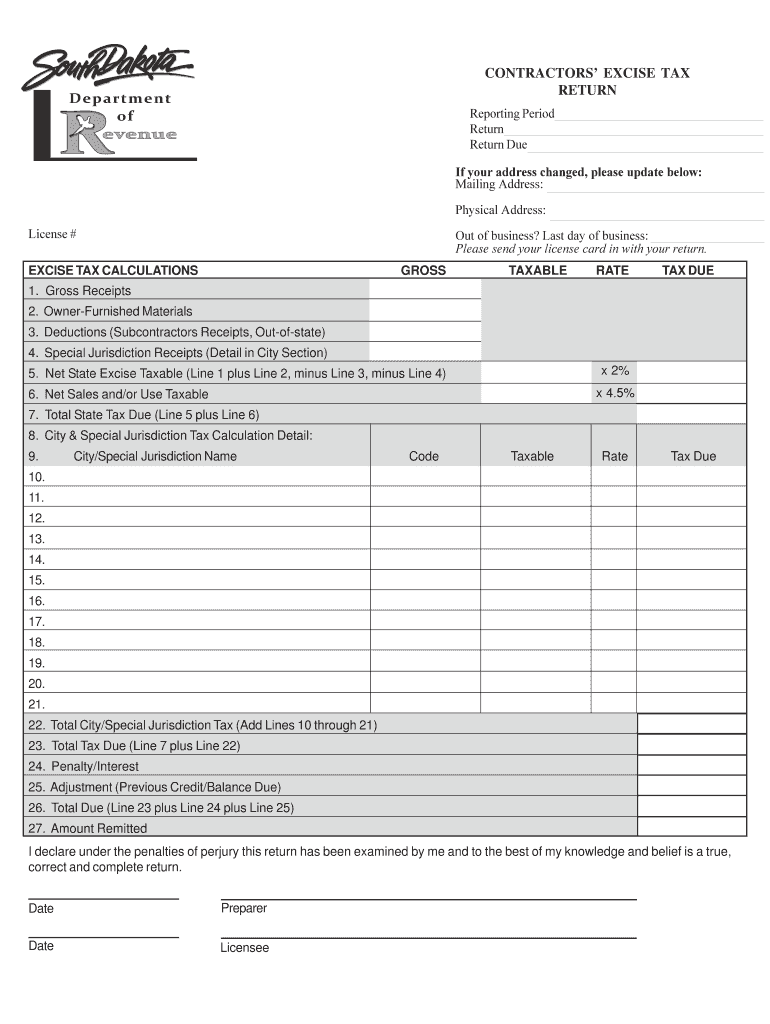
  2. Locate the section labeled 'Last day of business:' and enter the date you ceased operations. This is crucial for closing your tax account.
  3. If your address has changed, update it in the provided fields for Mailing Address and Physical Address to ensure accurate records.
  4. Review all other sections of the form, including Gross Receipts and Tax Calculations, ensuring all relevant information is filled out correctly.
  5. Once completed, utilize our platform's features to save, sign, and submit your form electronically for free.

Start using our editor today to simplify your document management!

See more Last day of business: versions

We've got more versions of the Last day of business: form. Select the right Last day of business: version from the list and start editing it straight away!
Versions Form popularity Fillable & printable
2023 4.1 Satisfied (27 Votes)
2005 4.4 Satisfied (41 Votes)
be ready to get more

Complete this form in 5 minutes or less

Get form

Got questions?

We have answers to the most popular questions from our customers. If you can't find an answer to your question, please contact us.
Contact us

Managing your forms with DocHub this way is very straightforward once you have downloaded its extension for Google Chrome. Go to the Chrome Web Store and set up DocHub - Sign PDF from Gmail to obtain it. Give our tool access to your Google account, and then open an email containing Last day of business: as an attachment and point to the file with your cursor - the DocHub extension key will automatically show up there. Click on it to open your file in our editor. Make any essential modifications, complete the blanks, and click Sign to create your legally-binding electronic signature.

If you are searching for a state-specific Last day of business: sample, you will find it in our DocHub Forms & Templates catalog. Use the search field, enter your form’s name, and search through the results for your state. You can also filter out irrelevant results while exploring our catalog by categories.

COB stands for close of business that professional organizations use when referring to the end of the business day. Many professionals base COB hours on times that businesses traditionally close in the United States, which is typically 5 p.m. Eastern Standard Time (EST).
COP (close of play): This acronym is often used instead of COB, as it has the same meaning but more directly refers to the closing of the financial markets. EOP (end of play): Many professionals use this acronym in place of COB.
COB = close of business, generally accepted at 5pm. EOD = end of day, could be after hours, any time up until 11:59pm is accepted, but still preferred before 5pm.

Security and compliance

At DocHub, your data security is our priority. We follow HIPAA, SOC2, GDPR, and other standards, so you can work on your documents with confidence.

Learn more
ccpa2
pci-dss
gdpr-compliance
hipaa
soc-compliance

People also ask

Is it correct to say EOD today? Yes, you can say EOD today to indicate that a task should be completed by the end of the current business day.

Related links