




Here's how it works

01. Edit your dochub com fillable form online
Type text, add images, blackout confidential details, add comments, highlights and more.

02. Sign it in a few clicks
Draw your signature, type it, upload its image, or use your mobile device as a signature pad.

03. Share your form with others
Send texas laser registration via email, link, or fax. You can also download it, export it or print it out.
How to use or fill out Registration application for lasers - dshs texas with our platform

- Click ‘Get Form’ to open the Registration application for lasers in the editor.
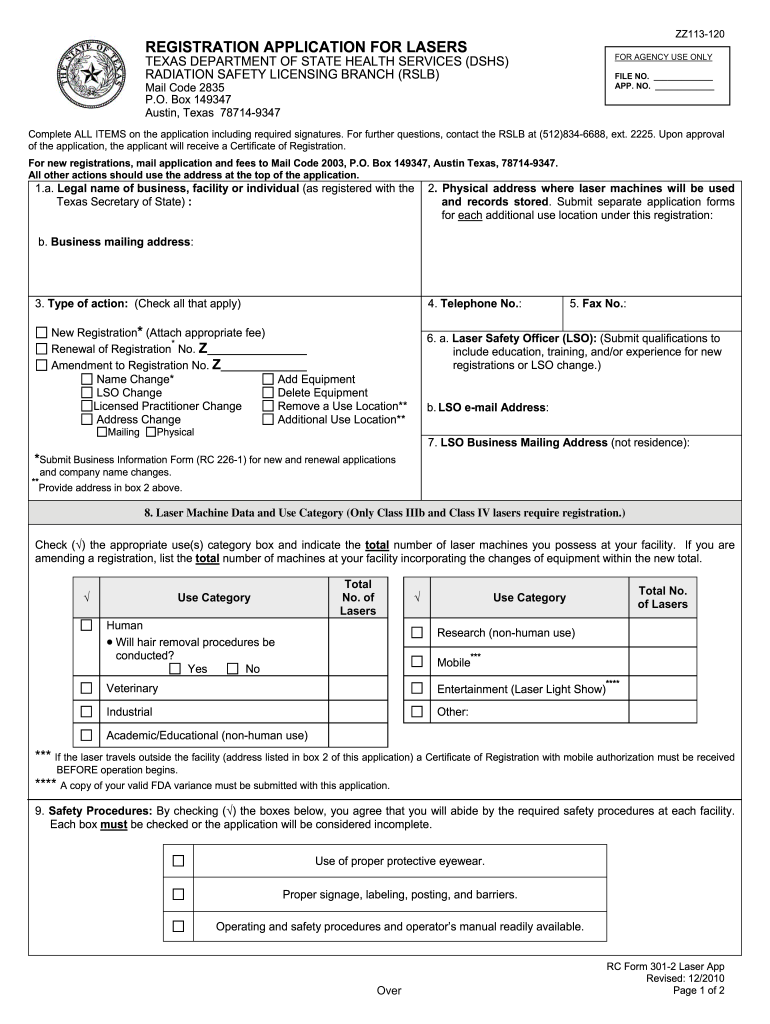
- Begin by entering the legal name of your business, facility, or individual as registered with the Texas Secretary of State in section 1.a.
- In section 2, provide the physical address where laser machines will be used and records stored. If you have multiple locations, submit separate applications for each.
- Select the type of action you are applying for in section 3 by checking all applicable boxes, such as New Registration or Renewal.
- Fill in your contact information including telephone and fax numbers in sections 4 and 5.
- Designate a Laser Safety Officer (LSO) in section 6.a., providing their qualifications if this is a new registration or LSO change.
- Complete section 8 by indicating the total number of laser machines and their use categories. Ensure to check all relevant boxes.
- Review safety procedures in section 9 and check each box to confirm compliance.
- Obtain necessary signatures from licensed practitioners and the LSO as required in sections 10 and 11.
- Finally, certify that all information provided is accurate by signing at the end of the application.
Start filling out your Registration application for lasers today using our platform for free!
Fill out Registration application for lasers - dshs texas online
It's free
It's free
See more Registration application for lasers - dshs texas versions
We've got more versions of the Registration application for lasers - dshs texas form. Select the right Registration application for lasers - dshs texas version from the list and start editing it straight away!
| Versions | Form popularity | Fillable & printable |
|---|---|---|
| 2010 | 4.8 Satisfied (144 Votes) |
Security and compliance
At DocHub, your data security is our priority. We follow HIPAA, SOC2, GDPR, and other standards, so you can work on your documents with confidence.
Learn more


