
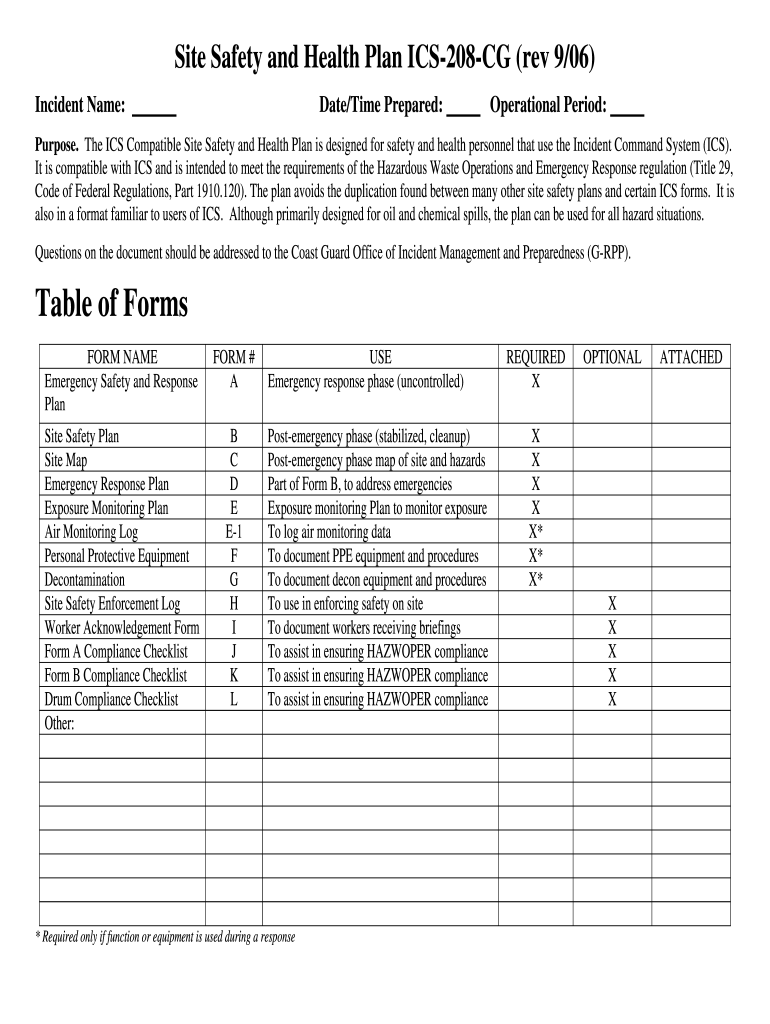




Here's how it works



How to use or fill out health and safety plan sample with our platform

- Click ‘Get Form’ to open the health and safety plan sample in the editor.
- Begin by entering the 'Incident Name' at the top of the form. This identifies the specific incident for which the plan is being created.
- Next, fill in the 'Date/Time Prepared' field to document when this plan was created. This is crucial for record-keeping.
- Specify the 'Operational Period' which indicates how long this plan will be applicable. This helps in managing timelines effectively.
- In the 'Attachments' section, ensure to attach any necessary Material Safety Data Sheets (MSDS) for chemicals involved, as required by regulations.
- Proceed to list all physical hazards present on site under 'Physical Hazards and Protection'. Check off relevant hazards and outline controls that will be implemented.
- Complete sections regarding chemical agents involved, including their names and potential health effects. This ensures all personnel are aware of risks.
- Finally, review all entries for accuracy before saving or sharing your completed health and safety plan sample. Utilize our platform's features to sign or distribute as needed.
Start using our platform today for free to streamline your document editing and ensure compliance with safety regulations!
It's free
See more health and safety plan sample versions
| Versions | Form popularity | Fillable & printable |
|---|---|---|
| 2006 | 4.9 Satisfied (340 Votes) |
Got questions?
What do I need to sign my health and safety programs examples electronically?
Electronic document signing requires a software solution that works in compliance with data protection and eSignature regulations. DocHub is an excellent tool for that, as it meets all the aforementioned requirements. Whatever method you prefer to sign your health and safety programs examples in DocHub, your eSignature will be legally binding and court-admissible.
Do I need to install software to modify my workplace safety plan example?
When you edit your workplace safety plan example with DocHub, you merely require a stable internet connection and virtually any web browser installed on your device. No need to set up any third-party applications or study tutorials. Simply open a tab with DocHub, drag and drop your file, and edit it on the spot.
What is the importance of a safety plan?
How do you write a safety plan?
What are some examples of health and safety?
Security and compliance
At DocHub, your data security is our priority. We follow HIPAA, SOC2, GDPR, and other standards, so you can work on your documents with confidence.
Learn more


