




Here's how it works



How to use or fill out 2014 CA BPPE Enrollment Agreement Checklist with our platform

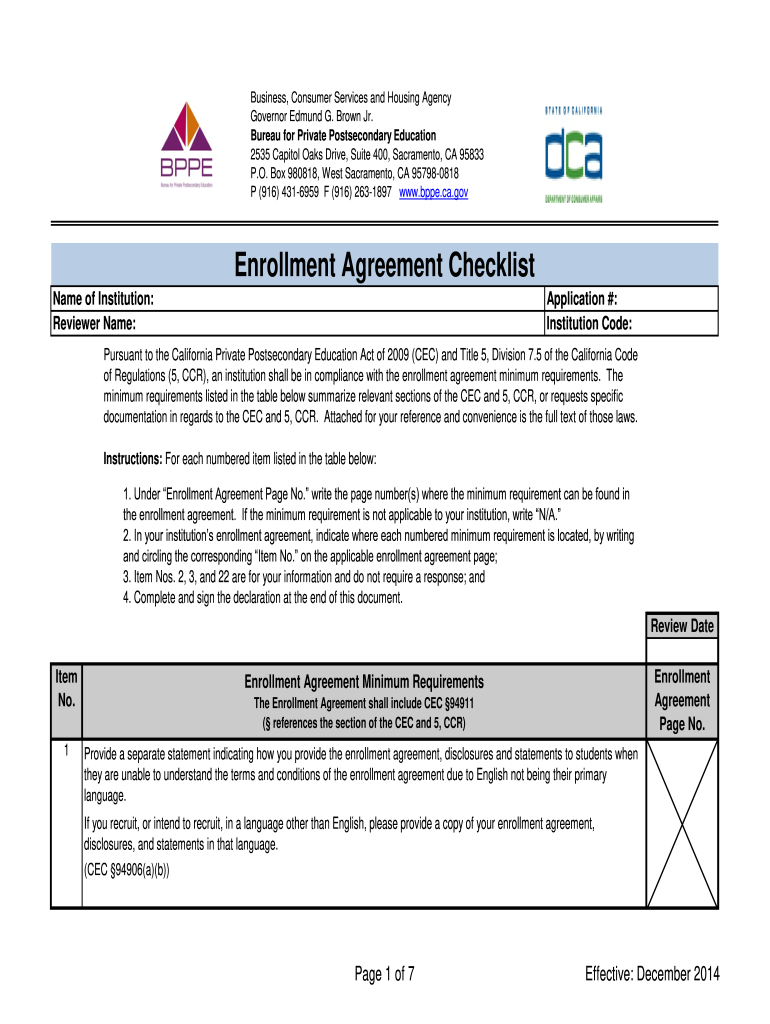
- Click ‘Get Form’ to open the 2014 CA BPPE Enrollment Agreement Checklist in the editor.
- Begin by entering the 'Name of Institution' and 'Reviewer Name' at the top of the form. This establishes the context for your checklist.
- For each item listed, locate the corresponding 'Enrollment Agreement Page No.' where you can find the minimum requirement in your enrollment agreement. If not applicable, simply write 'N/A'.
- Indicate where each numbered minimum requirement is located within your institution’s enrollment agreement by circling the corresponding 'Item No.' on the applicable page.
- Complete and sign the declaration at the end of this document, ensuring all information is accurate and complete.
Start using our platform today to streamline your document editing and ensure compliance effortlessly!
It's free
See more 2014 CA BPPE Enrollment Agreement Checklist versions
Got questions?
What is the best way to electronically sign my 2014 CA BPPE Enrollment Agreement Checklist?
A lot of software solutions are available on the market for document modifying and signing. DocHub is one of the most in-demand online solutions that comply with all security and compliance standards and ensures your electronically signed documentation is legally enforceable. All you need to try it out is to register an account, add your 2014 CA BPPE Enrollment Agreement Checklist, provide the required details, and click Sign. Create your eSignature by typing, drawing it, uploading its image to your document, or scanning a unique QR code.
How to complete and sign 2014 CA BPPE Enrollment Agreement Checklist online?
You may easily complete, modify, and even eSign your 2014 CA BPPE Enrollment Agreement Checklist using DocHub. Create a new profile and start your free trial. After that, you can upload the document with the form and simply make all the required edits. No need to print on paper or use a third-party application to sign it, as you can put your electronic signature on your document quicker via DocHub.
Security and compliance
At DocHub, your data security is our priority. We follow HIPAA, SOC2, GDPR, and other standards, so you can work on your documents with confidence.
Learn more


