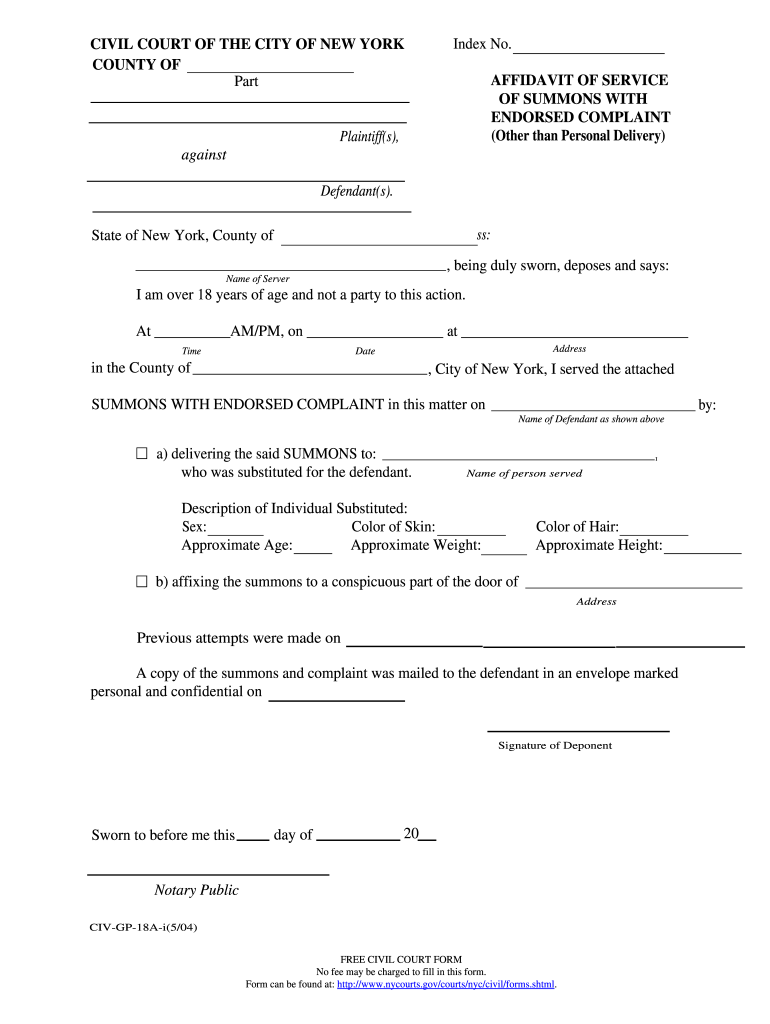
Form civgp 18a form 2026

Get Form
sample summons and complaint Preview on Page 1

Here's how it works

01. Edit your sample summons and complaint online
Type text, add images, blackout confidential details, add comments, highlights and more.
02. Sign it in a few clicks
Draw your signature, type it, upload its image, or use your mobile device as a signature pad.
03. Share your form with others
Send summons and complaint example via email, link, or fax. You can also download it, export it or print it out.

How to use or fill out form civgp 18a form with our platform

Form edit decoration
9.5
Ease of Setup
DocHub User Ratings on G2
9.0
Ease of Use
DocHub User Ratings on G2
  1. Click ‘Get Form’ to open the civgp 18a form in the editor.
  2. Begin by entering the 'County' and 'Index No.' at the top of the form. This information is crucial for identifying your case.
  3. In the section labeled 'Name of Server', input your name, ensuring you confirm that you are over 18 years old and not a party to this action.
  4. Fill in the 'Date' and 'Time' when the service was performed, along with the 'Address' where it took place.
  5. Specify the name of the defendant served and provide details about any individual substituted for them, including their description (sex, color of skin, approximate age, weight, hair color, and height).
  6. If applicable, indicate if you affixed the summons to a door and note any previous attempts made to serve.
  7. Finally, sign as the deponent and include the date sworn before a notary public.

Start using our platform today to fill out your civgp 18a form online for free!

See more form civgp 18a form versions

We've got more versions of the form civgp 18a form form. Select the right form civgp 18a form version from the list and start editing it straight away!
Versions Form popularity Fillable & printable
2004 4.7 Satisfied (105 Votes)
be ready to get more

Complete this form in 5 minutes or less

Get form

Got questions?

We have answers to the most popular questions from our customers. If you can't find an answer to your question, please contact us.
Contact us
In order to file a document electronically, as an attorney or a self-represented (pro se) litigant, it is necessary to register as a filing user on the NYSCEF page. When you file a claim electronically, it will be necessary to pay the $50.00 filing fee via credit card, or in person at the Clerks office.
Sign and date the form. Enter your printed name, your address, your telephone number, and your email address. Enter the hearing information, including the name of the judge, the county, courtroom, floor, court address, and the date and time. If there isnt a courtroom number or floor number, write NA.
Notice of Appearance for Unrepresented Parties Within 14 days after a new case is docketed, an unrepresented party must submit a Notice of Unrepresented Person Appearance (Form 8B) (pdf). As part of submitting this Notice, the unrepresented party will also elect whether to file or to receive service electronically.
by Practical Law Litigation. MaintainedStandard documentsUnited States. This Notice of Entry may be used to formally notify the parties of an order or judgment in New York State Supreme Court. This Standard Document has integrated drafting notes with important explanations and drafting tips.
CURRENT PROCESS FOR SERVING NOTICE OF ENTRY If a party wishes to serve notice of entry, it must down- load the entered judgment or order from NYSCEF, draft a notice of entry cover page, attach the notice of entry cover page to the entered judgment or order as a single PDF/A, and then file the notice of entry on NYSCEF.

Security and compliance

At DocHub, your data security is our priority. We follow HIPAA, SOC2, GDPR, and other standards, so you can work on your documents with confidence.

Learn more
ccpa2
pci-dss
gdpr-compliance
hipaa
soc-compliance