




Here's how it works



How to use or fill out av1m with our platform

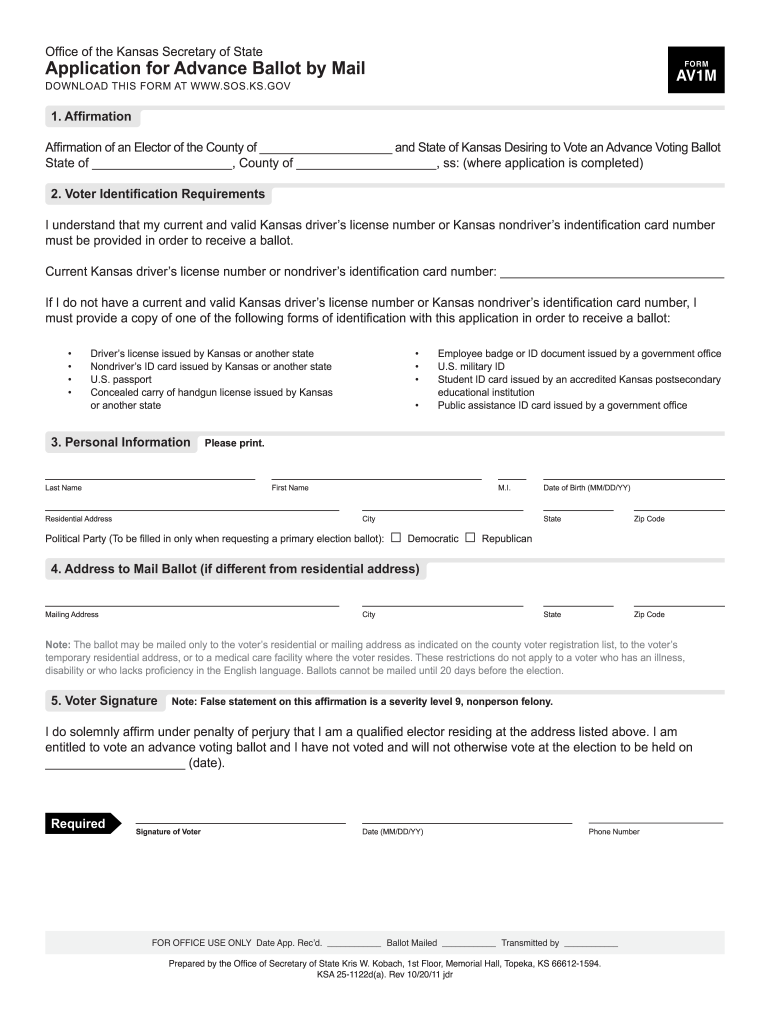
- Click ‘Get Form’ to open the av1m application in the editor.
- Begin by filling out the 'Affirmation' section. Enter your county and state where prompted.
- In the 'Voter Identification Requirements' section, provide your current Kansas driver’s license number or nondriver’s identification card number. If you do not have one, select an alternative form of ID from the list provided.
- Complete the 'Personal Information' section by entering your last name, first name, middle initial, date of birth, residential address, city, state, zip code, and political party if applicable.
- If your mailing address differs from your residential address, fill in the 'Address to Mail Ballot' section with the required details.
- Finally, sign and date the form in the 'Voter Signature' section to affirm that all information is accurate.
Start filling out your av1m application today for free using our platform!
It's free
See more av1m versions
Got questions?
How can I eSign my av1m from Gmail?
With DocHub, it’s pretty simple. The platform offers users an add-on called DocHub for Gmail, which you can locate in the Google Workspace Marketplace free of charge. Set it up and grant it access to your Google account. Open your email with your av1m attached and click on the add-on button in the right-side panel. Log in to your DocHub account, and import the file to our editor, where you can fill it out and sign.
How to manage my av1m from Gmail?
If your go-to electronic mail service is Gmail, it is simple to integrate your DocHub editor into your work. Edit your av1m with DocHub tools and connect it to your drafts in Gmail. See how straightforward it is to exchange documents and work together with a swift PDF editing solution at hand.
Security and compliance
At DocHub, your data security is our priority. We follow HIPAA, SOC2, GDPR, and other standards, so you can work on your documents with confidence.
Learn more


