Employee Training Documentation Form - smchealth 2026

Get Form
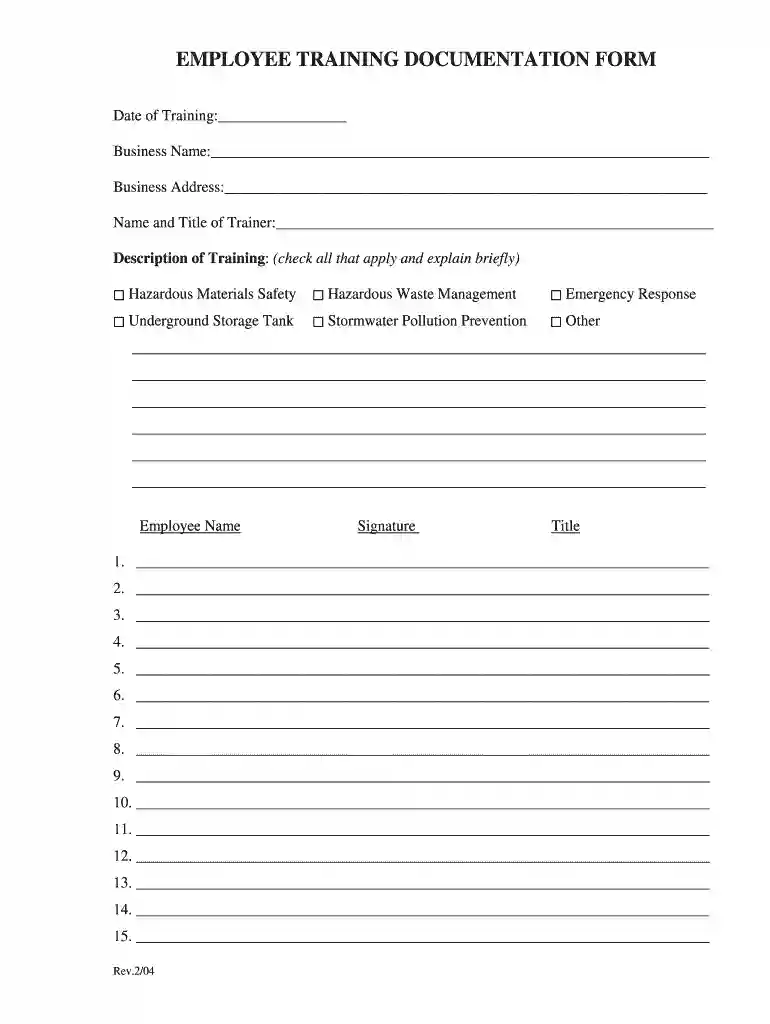
training documentation form Preview on Page 1

Here's how it works

01. Edit your training documentation form online
Type text, add images, blackout confidential details, add comments, highlights and more.

02. Sign it in a few clicks
Draw your signature, type it, upload its image, or use your mobile device as a signature pad.

03. Share your form with others
Send documentation of training via email, link, or fax. You can also download it, export it or print it out.

How to use or fill out Employee Training Documentation Form - smchealth

Form edit decoration
9.5
Ease of Setup
DocHub User Ratings on G2
9.0
Ease of Use
DocHub User Ratings on G2
  1. Click ‘Get Form’ to open it in the editor.
  2. Begin by entering the 'Date of Training' at the top of the form. This helps track when the training occurred.
  3. Fill in the 'Business Name' and 'Business Address' fields to identify where the training took place.
  4. Provide the 'Name and Title of Trainer' to ensure accountability and recognition for the training session.
  5. In the 'Description of Training' section, check all applicable training topics such as Hazardous Materials Safety or Emergency Response, and provide brief explanations as needed.
  6. List employee names in the designated fields, ensuring each participant is documented accurately.
  7. Finally, have each employee sign next to their name and include their title for verification purposes.

Start using our platform today to streamline your document editing and form completion for free!

See more Employee Training Documentation Form - smchealth versions

We've got more versions of the Employee Training Documentation Form - smchealth form. Select the right Employee Training Documentation Form - smchealth version from the list and start editing it straight away!
Versions Form popularity Fillable & printable
2018 4.9 Satisfied (32 Votes)
2004 3.9 Satisfied (49 Votes)
be ready to get more

Complete this form in 5 minutes or less

Get form

Got questions?

We have answers to the most popular questions from our customers. If you can't find an answer to your question, please contact us.
Contact us

Microsoft Word doesn’t have signing tools to generate legitimate eSignatures and enforceable documents. Luckily, DocHub is an online eSignature-compliant editor that supports various file formats, such as .doc files. Log in to your account and upload the Word version of your employee documentation form from your device and cloud, or URL - our editor will automatically transform it into an editable PDF. Make all essential adjustments in your form and click Sign to generate your own legally-binding eSignature. There are four signing options from which to choose.

If you edit your employee training form with DocHub, you merely need a steady web connection and virtually any web browser installed on your device. No need to set up any third-party software or research tutorials. Just open a tab with DocHub, drag and drop your file, and modify it on the spot.

What should be included in the documentation of training? Training materials usually include the topic, the instructor, the trainees, and the date of the training session. The trainers pass around attendance sheets at the training sessions or keep separate files for each employee.
How do you write a training document? Define Your Audience. Plan Your Training Content. Determine Content Presentation Format. Develop Your Content. Assemble and Deliver Your Manual. Track Feedback and Update Your Manual.
Here are the key steps to follow: Step 1: Set the Objectives of Your Training Manual. Step 2: Define Your Audience. Step 3: Get Input From Relevant Teams in Your Company. Step 4: Plan Your Content. Step 5: Determine the Training Manual Format. Step 6: Develop Your Content. Step 7: Assemble and Deliver Your Manual.

Security and compliance

At DocHub, your data security is our priority. We follow HIPAA, SOC2, GDPR, and other standards, so you can work on your documents with confidence.

Learn more
ccpa2
pci-dss
gdpr-compliance
hipaa
soc-compliance

People also ask

Training Report Format Title Page. Training Title: [Insert training title] Table of Contents. List all sections and subsections with page numbers for easy navigation. Executive Summary. Introduction. Training Objectives. Training Schedule/Agenda. Training Methodology. Participant Details.
In tracking employee training, you need to create a training plan, use a learning management system, set deadlines expectations, and regularly review. This is to effectively provide training experience in onboarding new employees.

Related links