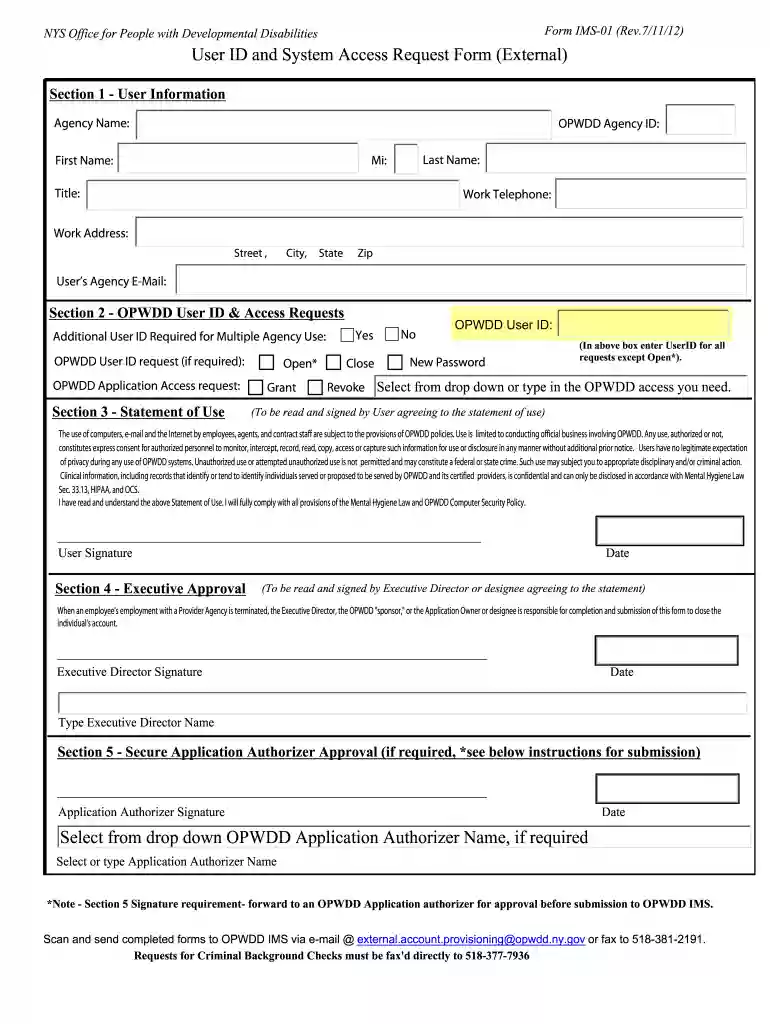
opwdd choices Preview on Page 1

User ID and System Access Request Form (External ... - NYS-OPWDD - www3 opwdd ny 2026

Here's how it works

  • 01. Edit your opwdd choices online

    Type text, add images, blackout confidential details, add comments, highlights and more.

  • 02. Sign it in a few clicks

    Draw your signature, type it, upload its image, or use your mobile device as a signature pad.

  • 03. Share your form with others

    Send choices opwdd via email, link, or fax. You can also download it, export it or print it out.

Overview of the User ID and System Access Request Form

The User ID and System Access Request Form (often used in the context of the New York State Office for People with Developmental Disabilities, or OPWDD) is a crucial document for individuals seeking access to various OPWDD systems. This form collects user information, specifies application access requests, and emphasizes compliance with OPWDD policies and confidentiality laws. Typically, it requires signatures from the user, an executive director, and potentially a designated application authorizer before submission. Understanding the purpose and functionality of this form is essential for those involved in the process.

Key Elements of the User ID and System Access Request Form

  • User Information: This section gathers essential details about the user, including their name, contact information, and any relevant identification numbers.
  • Application Access Requests: Users can specify which systems or applications they need access to, such as OPWDD Choices or IRMA systems. This is vital for ensuring that users receive the appropriate permissions relevant to their roles.
  • Compliance Statement: The form includes a statement guaranteeing that all provided information will be kept confidential and used solely for the intended purpose, in alignment with OPWDD policies and regulations.
  • Signature Requirements: Signatures are necessary not only from the users but also from their supervisors or authorized personnel, ensuring accountability and proper authorization of the access request.
  • Submission Instructions: Detailed guidance on how to submit the completed form, including acceptable submission methods, is critical for proper processing.

Steps to Complete the User ID and System Access Request Form

  1. Gather Required Information: Before filling out the form, collect all necessary details such as user names, contact information, and details about the specific applications for which access is requested.
  2. Fill Out the User Information Section: Accurately enter all required personal and professional information pertaining to the user.
  3. Specify Application Access: Clearly indicate which OPWDD systems the user needs access to. Be specific to avoid any delays in processing.
  4. Review Compliance Statement and Signatures: Ensure that the privacy statement is understood and confirm that any required signatures are obtained from supervisors or other authorized personnel.
  5. Submit the Form: Follow the submission instructions outlined in the form. Ensure it goes to the correct department or individual to process the request.

Legal Use of the User ID and System Access Request Form

The User ID and System Access Request Form is designed to comply with state and federal laws regarding data protection and user privacy. Users must understand that by submitting this form, they accept responsibility for managing the access granted to them. Compliance with OPWDD policies, including those concerning the confidentiality of information, is mandatory.

  • Regulatory Adherence: The form requires users to adhere to various laws and guidelines, including those from the Health Insurance Portability and Accountability Act (HIPAA) and pertinent state mandates, ensuring that access to sensitive data is properly regulated.
  • Consequences of Non-Compliance: Failing to comply with the guidelines set forth in the form can lead to a revocation of access privileges or further disciplinary actions.

Examples of Using the User ID and System Access Request Form

Consider a scenario in which a new employee at OPWDD needs access to the OPWDD Choices cloud system. To facilitate their access:

  • The employee completes the User ID and System Access Request Form, specifying their need for OPWDD Choices access.
  • Once the necessary managerial signatures are obtained, the form is submitted according to established protocols.
  • Upon processing, the user is granted their User ID and can log in to the system to begin their role effectively.

Important Terms Related to the User ID and System Access Request Form

Familiarity with specific terminology is essential for users completing the form:

  • User ID: A unique identifier assigned to individuals to gain access to OPWDD systems.
  • System Access: Refers to the permissions granted to users to interact with specific applications within OPWDD’s infrastructure.
  • Confidentiality Compliance: Adhering to guidelines and laws that protect sensitive information throughout the use of OPWDD systems.

Understanding these terms aids in completing the User ID and System Access Request Form accurately and compliantly.

See more opwdd choices versions

We've got more versions of the opwdd choices form. Select the right opwdd choices version from the list and start editing it straight away!

VersionsForm popularityFillable & printable
20164 Satisfied (45 Votes)
20124.8 Satisfied (295 Votes)

be ready to get more

Complete this form in 5 minutes or less

Security and compliance

At DocHub, your data security is our priority. We follow HIPAA, SOC2, GDPR, and other standards, so you can work on your documents with confidence.

opwdd choices application

NCCC | Resource Bank

This guide is designed to assist meeting and conference planners in incorporating principles, content, and themes related to cultural and linguistic competence.Read more

Learn more
CHOICES | Office for People With Developmental Disabilities

For OPWDD staff, your username is your full email address and for non-OPWDD employees, your username is your public\yourusername. You will only see a singleRead more

Learn more
If you believe that this page should be taken down, please follow our DMCA take down process here