




Here's how it works



How to use or fill out STUDENT EMPLOYEE TIMESHEET - Concordia University Chicago - cuchicago with DocHub

- Click ‘Get Form’ to open the STUDENT EMPLOYEE TIMESHEET in our editor.
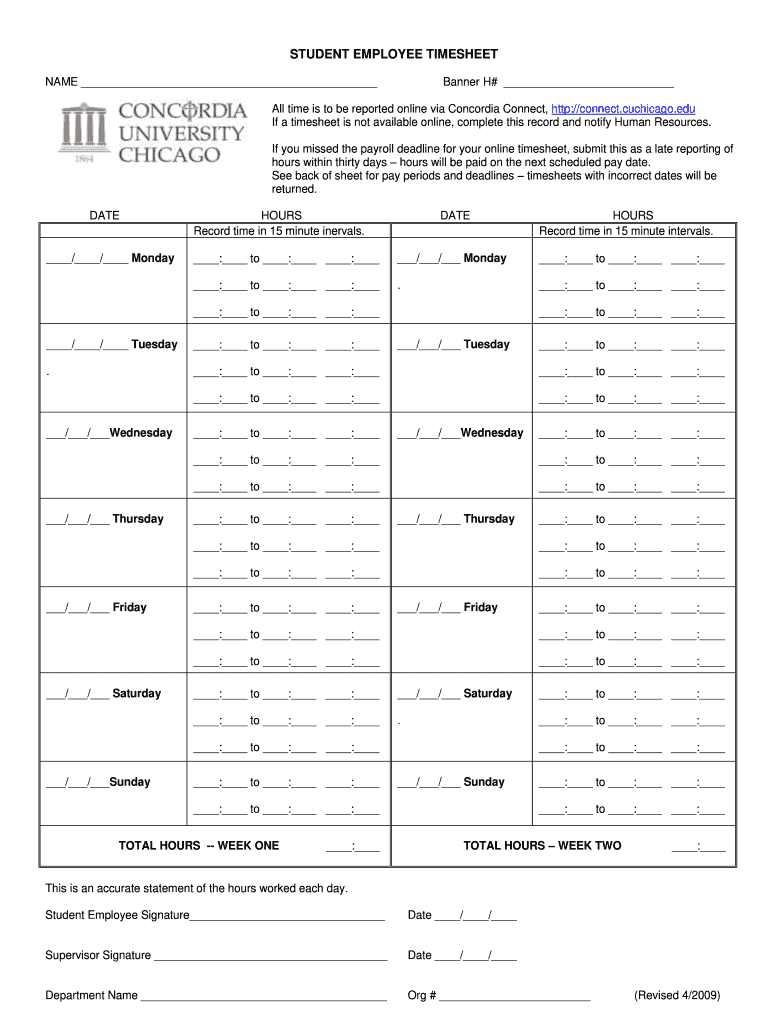
- Begin by entering your name and Banner H# at the top of the form. This personal information is essential for identification.
- For each day of the week, record your hours worked in 15-minute intervals. Ensure you fill in both the date and the corresponding hours accurately.
- If you need to report late hours, complete this timesheet and submit it within thirty days of missing the payroll deadline.
- At the end of each week, calculate your total hours worked and enter them in the designated sections for Week One and Week Two.
- Finally, sign and date the form along with your supervisor’s signature to validate your reported hours before submission.
Start using our platform today to streamline your timesheet completion for free!
It's free
See more STUDENT EMPLOYEE TIMESHEET - Concordia University Chicago - cuchicago versions
| Versions | Form popularity | Fillable & printable |
|---|---|---|
| 2009 | 4.8 Satisfied (65 Votes) |
Got questions?
What do I need to sign my STUDENT EMPLOYEE TIMESHEET - Concordia University Chicago - cuchicago electronically?
Electronic document approval requires a software solution that works in compliance with data protection and eSignature regulations. DocHub is a perfect tool for that, because it fulfills all the above mentioned requirements. Whatever method you prefer to sign your STUDENT EMPLOYEE TIMESHEET - Concordia University Chicago - cuchicago in DocHub, your electronic signature will be legally binding and court-admissible.
Can I print my STUDENT EMPLOYEE TIMESHEET - Concordia University Chicago - cuchicago and complete it on my own?
When you choose analog methods of completing your STUDENT EMPLOYEE TIMESHEET - Concordia University Chicago - cuchicago, it is simple to download your file for printing. Search DocHub’s Forms & Templates catalog to find the exact file template you need and open it for editing or download it on your gadget in the format of your liking. It is easy to complete your form electronically and place your handwritten signature on it right after printing or eSign your file with DocHub.
What is Concordia University Chicago ranked in the world?
Is Concordia University of Chicago a good school?
What majors is Concordia University Chicago known for?
Security and compliance
At DocHub, your data security is our priority. We follow HIPAA, SOC2, GDPR, and other standards, so you can work on your documents with confidence.
Learn more


