Skills gmp fmguesspeak template 2026

Get Form
guest request form Preview on Page 1

Here's how it works

01. Edit your guest request form online
Type text, add images, blackout confidential details, add comments, highlights and more.
02. Sign it in a few clicks
Draw your signature, type it, upload its image, or use your mobile device as a signature pad.
03. Share your form with others
Send blood oath format for client pdf via email, link, or fax. You can also download it, export it or print it out.

How to use or fill out skills gmp fmguesspeak template with our platform

Form edit decoration
9.5
Ease of Setup
DocHub User Ratings on G2
9.0
Ease of Use
DocHub User Ratings on G2
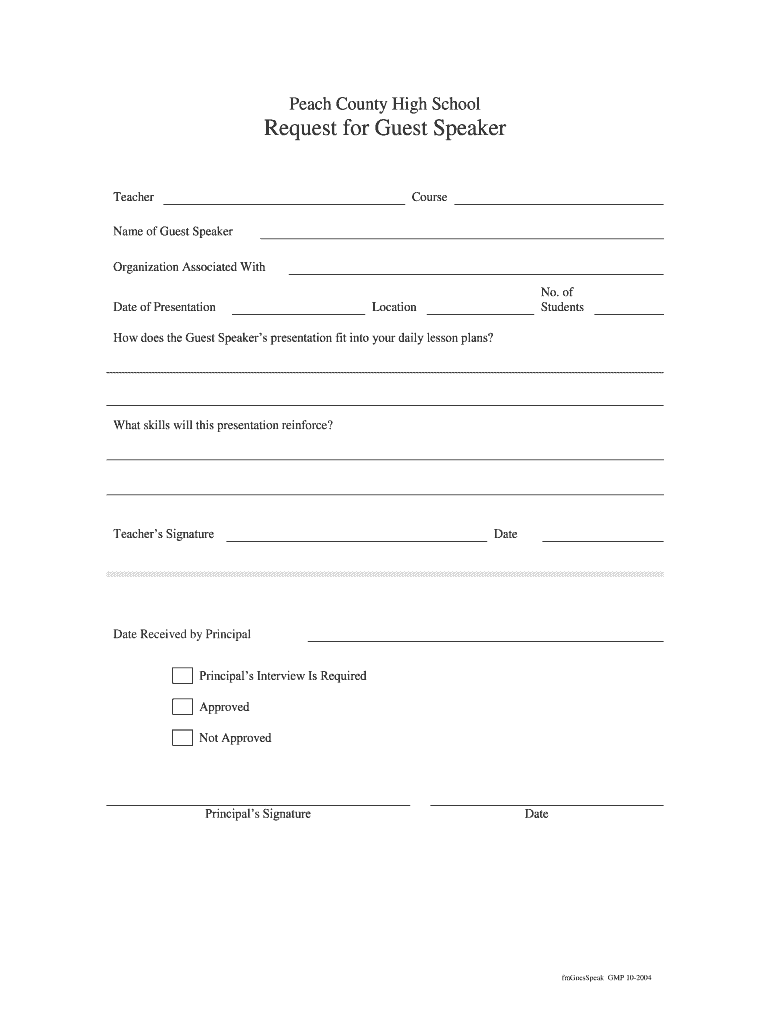
  1. Click ‘Get Form’ to open the skills gmp fmguesspeak template in the editor.
  2. Begin by entering the teacher's name and course details in the designated fields. This information is crucial for identifying who is requesting the guest speaker.
  3. Fill in the name of the guest speaker and their associated organization. Ensure accuracy as this reflects on your professional network.
  4. Specify the date of presentation and number of students expected to attend. This helps in planning logistics effectively.
  5. In the section asking how the presentation fits into daily lesson plans, provide a brief description that connects the guest speaker’s topic with your curriculum.
  6. Outline what skills will be reinforced during this presentation. This is essential for demonstrating educational value.
  7. Finally, sign and date the form before submitting it for principal approval. Ensure all fields are completed to avoid delays.

Start using our platform today to streamline your document editing and form completion process for free!

See more skills gmp fmguesspeak template versions

We've got more versions of the skills gmp fmguesspeak template form. Select the right skills gmp fmguesspeak template version from the list and start editing it straight away!
Versions Form popularity Fillable & printable
2004 4.8 Satisfied (81 Votes)
be ready to get more

Complete this form in 5 minutes or less

Get form

Got questions?

We have answers to the most popular questions from our customers. If you can't find an answer to your question, please contact us.
Contact us

Yes, a typed name is recognized as a legitimate electronic signature when you create it on your form utilizing a compliant solution like DocHub. Simply upload your skills gmp fmguesspeak template to our editor, click Sign in the top tool pane → Create your signature → Type your name in the proper tab, and choose how it will appear on your document.

If you are using Chrome, there are two easy methods to modify your skills gmp fmguesspeak template online. First, go to the DocHub site, add your file, and modify it using our toolbar. You may also install our Chrome extension and modify any document by dragging and dropping it in your browser window.

Security and compliance

At DocHub, your data security is our priority. We follow HIPAA, SOC2, GDPR, and other standards, so you can work on your documents with confidence.

Learn more
ccpa2
pci-dss
gdpr-compliance
hipaa
soc-compliance