




Here's how it works



How to use or fill out Exempt Employment Application - City of Spokane with our platform

- Click ‘Get Form’ to open the Exempt Employment Application in the editor.
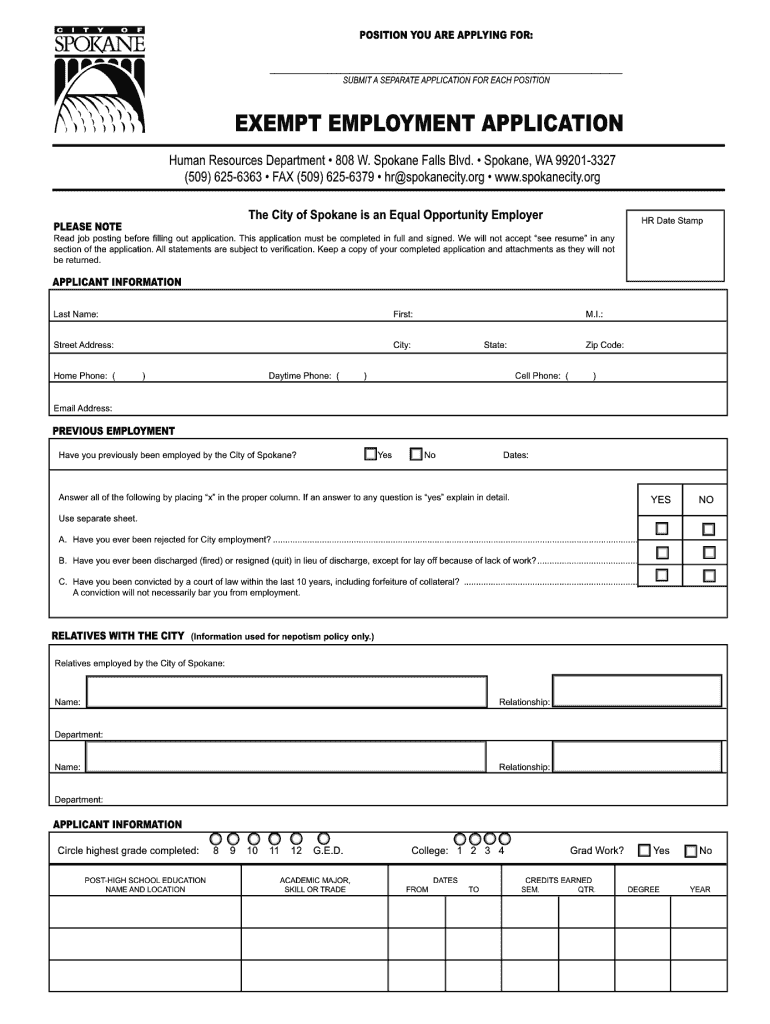
- Begin by filling out the 'Applicant Information' section. Enter your last name, first name, middle initial, address, phone numbers, and email address accurately.
- In the 'Previous Employment' section, indicate if you have worked for the City of Spokane before. Answer all questions by marking 'Yes' or 'No', and provide explanations where necessary.
- List your employment history in reverse chronological order. Include company names, job titles, dates employed, and responsibilities. Ensure all fields are completed thoroughly.
- Complete the 'Additional Information' section to highlight any qualifications or comments that may support your application.
- Sign the application digitally within our platform to confirm accuracy and consent before submitting.
Start filling out your Exempt Employment Application today for free using our platform!
It's free
See more Exempt Employment Application - City of Spokane versions
| Versions | Form popularity | Fillable & printable |
|---|---|---|
| 2010 | 4.8 Satisfied (288 Votes) |
Got questions?
How do I sign my Exempt Employment Application - City of Spokane online?
Log in to your DocHub account and add your Exempt Employment Application - City of Spokane to our editor using one of its upload options - from your device, cloud storage, protected URL, or your DocHub folders if you have already managed your form before. Open our editor, click the Sign key in the top toolbar, and choose your signing method. You can upload an image of your handwritten signature, draw it, enter your name, or utilize a QR code as an alternative.
How to manage my Exempt Employment Application - City of Spokane from Gmail?
If your go-to email service is Gmail, you can easily integrate your DocHub editor into your work. Modify your Exempt Employment Application - City of Spokane with DocHub tools and attach it to your drafts in Gmail. See how effortless it can be to exchange documents and collaborate having a swift PDF editing solution at hand.
Is it better to be exempt or non-exempt?
What is considered an exempt employee in Washington state?
What classifies you as an exempt employee?
Security and compliance
At DocHub, your data security is our priority. We follow HIPAA, SOC2, GDPR, and other standards, so you can work on your documents with confidence.
Learn more


