Form bcgeu 2026

Get Form
form bcgeu Preview on Page 1

Here's how it works

01. Edit your form bcgeu online
Type text, add images, blackout confidential details, add comments, highlights and more.

02. Sign it in a few clicks
Draw your signature, type it, upload its image, or use your mobile device as a signature pad.

03. Share your form with others
Send nomination form via email, link, or fax. You can also download it, export it or print it out.

How to use or fill out form bcgeu with our platform

Form edit decoration
9.5
Ease of Setup
DocHub User Ratings on G2
9.0
Ease of Use
DocHub User Ratings on G2
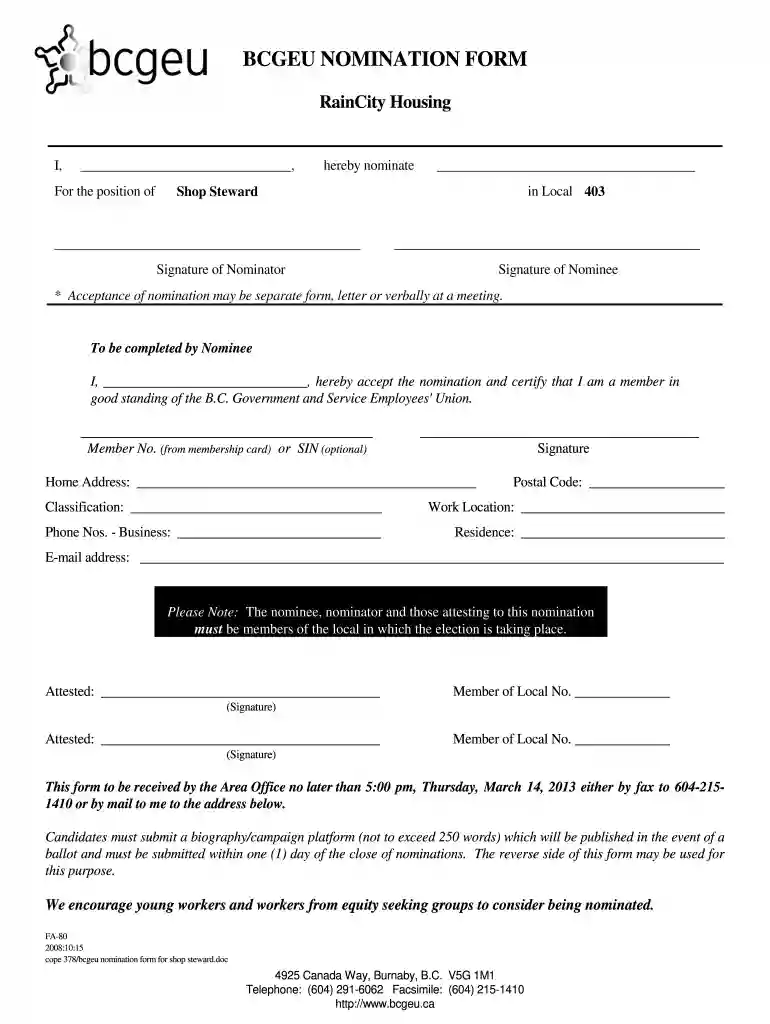
  1. Click ‘Get Form’ to open the BCGEU Nomination Form in the editor.
  2. Begin by entering your name in the first blank field, indicating who is nominating a candidate.
  3. In the next section, specify the position for which you are nominating someone, followed by their name and local number.
  4. Provide your signature as the nominator and ensure that the nominee also signs in their designated area.
  5. The nominee must complete their section by confirming acceptance of the nomination and providing their member number or optional SIN.
  6. Fill out personal details such as home address, postal code, classification, work location, and contact numbers.
  7. Ensure that two members from the local sign as attestants to validate the nomination.
  8. Finally, review all entries for accuracy before submitting the form by fax or mail to meet submission deadlines.

Start using our platform today to fill out your BCGEU Nomination Form easily and for free!

See more form bcgeu versions

We've got more versions of the form bcgeu form. Select the right form bcgeu version from the list and start editing it straight away!
Versions Form popularity Fillable & printable
2008 4.8 Satisfied (229 Votes)
be ready to get more

Complete this form in 5 minutes or less

Get form

Got questions?

We have answers to the most popular questions from our customers. If you can't find an answer to your question, please contact us.
Contact us
The union says talks broke down over wages, remote work and a modernized contract. This emphatic strike result reflects the seriousness of the affordability crisis our members are facing the need for fair wages to address that crisis, Finch said.
You can find your member ID on your BCGEU member card.
The BCGEU is one of Canadas most diverse unions, representing over 80,000 members through- out B.C. in a wide range of sectors, including the provincial public service (government), the broad- er public sector such as health care, community-based social services and education as well as the private sector.
British Columbia General Employees Union.
Union dues are a way for BCGEU members to collectively pool money to pay for union resources and supports. Members pay 1.85% of their gross wages in union dues - so for example $1.85 for every $100 earned in wages.

Security and compliance

At DocHub, your data security is our priority. We follow HIPAA, SOC2, GDPR, and other standards, so you can work on your documents with confidence.

Learn more
ccpa2
pci-dss
gdpr-compliance
hipaa
soc-compliance
be ready to get more

Complete this form in 5 minutes or less

Get form

People also ask

To find out what local you are in, the easiest way is to log in to the BCGEU member portal. If you havent already, make sure youve registered an account, and updated your profile with your personal email to ensure that you are receiving important communications.

bcgeu discounts