




Here's how it works



How to use or fill out form ita 4133p with our platform

- Click ‘Get Form’ to open the ita 4133p in the editor.
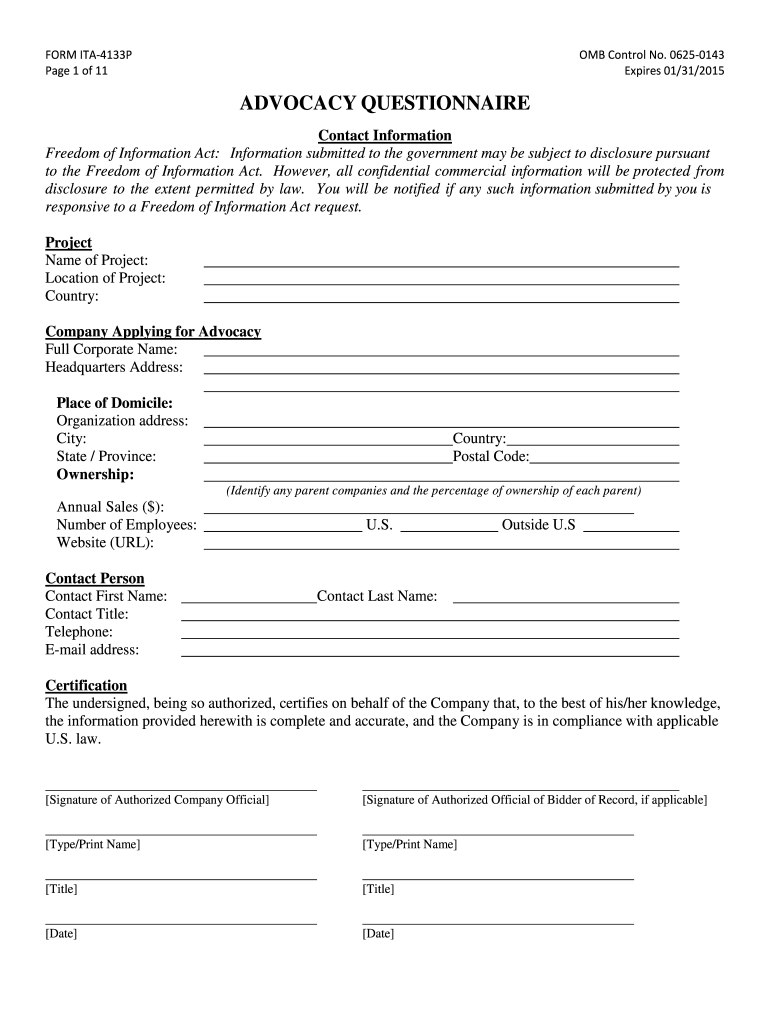
- Begin by filling out the 'Contact Information' section. Enter your project name, location, and company details including full corporate name and headquarters address.
- In the 'Project/Transaction' section, answer questions regarding previous advocacy requests and provide detailed information about the foreign government entity involved.
- Complete the 'Certification' section by signing and typing your name, title, and date to confirm accuracy of the information provided.
- Proceed to fill out sections on partnerships, financing, and competitors. Be thorough in detailing any known competitors and their nationalities.
- Finally, review all entries for completeness before saving or submitting your form through our platform.
Start using our platform today for free to streamline your form completion process!
It's free
Got questions?
Can I sign my form ita 4133p on a mobile?
Of course, you’ll find numerous applications for this on the web. Nonetheless, if you need to eSign your form ita 4133p without installing additional software, DocHub is the best choice you can make. This powerful editor works on mobile devices just as on desktops. Open our editor in your preferred internet browser, register or sign in to your account, and start managing your forms.
What internet browser do I need to edit form ita 4133p online?
If you want to edit your form ita 4133p on the internet swiftly, it does not matter what internet browser you use. DocHub’s simple editing tools are accessible using any internet browser. Just open the appropriate tab within our editor, add your file, and fill it out without stress.
Security and compliance
At DocHub, your data security is our priority. We follow HIPAA, SOC2, GDPR, and other standards, so you can work on your documents with confidence.
Learn more


