Virginia deq discharges search 2026

Get Form
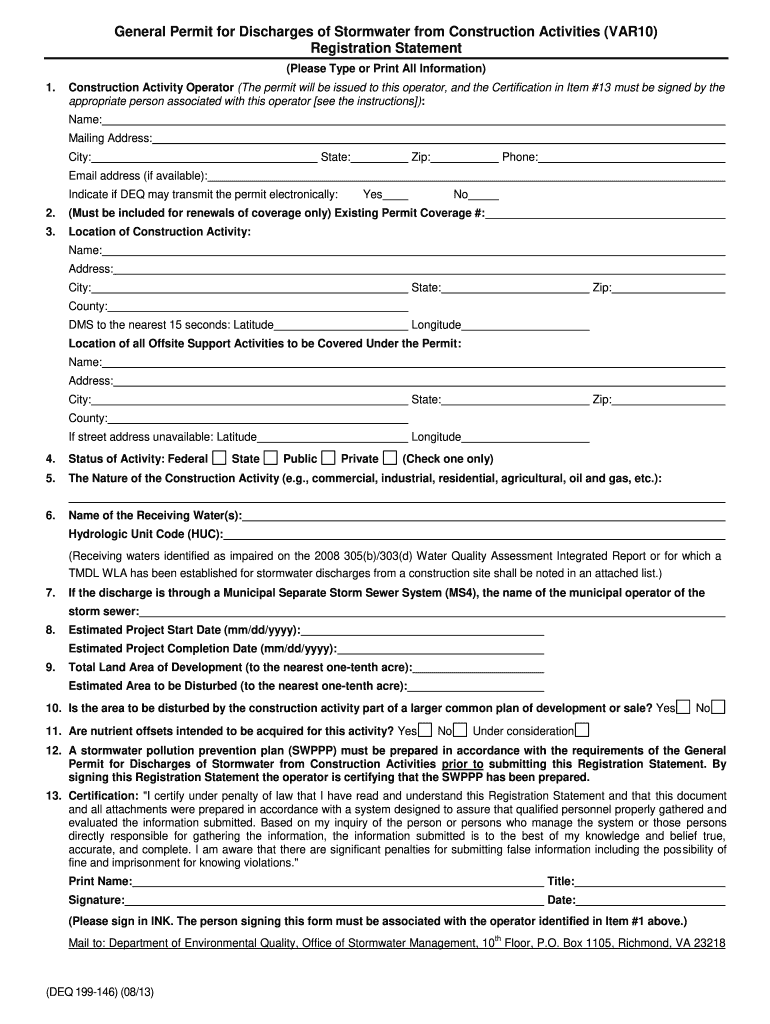
var10 Preview on Page 1

Here's how it works

01. Edit your var10 online
Type text, add images, blackout confidential details, add comments, highlights and more.
02. Sign it in a few clicks
Draw your signature, type it, upload its image, or use your mobile device as a signature pad.
03. Share your form with others
Send virginia deq database via email, link, or fax. You can also download it, export it or print it out.

How to use or fill out virginia deq discharges search with our platform

Form edit decoration
9.5
Ease of Setup
DocHub User Ratings on G2
9.0
Ease of Use
DocHub User Ratings on G2
  1. Click ‘Get Form’ to open the Virginia DEQ Discharges Search in the editor.
  2. Begin by filling out Section 1, which requires the Construction Activity Operator's name, mailing address, and contact information. Ensure all details are accurate as this will be the entity receiving the permit.
  3. If applicable, complete Section 2 with your existing Permit Coverage number for renewals. This is not needed for new applications.
  4. In Section 3, provide the location of the construction activity including its official name and full address. If no street address exists, enter latitude and longitude coordinates.
  5. Indicate the status of your activity in Section 4 by selecting Federal, Public, or Private.
  6. Describe the nature of your construction project in Section 5 (e.g., commercial or residential).
  7. List any receiving waters in Section 6 along with their Hydrologic Unit Code (HUC).
  8. Complete Sections 8 and 9 with estimated project start and completion dates, as well as total land area and area to be disturbed.
  9. Finally, ensure you sign Section 13 certifying that all information is true before submitting your form.

Start using our platform today to streamline your Virginia DEQ discharges search process for free!

See more virginia deq discharges search versions

We've got more versions of the virginia deq discharges search form. Select the right virginia deq discharges search version from the list and start editing it straight away!
Versions Form popularity Fillable & printable
2013 4.8 Satisfied (163 Votes)
be ready to get more

Complete this form in 5 minutes or less

Get form

Got questions?

We have answers to the most popular questions from our customers. If you can't find an answer to your question, please contact us.
Contact us

Sure, a typed name is recognized as a legitimate electronic signature when you add it to your form using a compliant solution like DocHub. Simply upload your virginia deq discharges search to our editor, click Sign in the top tool pane → Create your signature → Type your name in the proper tab, and decide how it will appear on your document.

You can find the latest and most relevant version of the virginia deq discharges search in our DocHub forms library. Browse it by categories or utilize the search field to locate the exact template that suits your situation. You can open this form for editing after you find it.

The Clean Water Act established the National Pollutant Discharge Elimination System (NPDES) program to limit pollutants getting into streams, rivers and bays. DEQ administers the program as the Virginia Pollutant Discharge Elimination System (VPDES).
Making a Request for Records from DEQ You may request records by the Va Department of Environmental Quality NextRequest Portal, U.S. mail, fax, e-mail, in person, or over the phone. FOIA does not require that your request be in writing, nor do you need to specifically state that you are requesting records under FOIA.

Security and compliance

At DocHub, your data security is our priority. We follow HIPAA, SOC2, GDPR, and other standards, so you can work on your documents with confidence.

Learn more
ccpa2
pci-dss
gdpr-compliance
hipaa
soc-compliance
be ready to get more

Complete this form in 5 minutes or less

Get form