




Here's how it works



How to use or fill out RUSH Request Form - Office of Superintendent of Public Instruction - k12 wa with DocHub

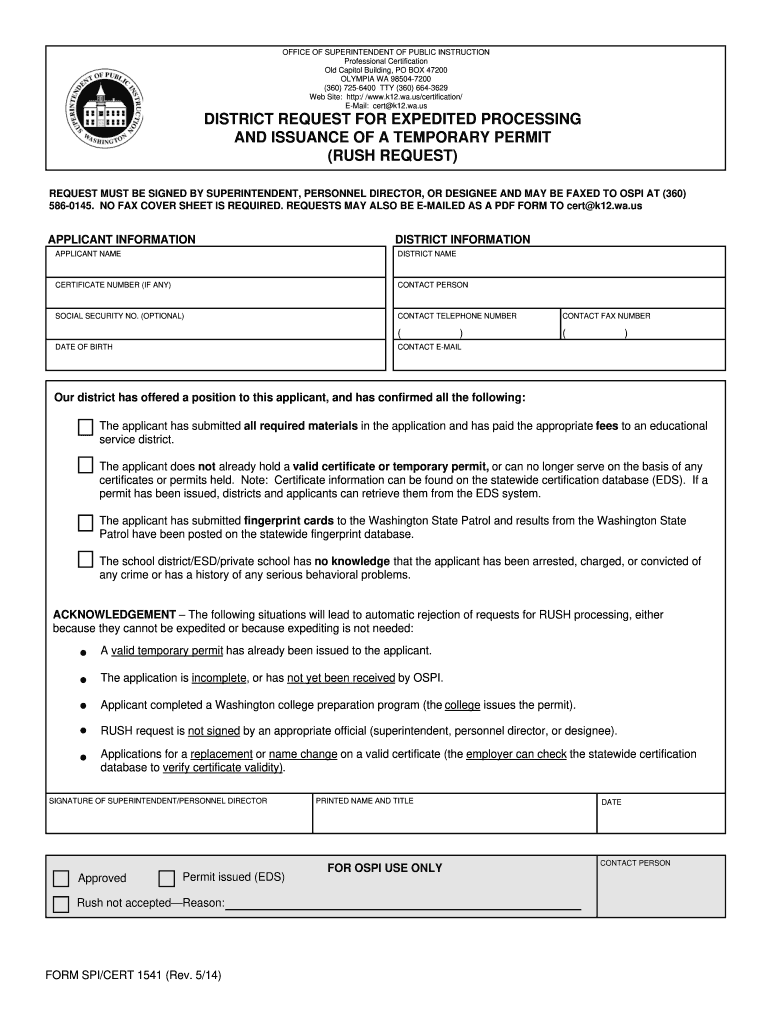
- Click ‘Get Form’ to open the RUSH Request Form in our editor.
- Begin by filling out the 'Applicant Information' section. Enter the applicant's name, certificate number (if applicable), date of birth, and optional social security number.
- Next, complete the 'District Information' section. Provide the district name, contact person, and their telephone and fax numbers.
- Ensure that all required materials have been submitted by the applicant and that they have paid any necessary fees. Confirm that no valid certificate or temporary permit is currently held by the applicant.
- Review the acknowledgment section carefully. Make sure none of the rejection criteria apply to your request before proceeding.
- Finally, obtain a signature from an authorized official such as a superintendent or personnel director. Include their printed name, title, and date.
Start using our platform today to streamline your form completion process for free!
It's free
See more RUSH Request Form - Office of Superintendent of Public Instruction - k12 wa versions
| Versions | Form popularity | Fillable & printable |
|---|---|---|
| 2014 | 4.8 Satisfied (62 Votes) |
Got questions?
How do I sign my RUSH Request Form - Office of Superintendent of Public Instruction - k12 wa without printing?
eSignatures are a great replacement for traditional signing, as they save time, effort, and costs people spend on printing, scanning, and paper delivery. You can electronically sign your RUSH Request Form - Office of Superintendent of Public Instruction - k12 wa utilizing a trustworthy and powerful online document processing tool like DocHub. It complies with main eSignature policies (ESIGN and UETA), so all documents approved there are legally binding and have the same validity as manually signed ones.
How do you edit RUSH Request Form - Office of Superintendent of Public Instruction - k12 wa on Android?
Document editing with DocHub is equally convenient on desktop and mobile devices. You only need an internet browser to edit your RUSH Request Form - Office of Superintendent of Public Instruction - k12 wa on Android. Open our website and sign in to access the instruments you require. Add your file and introduce your intended changes. Next, you can keep your form in your file storage or send it out right away.
Security and compliance
At DocHub, your data security is our priority. We follow HIPAA, SOC2, GDPR, and other standards, so you can work on your documents with confidence.
Learn more


