What is the difference between DocHub vs. Nitro PDF vs. Sejda in Ios?
When it comes to document management and editing on iOS, there are several great options available. In this comparison, we'll take a closer look at three popular tools: DocHub, Nitro PDF, and Sejda. Each of these applications offers its own unique set of features and benefits that can cater to different users' needs.
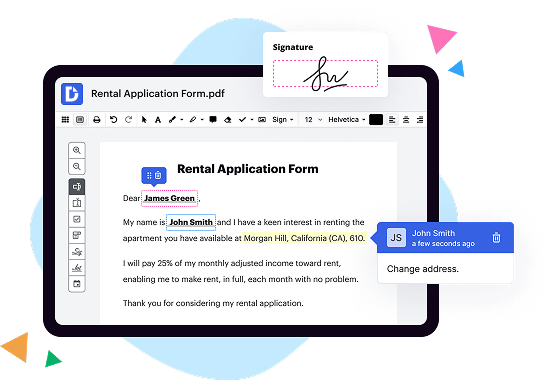
First on our list, DocHub is a powerful and user-friendly tool that excels in document collaboration. With DocHub, you can easily edit, sign, and share documents on your iOS device. Its intuitive interface and extensive editing options make it a top choice for professionals and individuals alike. DocHub's seamless integration with popular cloud storage services also ensures that your documents are always accessible from anywhere.
Next up is Nitro PDF, a reliable and feature-rich application that provides comprehensive PDF editing capabilities on iOS. Nitro PDF boasts an impressive array of tools, allowing you to create, convert, and edit PDFs with ease. Its robust annotation features make reviewing and commenting on documents a breeze. With Nitro PDF, you can confidently handle all your PDF editing needs on your iOS device.
Last but not least, we have Sejda, a versatile document management tool that offers a wide range of features and functionalities. Sejda stands out with its user-friendly interface and streamlined editing options. From merging and splitting documents to compressing and converting files, Sejda provides a comprehensive toolkit for managing and manipulating your documents on iOS.
In conclusion, each of these applications - DocHub, Nitro PDF, and Sejda - offers its own strengths and advantages. DocHub excels in document collaboration, Nitro PDF provides comprehensive PDF editing capabilities, and Sejda offers versatile document management features. Ultimately, the best choice for you depends on your specific requirements and preferences.
DocHub vs Nitro PDF vs Sejda in Ios: which is better for Enterprises?
While Nitro PDF and Sejda are good solutions to work with PDFs online, DocHub offers greater capabilities to help individuals and businesses digitize their documents and make them run smoothly across different devices and your favorite apps.
DocHub vs Nitro PDF vs Sejda in Ios: which is better for small businesses?
Nitro PDF and Sejda are good options for editing, signing, and sharing PDFs. However, DocHub offers a more comprehensive featureset that includes organizations, reusable templates, advanced eSignatures, seamless Google integrations, and more that are perfect for small businesses, helping them simplify and streamline document editing, sharing, signing, and form completition.
What is DocHub?
DocHub is a Google-integrated PDF editor and eSignature solution that helps you get your PDFs done online, using any device. DocHub comes with an online PDF editor, advanced eSignatures, PDF forms, reusable templates, and straightforward Google integrations so you can maximize your productivity when working within your favorite Google apps.
What is Nitro PDF and how does it work in Ios?
Nitro PDF is a powerful and versatile tool that allows you to view, edit, and collaborate on PDF documents. It is designed to enhance your productivity and simplify your document management tasks. With Nitro PDF, you can do so much more than just view and read PDF files on your iOS device.
So, how does Nitro PDF work in iOS? Well, it all starts with the user-friendly interface that makes navigating through the app a breeze. Whether you're using an iPhone or an iPad, the app is optimized to provide a seamless experience. You can effortlessly access your PDF files from various sources like email attachments, cloud storage services, or even the web.
Once you have a PDF open in Nitro PDF, you have a wide range of tools and features at your disposal. Whether you need to annotate, highlight, or add comments to a document, Nitro PDF has got you covered. You can easily mark up important sections, insert sticky notes, or draw your attention to specific areas using various annotation tools.
Collaboration is also a key aspect of Nitro PDF. You can easily share your PDF files with colleagues, clients, or friends, and they can view and comment on the document using their own iOS devices. This seamless collaboration feature allows for efficient teamwork and enhances productivity.
Another fantastic feature of Nitro PDF for iOS is its ability to convert documents to and from PDF format. Whether you need to convert a Word, Excel, or PowerPoint file to PDF, or vice versa, Nitro PDF can handle it with ease. This feature ensures that your document formats remain consistent across different platforms and devices.
In addition to these features, Nitro PDF also offers security options for your documents. You can protect your PDFs with passwords, restrict editing or printing permissions, and even add digital signatures to ensure the authenticity of your files. These security features provide peace of mind and ensure that your sensitive information stays protected.
In conclusion, Nitro PDF is a comprehensive PDF solution for iOS that enables you to view, edit, and collaborate on PDF documents with ease. Its user-friendly interface, powerful annotation tools, seamless collaboration features, document conversion capabilities, and security options make it a valuable tool for individuals and businesses alike. So, if you're looking for an efficient and reliable PDF solution for your iOS device, look no further than Nitro PDF.
What is Sejda and how does it work in Ios?
Sejda is a powerful and user-friendly app that allows you to easily manipulate PDF documents directly on your iOS device. With Sejda, you can effortlessly merge multiple PDF files into one, split a large PDF into smaller ones, compress PDFs to reduce their file size, and even convert various file formats to PDF.
Using Sejda on your iOS device is a breeze. Once you have downloaded and installed the app, simply open it and select the action you want to perform on your PDF document. Whether it's merging, splitting, compressing, or converting, Sejda's intuitive interface guides you through the process step by step.
Let's say you have several PDF files that you want to combine into a single document. With Sejda, you can easily select the files you want to merge, arrange them in the desired order, and let the app handle the rest. In just a few taps, your PDFs will be seamlessly merged together.
If you find yourself with a large PDF that needs to be divided into smaller sections, Sejda is here to help. Simply choose the split function, select the points where you want to divide the document, and let Sejda do the work. It ensures that each section retains its original formatting, making it easy for you to navigate through the resulting split documents.
With Sejda, you can also compress PDF files to make them more manageable or send them faster via email. The app optimizes the file size without compromising the quality of the content. It's perfect for those times when you need to share a large document but want to save some precious data or storage space.
Converting files to PDF format is a breeze with Sejda. Whether you have a Word document, an Excel spreadsheet, or even an image file, Sejda can transform it into a PDF with just a few taps. This can be incredibly useful when you need to share or print a document, ensuring that its formatting remains consistent across different devices and platforms.
Sejda's seamless integration with iOS makes it an indispensable tool for anyone working with PDF documents on their Apple devices. The app's user-friendly interface, coupled with its powerful features, makes PDF manipulation a breeze. Whether you're a student, a professional, or just someone who frequently deals with PDFs, Sejda is a must-have app for your iOS device.
Is DocHub free?
Yes. DocHub's free plan is a perfect fit for one-offs or occasional projects. You can start using DocHub’s Free Plan straight away after completing the quick account registration. No learning is needed. The DocHub Pro Plan has a 30-day free trial so you have enough time to test the product.
Is Nitro PDF free to use?
Yes, Nitro PDF is free to use! You can enjoy all its fantastic features without spending a single penny. Isn't that great? Nitro PDF offers a range of powerful tools that allow you to create, edit, convert, and share PDF files effortlessly.
By using Nitro PDF, you can easily create professional-looking PDFs from any document or file format. Need to make some changes to your PDF? No problem! Nitro PDF enables you to edit text, images, and even pages within the PDF itself. It's incredibly convenient and user-friendly.
But that's not all! Nitro PDF also lets you convert your PDFs to and from popular file formats like Word, Excel, and PowerPoint in a flash. Plus, sharing your PDFs with others has never been easier. Nitro PDF provides various collaboration tools that allow you to annotate, review, and comment on documents with your colleagues or clients.
With Nitro PDF, the possibilities are endless. Whether you're a student, professional, or just someone who frequently works with PDFs, this free tool is definitely worth checking out. So what are you waiting for? Give Nitro PDF a try and experience the ease and efficiency it brings to your document management.
Is Sejda free to use?
Yes, Sejda is absolutely free to use! With Sejda, you can take control of your PDF documents without having to spend a dime. This user-friendly platform offers a wide range of tools and features that can help you manage, edit, and manipulate your PDFs effortlessly.
Sejda's free version allows you to perform various tasks such as merging multiple PDF files into one, splitting a large PDF into smaller parts, compressing files to reduce their size, and even converting PDFs to different formats like Word, Excel, and PowerPoint. Whatever your PDF needs may be, Sejda has got you covered!
Not only is Sejda completely free, but it's also incredibly easy to use. You don't need any advanced technical skills or knowledge to navigate through the platform. Its intuitive interface makes it a breeze to upload, modify, and save your documents with just a few clicks.
What's more, Sejda offers a seamless experience across different devices and operating systems. Whether you're using a computer, tablet, or smartphone, you can access Sejda's features from anywhere, anytime. It's the perfect solution for both personal and professional use.
So, if you're looking for a hassle-free way to conquer your PDF tasks without spending a penny, Sejda is the answer. Start using Sejda today and say goodbye to the limitations and constraints of traditional PDF software. With Sejda, the power to handle your PDF documents is right at your fingertips!
What is DocHub’s cost and pricing?
DocHub has straightforward pricing that includes one free plan and one paid plan. If you need to get documents done once in a while, the Free Plan is just the thing for you. It includes all the PDF tools to help you edit, sign, share, and organize your documents. For a growing document workflow, we recommend the DocHub Pro plan at $14 per user per month. It includes unlimited PDF capabilities and priority tech support. You can even test it free for 30 days before buying.
What are the plans and prices for Nitro PDF?
Nitro PDF offers a range of plans and prices that cater to various needs and budgets. Whether you're an individual, small business, or large enterprise, Nitro PDF has got you covered.
For individuals who mainly require basic PDF functionalities, the Nitro Productivity Suite plan would be a great fit. This plan allows you to work with PDF documents effortlessly, from creating and editing to converting and sharing. With the Nitro Productivity Suite, you can boost your productivity and get things done in a snap. The plan is fairly priced, making it accessible to individuals looking for an affordable yet powerful PDF solution.
For small businesses and teams, Nitro PDF offers the Nitro Pro plan. This plan not only includes all the features of the Nitro Productivity Suite but also provides advanced functionalities such as electronic signatures, form creation, and OCR (Optical Character Recognition) capabilities. It enables you to collaborate seamlessly with your colleagues, streamline your workflow, and achieve higher efficiency. The Nitro Pro plan comes at a reasonable price, ensuring value for your investment.
If you are part of a large enterprise that deals with heavy PDF usage, Nitro PDF has the Nitro VIP Access plan tailored specifically for you. This plan encompasses all the features of the Nitro Pro plan, with additional benefits such as priority support, deployment assistance, and custom training options. The Nitro VIP Access plan aims to cater to the needs of enterprise-level customers, providing them with top-notch PDF solutions and optimal user experiences.
It's important to note that Nitro PDF's plans and prices may vary based on factors such as the number of licenses needed and any specific customization requirements. Their website provides detailed information about each plan, including the features and pricing structure, so you can easily find the perfect fit for your PDF needs.
In summary, Nitro PDF offers a range of plans and prices designed to meet the diverse requirements of individuals, small businesses, and large enterprises. Whether you're a casual user or a corporate powerhouse, Nitro PDF has the right plan for you. Their affordable prices, coupled with their powerful PDF functionalities, make them a trusted choice in the market. So why wait? Empower yourself with Nitro PDF and unlock the true potential of your PDF documents.
What are the plans and prices for Sejda?
Sejda is a fantastic tool that offers a range of plans and prices to cater to your specific needs. Whether you're an individual, a student, a business owner, or a team, Sejda has got you covered. Allow me to provide you with more information.
For individuals, Sejda offers a free plan that provides limited access to its features. It's a great way to dip your toes in and see how Sejda can enhance your productivity. However, if you find yourself needing more advanced features and unlimited access, their premium plan is the way to go. Priced at a reasonable and competitive rate, the premium plan unlocks all the powerful tools Sejda has to offer.
If you're a student, Sejda understands the importance of efficient and reliable tools for your academic journey. That's why they offer a special discounted price for students. With the same features as the premium plan, this affordable option ensures that you can optimize your workflow without breaking the bank.
Business owners and teams are not left behind either. Sejda offers a business plan specifically tailored to meet the demands of collaborative work environments. This plan allows multiple team members to access and utilize the platform simultaneously, facilitating seamless cooperation and boosting productivity. The business plan comes at an affordable price per user, making it a practical choice for teams of any size.
Transitional words like "Furthermore," "Moreover," and "In addition" help me emphasize the range of Sejda's plans and prices. This allows for a smooth flow of information, guiding you through the various options available.
In summary, Sejda offers plans and prices that cater to individuals, students, business owners, and teams. These plans are designed to suit your specific needs and provide access to a powerful suite of tools. Whether you opt for the free plan, premium plan, student discount, or the business plan, Sejda is confident in their ability to elevate your productivity and simplify your workflow.
Is DocHub safe?
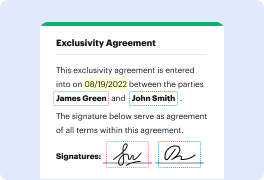
Absolutely! For DocHub, your data security is a top priority. DocHub complies with industry-leading regulations including GDPR, PCI DSS, CCPA, and more. DocHub offers 256-bit SSL encryption, OAuth 2.0 authentication, encrypted storage, and all signatures added using DocHub are legally-binding under the ESIGN Act. Additionally, all changes made in a document are recorded and available in a detailed audit trail.
Is Sejda in Ios safe?
Sejda in Ios is absolutely safe, and I'm excited to share all the reasons why you can trust this amazing platform. First and foremost, Sejda prioritizes your privacy and security at every step. Your documents and personal information are diligently protected using the latest encryption technology, ensuring that your data remains confidential and out of the wrong hands.
With Sejda, you can confidently upload, edit, and store your files without any worries. Plus, their user-friendly interface makes it incredibly easy for you to navigate and perform various tasks effortlessly. You'll love the seamless experience that Sejda offers!
Whether you need to merge PDFs, compress files, or edit documents, Sejda has got you covered. The platform is packed with a comprehensive set of features that cater to all your PDF needs. You'll be able to complete tasks swiftly and efficiently, saving you valuable time and effort.
Sejda not only guarantees safety, but it also ensures quality. The platform delivers top-notch results that meet your expectations every single time. You can rely on Sejda to provide professional-looking PDFs that are flawless and ready to be shared or submitted.
Furthermore, Sejda takes pride in its outstanding customer support. Whenever you have a question or encounter an issue, their knowledgeable and friendly team is ready to assist you. You can count on them to provide prompt and reliable solutions, ensuring that your experience with Sejda remains smooth and hassle-free.
In conclusion, Sejda in Ios is an exceptionally safe and reliable platform that offers an array of convenient features to fulfill your PDF needs. From its commitment to privacy and security to its user-friendly interface and excellent customer support, Sejda has everything you need. So go ahead and take advantage of this amazing tool with full confidence, knowing that Sejda has your back.
What are the main DocHub alternatives in Ios?
The main DocHub alternatives are Lumin PDF, Small PDF, PDF escape, and others. However, DocHub’s ease of use, flexibility, affordability, and deep Google integrations are the reasons why DocHub is ahead of the competition.
What are the 10 best Nitro PDF alternatives in Ios?
When it comes to finding the best Nitro PDF alternatives in iOS, you're in luck! There are several fantastic options out there that can cater to your PDF editing and management needs. Let's dive right in and uncover the top 10 alternatives, with DocHub shining at the forefront.
1. DocHub: First and foremost, we have DocHub, a versatile and user-friendly PDF alternative that offers a wide range of features. From annotating and signing documents to adding text and images, this app has got you covered.
2. PDF Expert: With its sleek interface and powerful tools, PDF Expert is a top contender. It allows for seamless editing, annotation, and form filling, ensuring a smooth PDF experience on your iOS device.
3. Adobe Acrobat Reader: As a renowned name in PDF solutions, Adobe Acrobat Reader deserves a spot on this list. It offers a multitude of features such as document scanning, signing, and even converting files into various formats.
4. Foxit PDF Reader: Foxit PDF Reader provides a simple yet effective platform for reading, annotating, and editing PDFs. Its user-friendly interface and extensive functionality make it a go-to choice for many iOS users.
5. GoodReader: Offering an array of advanced features, GoodReader makes managing PDFs on your iOS device a breeze. It enables file organization, annotation, and seamless file transfer across various cloud services.
6. PDFpen: PDFpen is a well-rounded PDF editor that allows for smooth navigation, editing, and annotation. Its intuitive design and comprehensive toolkit make it an ideal alternative for iOS users seeking versatility.
7. Readdle PDF Converter: Known for its impressive conversion capabilities, Readdle PDF Converter is a handy app for converting files to and from PDF format. It also provides basic editing and annotation features.
8. PDFelement: Equipped with a range of editing tools, PDFelement ensures complete control over your PDFs. From adding text and images to modifying layouts, this app offers a comprehensive set of features.
9. iAnnotate: iAnnotate combines a user-friendly interface with seamless annotation capabilities, making it a go-to choice for PDF enthusiasts. With its diverse range of tools, it's perfect for both personal and professional use.
10. PDF Viewer: Last but not least, PDF Viewer offers a clean and intuitive interface, making it effortless to read, annotate, and sign PDF documents. It offers cloud integration and ensures smooth collaboration on the go.
So there you have it, a comprehensive list of the 10 best Nitro PDF alternatives in iOS. With DocHub leading the pack, these alternatives provide a diverse range of features to suit your PDF editing needs. Whether you need advanced annotation tools, powerful conversion capabilities, or intuitive interface, there's an option that fits your preferences. Happy PDF editing!
What are the 10 best Sejda alternatives in Ios?
Looking for the best Sejda alternatives on iOS? Look no further! We've compiled a list of 10 amazing alternatives that are sure to meet all your PDF editing needs. From annotation and signing to merging and converting, these apps have got you covered.
1. DocHub: DocHub tops our list of alternatives, providing a user-friendly and feature-rich experience. Quickly edit, sign, and share your PDFs with ease.
2. PDFelement: A powerful PDF editor that lets you annotate, fill forms, and convert documents effortlessly. Its intuitive interface makes editing a breeze.
3. Adobe Acrobat Reader: A household name in the PDF industry, Adobe Acrobat Reader offers impressive features such as highlighting text, adding comments, and organizing your documents efficiently.
4. Foxit PDF Reader: With its fast performance and extensive range of editing tools, Foxit PDF Reader is a prime choice. It allows you to collaborate, annotate, and protect your files effortlessly.
5. PDF Expert: Delivering a seamless experience, PDF Expert enables easy navigation, annotation, and form filling. Business professionals will appreciate its advanced features like redaction and custom stamps.
6. GoodReader: GoodReader is a versatile PDF reader that also supports various file formats. It offers robust features like text-to-speech, file management, and cloud integration.
7. iAnnotate: Seamlessly annotate, mark up, and share your PDFs using iAnnotate. Its smooth interface and extensive toolset enhance your productivity and collaboration.
8. PDFpen: PDFpen is a reliable PDF editing tool that allows you to easily modify and correct your documents. Its OCR feature makes searching and editing scanned PDFs a breeze.
9. PDF Converter: Convert your PDFs to various formats effortlessly with PDF Converter. This app supports batch conversions and offers a simple, user-friendly interface.
10. PDF Viewer: With a sleek design and intuitive controls, PDF Viewer lets you read, annotate, and manage your PDF files with ease. It also supports various cloud storage services for convenient access.
We hope this list of iOS alternatives helps you find the perfect PDF editing app for your needs. Give them a try and discover a world of possibilities for your PDF documents!