What is the difference between DocHub vs CovePDF vs. ApowerPDF?
When it comes to document management and editing, comparing tools like DocHub, CovePDF, and ApowerPDF can be useful in finding the right solution for your needs. While each of these tools offers similar functionalities, they also have distinct features that set them apart.
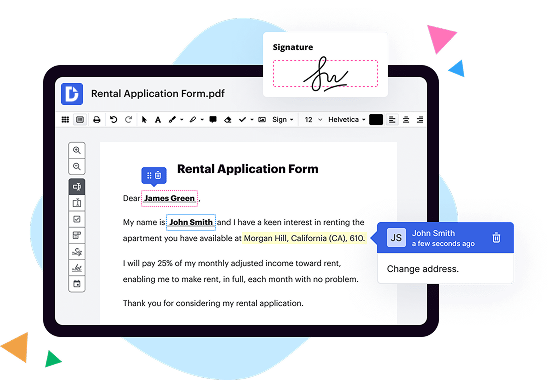
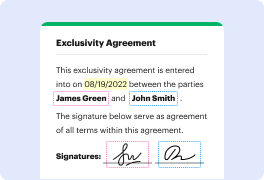
DocHub, for instance, stands out as a robust and user-friendly tool for editing and annotating PDFs. Its elegant interface, smooth performance, and comprehensive set of features make it a top choice. With DocHub, you can edit text, add signatures, highlight important sections, insert images, and even collaborate with others in real-time. The platform ensures seamless integration with popular cloud storage services, making it effortless to access and manage your documents from anywhere.
CovePDF, on the other hand, offers a sleek and intuitive interface that simplifies the task of handling PDF files. It provides essential features for document editing, such as annotating, merging, splitting, and compressing PDFs, all within a clean and user-friendly environment. CovePDF also boasts advanced security options like password protection and redaction, ensuring the confidentiality of your sensitive information.
ApowerPDF is another reliable tool that offers a wide range of features to enhance your PDF management experience. It allows you to edit text, insert images, add watermarks, merge multiple files, and even convert PDFs to other formats. With its OCR (Optical Character Recognition) capabilities, ApowerPDF can also recognize text within scanned documents, making it easier to edit and search for specific content.
In conclusion, while all these tools excel in providing efficient PDF management solutions, they do have their own unique strengths. Whether you prefer DocHub's comprehensive editing features, CovePDF's simplicity and security options, or ApowerPDF's versatility and OCR capabilities, you can navigate your document management tasks with confidence. Remember to consider your specific needs and preferences to make a well-informed choice.
DocHub vs CovePDF vs ApowerPDF: which is better for Enterprises?
While CovePDF and ApowerPDF are good solutions to work with PDFs online, DocHub offers greater capabilities to help individuals and businesses digitize their documents and make them run smoothly across different devices and your favorite apps.
DocHub vs CovePDF vs ApowerPDF: which is better for small businesses?
CovePDF and ApowerPDF are good options for editing, signing, and sharing PDFs. However, DocHub offers a more comprehensive featureset that includes organizations, reusable templates, advanced eSignatures, seamless Google integrations, and more that are perfect for small businesses, helping them simplify and streamline document editing, sharing, signing, and form completition.
What is DocHub?
DocHub is a Google-integrated PDF editor and eSignature solution that helps you get your PDFs done online, using any device. DocHub comes with an online PDF editor, advanced eSignatures, PDF forms, reusable templates, and straightforward Google integrations so you can maximize your productivity when working within your favorite Google apps.
What is CovePDF and how does it work?
CovePDF is a user-friendly, efficient, and secure PDF editor that simplifies your document management tasks. It provides a seamless experience for users by offering a wide range of features and a simple interface. With CovePDF, you can easily view, edit, and annotate PDF files.
This intelligent tool works by giving you full control over your PDF documents. It allows you to add text, images, and shapes to your PDF, making it a versatile editor for any task. Say goodbye to the hassle of printing, scanning, or sending documents back and forth, as CovePDF lets you make changes directly within the digital format.
You can also highlight important sections, underline text, and strike through unnecessary information with CovePDF's annotation features. This makes it perfect for studying, collaborating with colleagues, or simply organizing your documents efficiently. It's like having a virtual highlighter and sticky notes right at your fingertips.
CovePDF's captivating feature is its focus on security. It employs state-of-the-art encryption to protect your confidential data from unauthorized access. Rest assured that your files are safe and secure throughout the editing and sharing process. The user interface is designed to be intuitive, which means you can confidently navigate through the features without feeling overwhelmed.
Whether you're a student, professional, or just someone who loves working with PDFs, CovePDF streamlines your document management experience. Seamlessly edit, annotate, and safeguard your files with this efficient and easy-to-use PDF editor. Try CovePDF today and take your PDF editing game to the next level.
What is ApowerPDF and how does it work?
ApowerPDF is a powerful and user-friendly PDF editing and management software. It offers you a whole range of tools and features to effortlessly create, edit, convert, and secure your PDF documents. Let me break it down for you in a way that is easy to understand.
So, picture this. You have a bunch of PDF files and you want to make some changes to them - maybe add some text, insert images, or even extract certain pages. That's where ApowerPDF steps in. With its intuitive interface and straightforward navigation, you can manipulate your PDFs with ease. It's like having your own personal PDF expert right at your fingertips.
But wait, there's more! ApowerPDF also lets you convert files to and from various formats like Word, Excel, PowerPoint, and even image files. Ever felt the frustration of trying to copy text from a PDF? Well, with this software, you can easily extract the text you need and save it in a format that works for you.
Security is a hot topic these days, and ApowerPDF has got you covered. You can protect your PDF documents with passwords, add digital signatures, and apply different levels of permissions to ensure that your sensitive information stays safe and secure.
Oh, and did I mention that ApowerPDF has a built-in OCR (Optical Character Recognition) feature? This means it can recognize and convert scanned PDFs and images into editable and searchable text. No more retyping or searching through heaps of paper - just a simple click and you're good to go.
So, how does ApowerPDF work its magic? Well, it harnesses the power of cutting-edge technology wrapped in a user-friendly package. It's designed to make your PDF editing tasks a breeze, whether you're a seasoned pro or a newbie to the world of PDFs. With just a few clicks, you can create, edit, and manage your PDFs like a pro.
In a nutshell, ApowerPDF is your go-to PDF assistant that combines simplicity, functionality, and security into one comprehensive software. It empowers you to take control of your PDFs and unlock their full potential. So why not give it a try and experience the future of PDF editing for yourself?
Is DocHub free?
Yes. DocHub's free plan is a perfect fit for one-offs or occasional projects. You can start using DocHub’s Free Plan straight away after completing the quick account registration. No learning is needed. The DocHub Pro Plan has a 30-day free trial so you have enough time to test the product.
Is CovePDF free to use?
Yes, CovePDF is absolutely free for you to use! You can use this fantastic PDF reader and editor without spending a penny. You'll be pleased to know that CovePDF offers a wide range of features that allow you to view, edit, and protect your PDF documents effortlessly. With CovePDF, you can easily annotate, highlight, and add comments to your PDFs. Additionally, you can merge multiple files into one, split larger documents, and encrypt your sensitive information for enhanced security. Plus, CovePDF has a sleek and user-friendly interface that ensures a seamless experience. So, go ahead and start enjoying the benefits of CovePDF's free services without any hesitation.
Is ApowerPDF free to use?
Yes, ApowerPDF is completely free to use! It offers a wide range of powerful and user-friendly features that cater to all your PDF needs. With ApowerPDF, you can easily create, edit, convert, and merge PDF files, making your work more efficient and seamless. Better yet, you won't face any annoying limitations or hidden charges. ApowerPDF ensures a hassle-free experience, allowing you to enhance your productivity effortlessly. So, go ahead and enjoy the convenience of this incredible PDF tool without any cost involved!
What is DocHub’s cost and pricing?
DocHub has straightforward pricing that includes one free plan and one paid plan. If you need to get documents done once in a while, the Free Plan is just the thing for you. It includes all the PDF tools to help you edit, sign, share, and organize your documents. For a growing document workflow, we recommend the DocHub Pro plan at $14 per user per month. It includes unlimited PDF capabilities and priority tech support. You can even test it free for 30 days before buying.
What are the plans and prices for CovePDF?
As of September 2021, CovePDF offers two pricing plans: Free and Premium.
1. Free Plan: This plan allows users to access basic features and tools of CovePDF at no cost. With the Free plan, you can view, edit, and annotate PDF files, as well as perform basic document operations. However, some advanced features are limited and certain tools may require an upgrade to the Premium plan.
2. Premium Plan: The Premium plan offers extended functionalities and additional features compared to the Free plan. Some of the features exclusive to the Premium plan include advanced editing, document signing, converting files to different formats, merging and splitting PDFs, password protection, and more. The Premium plan is available for a subscription fee, but the specific pricing information can vary depending on your region and any ongoing promotions.
To get the most accurate and up-to-date information on the pricing plans and any promotions available for CovePDF, it is recommended to visit their official website or reach out to their customer support.
What are the plans and prices for ApowerPDF?
ApowerPDF offers several plans and pricing options, including:
1. Monthly Subscription:
- Individual: $29.95 per month
- Team (up to 10 users): $89.95 per month
2. Yearly Subscription:
- Individual: $79.95 per year
- Team (up to 10 users): $239.95 per year
3. Lifetime Subscription:
- Individual: $159.95 (one-time payment)
- Team (up to 10 users): $479.95 (one-time payment)
It's worth noting that ApowerPDF occasionally provides discounts and promotions on their pricing plans. Furthermore, the team plan allows for collaboration and sharing between team members. For exact and up-to-date pricing information, you can visit the official ApowerPDF website.
Is CovePDF safe?
Yes, CovePDF is indeed safe for use. Rest assured, you can trust this software to keep your documents secure and protected. CovePDF takes your privacy seriously and ensures that all your sensitive information remains confidential. With its advanced security measures, you can confidently handle your PDF files without any worries. Additionally, CovePDF offers a user-friendly interface, making it easy for you to navigate and utilize its features. So go ahead and confidently explore the world of PDFs with CovePDF!
Is ApowerPDF safe?
ApowerPDF is indeed safe and secure for all your PDF needs. Rest assured, this powerful tool has been designed with the utmost care to prioritize your privacy and data protection. You can confidently convert, edit, create, and merge your PDF files with ApowerPDF, knowing that your documents are in good hands.
Not only is ApowerPDF safe, but it also guarantees a user-friendly experience. Its intuitive interface makes it easy for you to navigate through the various features it offers. Whether you're a beginner or a seasoned professional, ApowerPDF ensures smooth and hassle-free operations.
In terms of security, ApowerPDF employs robust measures to safeguard your information. Your files are processed locally on your device, which means they never leave your computer unless you choose to share them. This ensures complete confidentiality and eliminates any risk of unauthorized access.
Furthermore, ApowerPDF's regular updates further enhance its safety features, ensuring it remains up-to-date with the latest security protocols. The team behind ApowerPDF understands the importance of safeguarding your data, and they continually strive to provide a reliable and secure platform.
So, if you're searching for a trustworthy and dependable PDF tool, ApowerPDF is the answer. With its unmatched safety features, user-friendly design, and commitment to confidentiality, you can confidently entrust your PDF files to ApowerPDF without any concerns.
What are the main DocHub alternatives?
The main DocHub alternatives are Lumin PDF, Small PDF, PDF escape, and others. However, DocHub’s ease of use, flexibility, affordability, and deep Google integrations are the reasons why DocHub is ahead of the competition.
What are the 10 best CovePDF alternatives?
When it comes to finding the perfect alternative to CovePDF, there are several outstanding options that you'll surely love. Allow me to present you with a curated list of 10 remarkable alternatives, each offering unique features and functionalities to cater to your PDF editing needs.
1. DocHub: DocHub tops our list with its seamless and user-friendly platform. This powerful tool allows you to effortlessly edit, sign, and share PDFs with ease.
2. Adobe Acrobat DC: A highly popular choice, Adobe Acrobat DC provides a comprehensive set of PDF editing features suitable for both individuals and businesses.
3. Smallpdf: With its sleek interface and intuitive tools, Smallpdf simplifies PDF editing tasks and offers a range of handy features such as compression, merging, and conversion.
4. PDFescape: This browser-based alternative offers a wide range of editing features, allowing you to modify text, add images, and annotate PDFs without the need for installation.
5. Foxit PhantomPDF: Engineered for efficiency, Foxit PhantomPDF boasts powerful editing capabilities while maintaining a lightweight and speedy performance.
6. Nitro Pro: Known for its robust set of features, Nitro Pro enables you to create, edit, and convert PDFs effortlessly, making it a great option for professionals.
7. Sejda PDF Editor: Seamlessly edit and collaborate on PDF documents with Sejda PDF Editor. This versatile tool offers features like form filling, merging, and conversions.
8. PDF Studio: PDF Studio combines simplicity with advanced editing tools, making it an ideal choice for both beginners and experienced users seeking a comprehensive PDF editing software.
9. Soda PDF: With its sleek design and easy-to-use interface, Soda PDF makes editing PDFs a breeze while providing a range of additional features like e-signature support.
10. PDFelement: PDFelement offers an impressive array of editing tools, allowing you to modify and customize your PDFs effortlessly while providing a user-friendly experience.
Remember, each of these alternatives brings its own strengths and features to the table. Choose one that suits your specific needs and get ready to dive into a seamless PDF editing experience.
What are the 10 best ApowerPDF alternatives?
If you're looking for the ultimate ApowerPDF alternative, fear not! We have compiled a list of the top 10 alternatives that will surely meet your PDF needs with flying colors. Ready for an exquisite experience? Let's dive in!
1. DocHub: Our first recommendation is DocHub—the pinnacle of PDF editing. Seamlessly edit, sign, and share your documents with ease. It's the all-in-one solution you've been searching for!
2. Adobe Acrobat DC: With a name synonymous with PDF excellence, Adobe Acrobat DC offers a wide range of features, from editing to creating professional PDFs. It's a solid choice for any PDF enthusiast.
3. Smallpdf: This user-friendly platform allows you to compress, convert, and edit PDFs effortlessly. Smallpdf truly lives up to its name, making it a fantastic alternative.
4. PDFelement: Elevate your PDF editing game with PDFelement. It boasts a sleek interface and robust features, providing you with full control over your documents. Power meets simplicity!
5. Nitro PDF: Nitro PDF offers a plethora of tools for editing and collaborating on PDFs. Its intuitive and straightforward interface ensures a smooth experience for all users.
6. Foxit PhantomPDF: Known for its lightning-fast performance, Foxit PhantomPDF is a great alternative to ApowerPDF. Say goodbye to waiting around and hello to efficient PDF editing.
7. PDF-XChange Editor: With its focus on versatility, PDF-XChange Editor lets you modify and annotate your documents effortlessly. It's an underrated gem in the PDF editing world.
8. Sejda PDF Editor: Sejda PDF Editor is a web-based tool that simplifies all your PDF needs. Edit, merge, and convert documents with just a few clicks. It's convenience at its finest!
9. Soda PDF: If you love customization, Soda PDF is the perfect match for you. Tailor your PDFs to your liking with its wide array of editing features. Your documents, your way!
10. PDFescape: Rounding up our list is PDFescape—a reliable and easy-to-use PDF editor. It allows you to make quick edits without the hassle of installing any software. Simple and effective!
You now have an array of exceptional ApowerPDF alternatives at your disposal. Explore these options, compare their unique features, and find the one that suits your needs best. Start experiencing PDF greatness today!