What is the difference between DocHub and Adobe Acrobat in Ios?
There are a few key differences between DocHub and Adobe Acrobat in iOS, but let me start by saying that DocHub offers a more comprehensive and user-friendly experience overall.
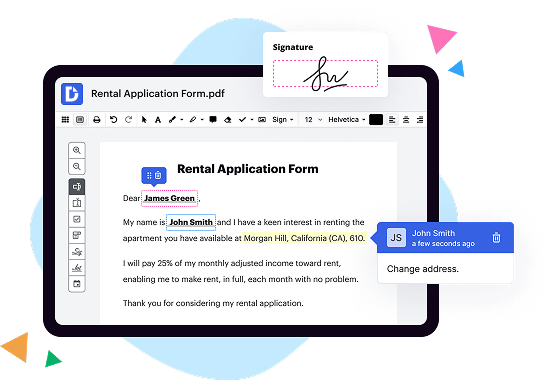
DocHub is a powerful solution that gives you the tools you need to streamline document editing, signing, distribution, and form completion. It's designed to empower anyone, from individuals to businesses, to easily manage their documents with confidence.
One of the standout features of DocHub is its deep integration with Google Workspace. This means that if you're already using Google apps like Google Drive or Google Docs, you can seamlessly import, export, modify, and sign documents directly from these applications. It's a seamless workflow that saves you time and ensures your documents are always up to date.
DocHub also offers a wide range of editing and annotation tools, allowing you to make changes to your documents with ease. You can add text, images, and even your own signature. Plus, DocHub supports a variety of file formats, making it incredibly versatile.
When it comes to collaboration, DocHub shines. You can easily share documents with others, and multiple people can edit and comment on the same document simultaneously. This makes it perfect for teams or anyone working on a collaborative project.
Another advantage of DocHub is its user-friendly interface. It's intuitive and easy to navigate, which means you can quickly get started without any steep learning curve. Everything is designed to be straightforward and efficient, ensuring you can focus on what matters most – getting your work done.
In summary, while both DocHub and Adobe Acrobat offer features for document management on iOS, DocHub stands out as a more comprehensive and user-friendly solution. With its deep integration with Google Workspace and its powerful editing and collaboration tools, DocHub empowers you to streamline your document workflow and get more done. Give it a try and discover the ease and efficiency of DocHub for yourself.
Does DocHub vs. Adobe Acrobat have more enterprise-ready document-centered features?
DocHub comes in handy no matter which document-driven workflow challenges your business or organization faces. Our robust platform scales seamlessly to meet your every need. Whether you need simple PDF editing and creating fillable forms or you need to tackle more complex workflows involving eSignature and automation, all your document needs are covered. You can stay ahead of your competitors and get things done faster and simpler. Make the right decision by choosing DocHub over Adobe Acrobat.
Does DocHub vs. Adobe Acrobat offer enough tools and features to accommodate the needs of small businesses?
This hypothetical document management and editing solution is a cut above the rest when it comes to providing advanced functionality tailored for small businesses. The platform offers a plethora of features, including multiple signer workflows, PDF editing, fillable forms, reusable templates, document sharing, and collaboration options, making it the perfect all-in-one solution. Consider this when making your choice between DocHub vs. Adobe Acrobat
What makes DocHub the best document management solution?
DocHub is shaping the future of robust, intuitive, and hassle-free document editing, signing, completion, and distribution experiences. It offers all the features you need to simplify complex document-driven workflows by supercharging them with multi-signer options, as well as an extensive PDF editing toolset, reusable templates, and various integration and collaboration capabilities. Over 83 million users can’t be wrong in choosing DocHub. Become one of them today!
What is Adobe Acrobat and how does it work?
Adobe Acrobat is a powerful software tool that allows you to create, edit, view, and share PDF documents effortlessly. Let's dive into how it works and how it can make your life easier.
First and foremost, Acrobat empowers you to convert various file formats, such as Word documents or images, into the universally compatible PDF format. This means you can easily share your files with others, regardless of the software or device they use, while preserving the original formatting and layout.
Once your documents are in PDF format, Acrobat provides a wide range of editing capabilities. From simple tasks like rearranging pages or adding images, to more advanced features like modifying text or even digitally signing documents, Acrobat gives you full control over your PDFs. And don't worry about any mistakes, as you can easily undo changes or revert to a previous version with just a few clicks.
Collaboration is a breeze with Acrobat. You can invite others to review and comment on your PDFs, allowing for seamless cooperation and feedback exchange. Whether you're working with a team or seeking input from clients or colleagues, Acrobat ensures everyone is on the same page.
When it comes to securing your documents, Acrobat shines. You can easily add passwords, restrict access, or apply digital signatures to protect sensitive information. This ensures that only authorized individuals can view, edit, or print your PDFs, granting you peace of mind.
Moreover, Acrobat simplifies the process of collecting information from forms. With its interactive form features, you can create personalized forms, collect responses, and even export or analyze the data effortlessly. This saves you time and streamlines your workflow, eliminating the need for manual data entry.
Not only is Acrobat a robust desktop application, but it also provides integrated services that work seamlessly across multiple devices. You can access and work on your PDFs from your computer, tablet, or smartphone, ensuring productivity on the go.
In conclusion, Adobe Acrobat is a game-changer in the world of document management. Its user-friendly interface, extensive editing capabilities, collaboration tools, and robust security features make it an indispensable tool for professionals and individuals alike. By simplifying tasks and providing a seamless experience across devices, Acrobat empowers you to create, edit, and share PDFs effortlessly. With Adobe Acrobat, the possibilities are endless, and your documents are in safe hands.
How much does DocHub cost?
The price for the Pro plan starts at $14 per user/per month. If you pay for one year upfront, you will save 29%, and the monthly price will be $10. DocHub also offers special discounts for non-profits, charities, and schools. For more information, please contact the DocHub support team.
Is DocHub free?
Yes, DocHub allows you to manage your documents without being charged. You can create a free account and use the service for a limited number of documents, electronic signatures, and email attachments. Also, a free 30-day trial will give you access to its complete set of features to help you decide if you want to switch to a Pro account.
How much does Adobe Acrobat cost?
Adobe Acrobat is a versatile and powerful software that allows you to create, edit, and manage PDF files effortlessly. Now, let's talk about the cost. Adobe Acrobat offers a range of pricing options to suit different needs and budgets. The exact price depends on the specific plan you choose, as Adobe provides both subscription-based and one-time purchase options. By opting for a subscription plan, you can enjoy the latest features and updates seamlessly. Adobe Acrobat DC, an all-in-one PDF solution, starts at $14.99 per month for an annual commitment. If you prefer a one-time purchase, the price for Adobe Acrobat Standard DC starts at $299. No matter which option you go for, Adobe Acrobat is well worth the investment thanks to its comprehensive features and ongoing enhancements. So, if you're ready to unlock the full potential of PDF files, Adobe Acrobat is here to make your life easier and more productive.
How can I additionally protect documents in DocHub?
To ensure no third party will open your document after you share it with your recipients, you can protect it with a password. Edit your form and add fields for fill-out according to your requirements, and then proceed to the dropdown menu on the top of the page and choose Send → Email Attachment. Check the Password Protect option and type your secret combination in the relative field.
Is Adobe Acrobat safe?
Yes, Adobe Acrobat is indeed safe for you to use. With its robust security features and regular updates, you can trust that your documents are well-protected. Our team is committed to ensuring the safety and privacy of your sensitive information. Rest assured, Adobe Acrobat prioritizes your security and provides a reliable platform for all your document needs. Plus, it's user-friendly and intuitive, making it easy for you to navigate and utilize its various features. So, go ahead and enjoy the peace of mind that comes with using Adobe Acrobat for your document management tasks!
Is DocHub’s eSignature legally binding?
Yes, DocHub's eSignature is indeed legally binding. When you electronically sign a document using DocHub, it holds the same legal weight as a traditional pen-on-paper signature. In fact, numerous countries recognize the validity and enforceability of eSignatures, including the United States, Canada, and many European nations.
By staying on top of the ever-changing legal landscape, DocHub ensures that its eSignature process adheres to the highest industry standards and complies with relevant regulations. This means you can confidently sign important documents with DocHub, knowing that they will hold up in court if necessary.
DocHub's user-friendly interface makes the eSigning process seamless and straightforward. Whether you're signing a contract, a lease agreement, or any other legal document, DocHub's platform allows you to securely affix your signature with just a few clicks. Plus, you can easily track and manage your signed documents for future reference.
So, rest assured that when you use DocHub's eSignature feature, you are making a legally binding commitment. Embrace the convenience and efficiency of eSigning with DocHub, knowing that your signed documents are protected and valid.
Are Adobe Acrobat signatures legal?
Yes, Adobe Acrobat signatures are absolutely legal. When it comes to signing and verifying digital documents, Adobe Acrobat offers a reliable and legally recognized solution. Using this powerful software, you can effortlessly create a secure and tamper-proof electronic signature to authenticate your documents.
By leveraging advanced encryption techniques, Adobe Acrobat ensures the integrity and authenticity of your digital signatures. These signatures have the same legal validity as traditional pen-and-paper signatures, making them widely accepted in various industries, such as finance, legal, and government.
The convenience of Adobe Acrobat signatures cannot be overstated. Gone are the days of printing, signing, scanning, and emailing documents back and forth. With Adobe Acrobat, you can sign and share important files electronically within seconds, saving precious time and resources.
Furthermore, Adobe Acrobat offers additional features like certification, where you can provide further assurance and control over your documents. Certification allows you to establish trust by adding a certifying signature that confirms the origin and authenticity of the document.
Rest assured, Adobe Acrobat signatures have gained recognition and acceptance on a global scale. They adhere to legal standards and comply with various regulations, including eIDAS in Europe and the ESIGN Act in the United States.
In conclusion, Adobe Acrobat signatures offer a secure, efficient, and legally valid way of signing documents electronically. Embrace the convenience and peace of mind that come with using this trusted solution for your digital signing needs.
How can I sign a document in DocHub?
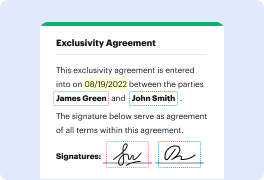
DocHub offers several options for document signing. You can type in your full name and stylize its look, upload an image of your handwritten signature, draw it with your touchpad or stylus, or use your fingernail on your phone screen. You can also sign your form through a secure QR code or by requesting a phone text (SMS) link for signing after providing your mobile number. Whatever option you choose, your electronic signature will be legally binding.
How do I use Adobe Acrobat?
To use Adobe Acrobat, simply follow these steps, my friend:
1. First, download and install Adobe Acrobat on your device. Don't worry, it's a breeze to set up!
2. Once installed, open the application and familiarize yourself with the user-friendly interface. You'll notice a variety of helpful tools at your disposal.
3. To create a PDF file, click on the "Create PDF" button. From here, you can select files or documents you wish to convert into PDF format. Acrobat will do the magic for you!
4. Editing PDFs is a snap too. Just click on the "Edit PDF" button and make any necessary changes to the content. Need to add or remove text? No problem at all!
5. Need to collaborate with others on a PDF? Easy peasy! Click on the "Share" button and invite your colleagues or friends to review, comment, or edit the document together. Teamwork makes the dream work!
6. Security is essential, and Adobe Acrobat has your back. Utilize the "Protect" feature to password-protect your PDFs so only authorized individuals can access them. Your documents will stay safe and sound!
7. Finally, when you're ready to share your PDF masterpiece, click on the "Save" or "Export" button to choose your desired format. Whether it's sending it via email, printing it out, or sharing it on a website, the choice is yours!
Remember, my friend, Adobe Acrobat is a powerful tool that allows you to create, edit, and share PDFs with ease and confidence. So go ahead and explore its fantastic features – you'll become a PDF pro in no time!
Why should I choose DocHub over other editors?
DocHub has many strong points compared to other solutions. For example, it enables users to create new forms from scratch and perfectly integrates with Google Docs and Gmail. Apart from that, students and teachers can easily export their modified documents right to Google Classroom. It also has favorable pricing options. Compare DocHub with any other solution on these points before you make your final decision.
What are the 10 best Adobe Acrobat alternatives in Ios?
If you're on the lookout for the best Adobe Acrobat alternatives in iOS, you're in luck! There are several fantastic options available to suit your needs. Let's explore the top 10 alternatives together and find the perfect fit for you.
1. DocHub: Our first recommendation is DocHub, a robust solution that goes above and beyond Adobe Acrobat. It offers a comprehensive set of features that empower you to streamline document editing, signing, distribution, and form completion. With DocHub's seamless integration with Google Workspace, you can import, export, modify, and sign documents directly from Google apps. It's a user-friendly and highly efficient choice.
2. PDF Expert: Another excellent alternative is PDF Expert. This intuitive app allows you to view, annotate, and edit PDF documents effortlessly. With its powerful editing tools and smooth interface, PDF Expert makes managing PDF files a breeze. Its advanced features and seamless sync across all your iOS devices ensure a seamless user experience.
3. PDFelement: If you're looking for a versatile PDF editor, PDFelement is a great option. From editing text and images to converting and merging documents, PDFelement has you covered. Its user-friendly interface and extensive feature set make it a popular choice among iOS users.
4. GoodReader: Offering powerful PDF management capabilities, GoodReader is a reliable alternative to Adobe Acrobat. With its advanced annotation options, easy file organization, and cloud storage integration, this app provides a seamless reading and editing experience.
5. Foxit PDF Reader: Foxit PDF Reader is a feature-rich and user-friendly alternative. It allows you to view, annotate, and fill out PDF forms effortlessly. The app also includes advanced security features to protect your sensitive documents. With its efficient performance and intuitive interface, Foxit PDF Reader is a top contender.
6. PDF Viewer: Simplistic yet powerful, PDF Viewer offers an excellent alternative to Adobe Acrobat. Apart from basic PDF viewing and annotation features, it supports cloud storage and sync, allowing you to access your documents from anywhere. Its clean interface and user-friendly design make it a pleasure to use.
7. iAnnotate: Ideal for those who require advanced annotation and markup tools, iAnnotate is a highly regarded PDF editor. With its vast selection of tools and seamless syncing capabilities, you can easily highlight, underline, and add comments to your documents. iAnnotate is a solid choice for iOS users looking to collaborate and edit PDF files efficiently.
8. PDF Converter: If you frequently need to convert PDF files to other formats, PDF Converter is your go-to alternative. This app provides a straightforward and hassle-free conversion process, supporting various file formats. Whether you need to convert PDFs to Word, Excel, or other formats, PDF Converter has you covered.
9. PDFpen: Designed with simplicity and functionality in mind, PDFpen is an excellent alternative for iOS users. It offers a range of editing tools, including text and image editing, OCR capabilities, and form filling. With its iCloud and Dropbox integration, managing and accessing your PDFs is a breeze.
10. Adobe Fill & Sign: For those who prefer a more lightweight alternative from Adobe itself, Adobe Fill & Sign is worth considering. It focuses on easy form filling and signing, allowing you to complete and sign documents quickly. While it may not offer the extensive features of Adobe Acrobat, it's a straightforward and efficient choice for specific needs.
Now that we've explored these excellent alternatives, you have plenty of options to choose from. Take a closer look at their features, consider your specific requirements, and find the perfect Adobe Acrobat alternative that suits your workflow and preferences. Happy document management!