




Here's how it works

01. Edit your soldier number online
Type text, add images, blackout confidential details, add comments, highlights and more.

02. Sign it in a few clicks
Draw your signature, type it, upload its image, or use your mobile device as a signature pad.

03. Share your form with others
Send soldier new via email, link, or fax. You can also download it, export it or print it out.
How to use or fill out form urinalysis ledger with our platform

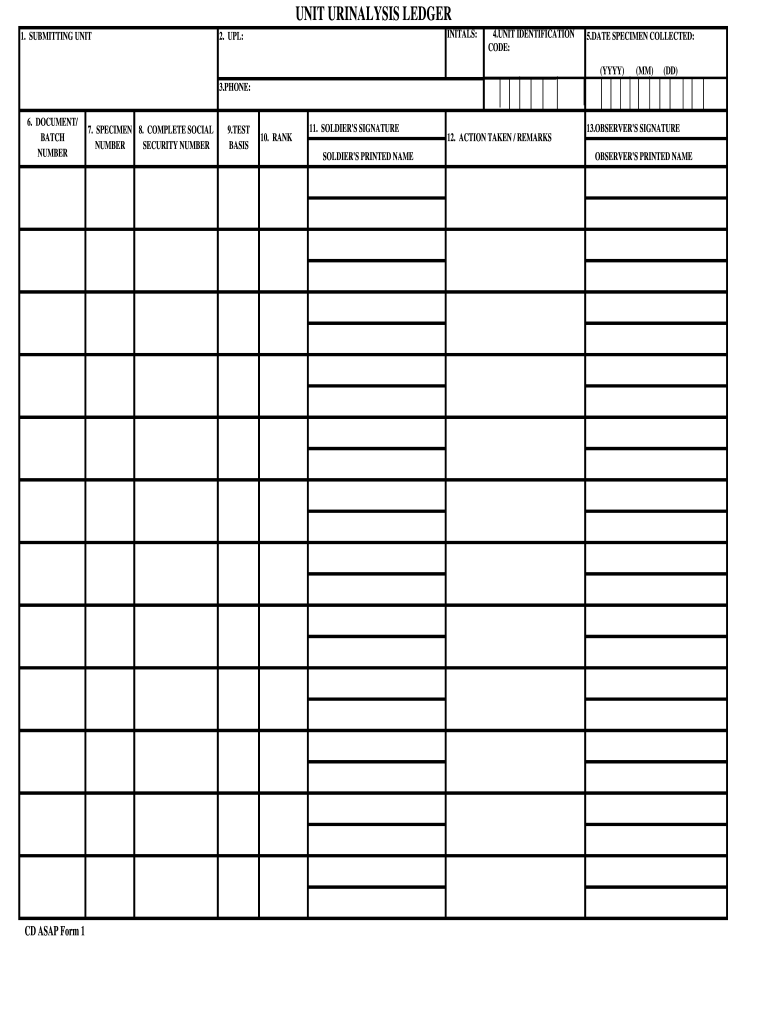
- Click ‘Get Form’ to open the urinalysis ledger in the editor.
- Begin by entering the 'Submitting Unit' initials in the designated field. This identifies the unit responsible for the specimen.
- Fill in the 'UPL' section, which stands for Unit Prevention Leader, ensuring accurate representation of your unit's leadership.
- In 'Unit Identification Code', input your specific code to maintain proper tracking of specimens.
- Record the 'Date Specimen Collected' using the format (YYYY-MM-DD) to ensure clarity on collection timing.
- Provide a contact number in the 'Phone' field for any follow-up inquiries regarding the specimen.
- Enter the 'Document/Batch Number' to link this ledger entry with its corresponding batch for easy reference.
- Input the 'Specimen Number' assigned to this particular sample for identification purposes.
- Complete the 'Social Security Number' field carefully, as it is crucial for record accuracy and privacy compliance.
- Specify the 'Test Basis', detailing what tests are being conducted on this specimen.
- Indicate the rank of the individual providing their sample in the 'Rank' section.
- 'Soldier's Signature' and 'Printed Name' must be filled out by the soldier providing their sample, confirming their consent.
- 'Action Taken / Remarks' allows you to note any additional information relevant to this specimen or test results.
- 'Observer's Signature' and 'Printed Name' should be completed by an authorized observer verifying this process.
Start filling out your urinalysis ledger online for free today!
Fill out form urinalysis ledger online
It's free
It's free
Security and compliance
At DocHub, your data security is our priority. We follow HIPAA, SOC2, GDPR, and other standards, so you can work on your documents with confidence.
Learn more


