01. Edit your certificate of conformity new york online
Type text, add images, blackout confidential details, add comments, highlights and more.
02. Sign it in a few clicks
Draw your signature, type it, upload its image, or use your mobile device as a signature pad.
03. Share your form with others
Send sample certificate of conformity new york via email, link, or fax. You can also download it, export it or print it out.
How to use or fill out certificate of conformity new york with our platform
Ease of Setup
DocHub User Ratings on G2
Ease of Use
DocHub User Ratings on G2
Click ‘Get Form’ to open the certificate of conformity in the editor.
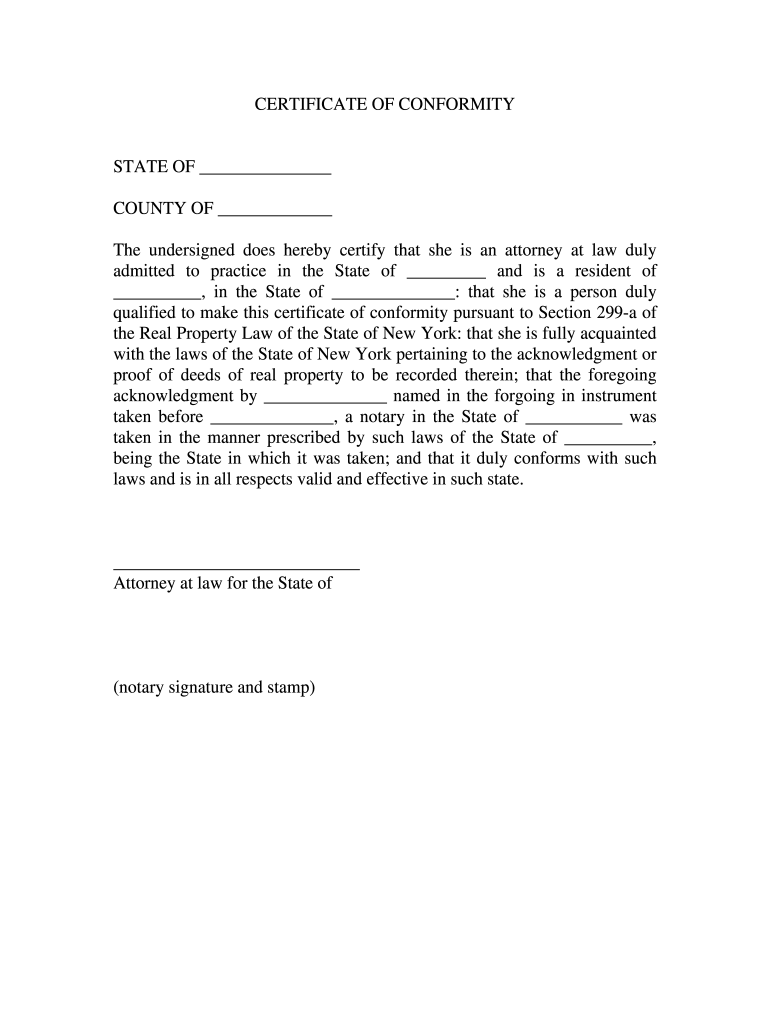
Begin by filling in the 'STATE OF' field with the appropriate state where the certificate is being issued.
Next, complete the 'COUNTY OF' section with the relevant county information.
In the first blank, enter your name as the attorney at law certifying this document.
Fill in your state of admission and residence in the respective fields.
Provide details about your qualifications to make this certificate under Section 299-a of New York's Real Property Law.
Complete the acknowledgment section by entering the name of the individual whose acknowledgment is being certified and the name of the notary public who took it.
Finally, ensure you sign and date at the bottom, including any necessary notary signature and stamp.
Start using our platform today to easily fill out your certificate of conformity for free!
Fill out certificate of conformity new york online It's free
Feb 29, 2024 In 2015, CPLR 2106 was amended to create two subdivisions, (a) and (b). In sum, the provision only allowed certain professionals licensed toRead more
Feb 28, 2026 Indicate by check mark if the registrant is a well-known seasoned issuer, as defined in Rule 405 of the Securities Act. ☒ Yes ☐ No.Read more
Cookie consent notice
This site uses cookies to enhance site navigation and personalize your experience.
By using this site you agree to our use of cookies as described in our Privacy Notice.
You can modify your selections by visiting our Cookie and Advertising Notice.