West bank personal financial statement 2026

Get Form
west bank personal financial statement Preview on Page 1

Here's how it works

01. Edit your form online
Type text, add images, blackout confidential details, add comments, highlights and more.

02. Sign it in a few clicks
Draw your signature, type it, upload its image, or use your mobile device as a signature pad.

03. Share your form with others
Send it via email, link, or fax. You can also download it, export it or print it out.

How to use or fill out west bank personal financial statement with our platform

Form edit decoration
9.5
Ease of Setup
DocHub User Ratings on G2
9.0
Ease of Use
DocHub User Ratings on G2
  1. Click ‘Get Form’ to open the west bank personal financial statement in the editor.
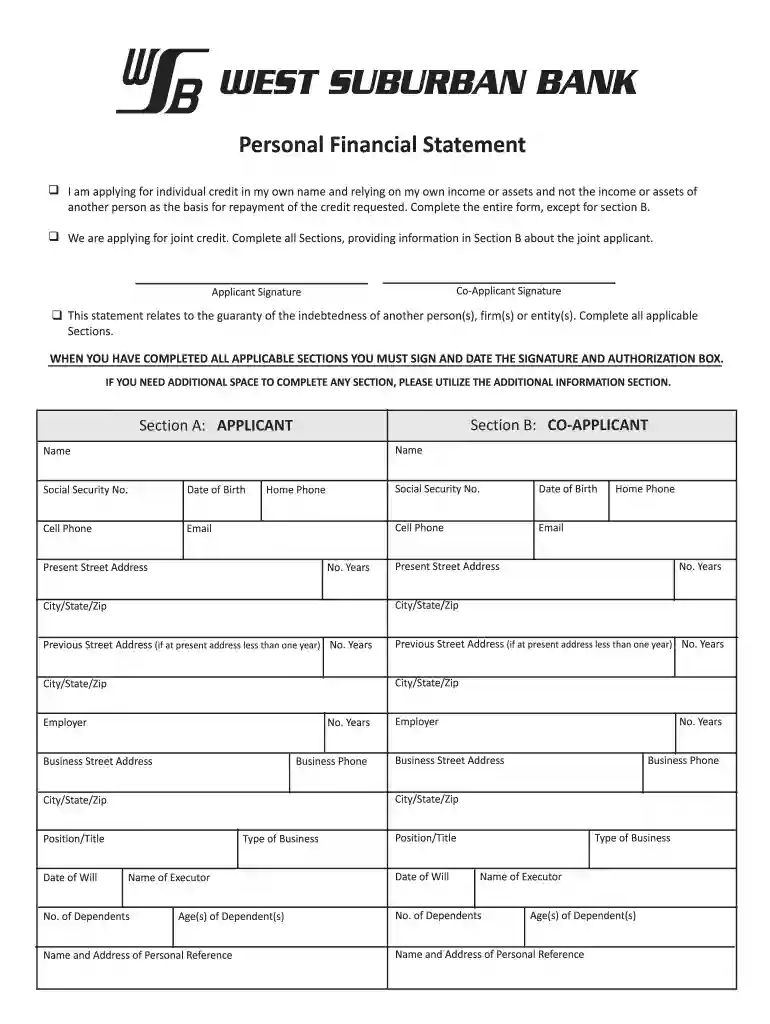
  2. Begin with Section A: Applicant. Fill in your name, date of birth, contact information, and address details. Ensure accuracy as this information is crucial for credit evaluation.
  3. Proceed to Section B: Co-Applicant if applicable. Enter the co-applicant's details similarly to ensure all necessary information is captured.
  4. Complete the Balance Sheet section by listing all assets and liabilities. Use the provided schedules (A through L) to detail specific asset types like cash, real estate, and investments.
  5. Fill out the Income Statement section, detailing annual income and expenses for both applicants. This will help provide a clear picture of financial health.
  6. Review all sections for completeness and accuracy. If additional space is needed, utilize the Additional Information section provided at the end of the form.
  7. Finally, sign and date the Signature and Authorization box to validate your application before submission.

Start using our platform today to fill out your west bank personal financial statement online for free!

be ready to get more

Complete this form in 5 minutes or less

Get form

Got questions?

We have answers to the most popular questions from our customers. If you can't find an answer to your question, please contact us.
Contact us
You can order a copy of an up-to-date statement in Online Banking or at one of our cash machines. You can also order your previous statements by calling Telephone Banking or visiting a branch.
Bank Branch: Visit your local bank branch. Request a printed copy of your bank statement from a teller. Provide identification and account details if necessary.
Whatever the reason, most banks allow you to request a paper statement to be mailed to you. This request form is likely in the same place as your digital statements. It may be a different option under the same Statement heading, or there may be a button on the page showing your statements.
Check Bank Statement at ATM Remember that you can also access your bank statement offline by visiting the nearest bank branch.
How can I view my East West Bank account statement? On the dashboard tap on your account balance to enter the transaction history page. Tap Account Details, then tap View Statements.

Security and compliance

At DocHub, your data security is our priority. We follow HIPAA, SOC2, GDPR, and other standards, so you can work on your documents with confidence.

Learn more
ccpa2
pci-dss
gdpr-compliance
hipaa
soc-compliance
be ready to get more

Complete this form in 5 minutes or less

Get form

People also ask

Decision Making: Financial statements aid banks in making informed decisions about the loan terms, interest rates, and collateral requirements they can comfortably extend. Creditworthiness: Your financial history helps banks determine your creditworthiness.

Related links