Cgihk 2026

Get Form
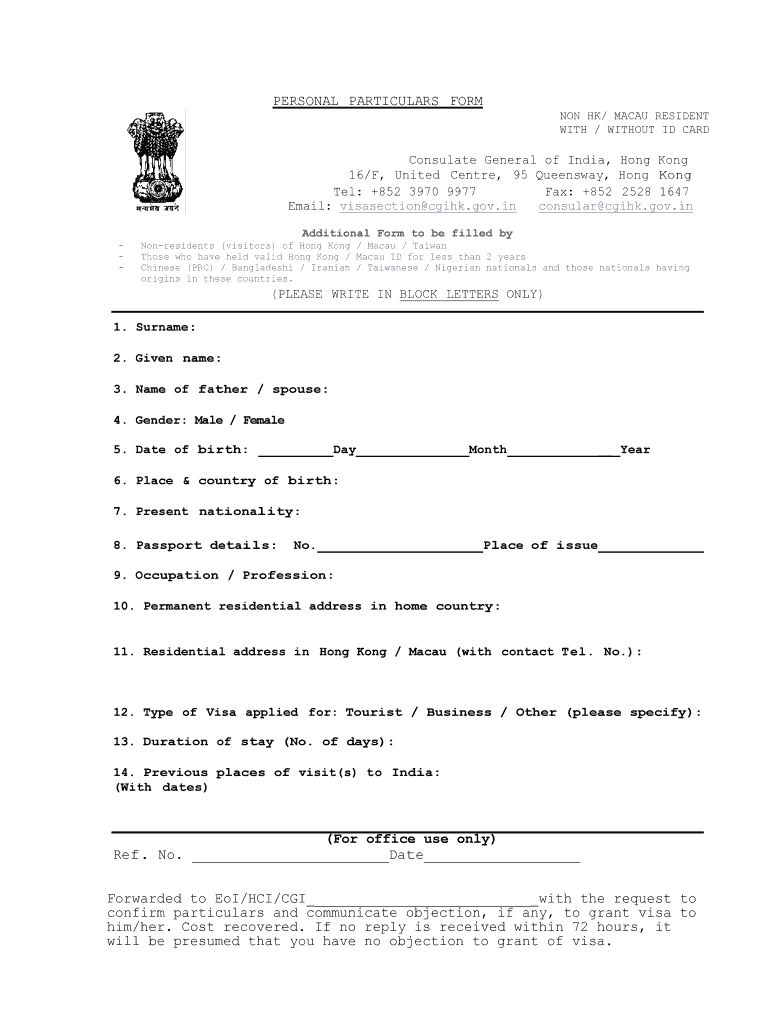
cgihk Preview on Page 1

Here's how it works

01. Edit your form online
Type text, add images, blackout confidential details, add comments, highlights and more.
02. Sign it in a few clicks
Draw your signature, type it, upload its image, or use your mobile device as a signature pad.
03. Share your form with others
Send it via email, link, or fax. You can also download it, export it or print it out.

How to use or fill out cgihk with our platform

Form edit decoration
9.5
Ease of Setup
DocHub User Ratings on G2
9.0
Ease of Use
DocHub User Ratings on G2
  1. Click ‘Get Form’ to open the Personal Particulars Form in the editor.
  2. Begin by entering your surname and given name in block letters as required. This ensures clarity in your application.
  3. Next, provide the name of your father or spouse, followed by selecting your gender from the options provided.
  4. Fill in your date of birth accurately, specifying the day, month, and year.
  5. Indicate your place and country of birth, along with your present nationality.
  6. Enter your passport details including the passport number and place of issue.
  7. Complete the section on occupation or profession, followed by your permanent residential address in your home country.
  8. Provide your residential address in Hong Kong or Macau along with a contact telephone number.
  9. Select the type of visa you are applying for and specify the duration of stay in days.
  10. Lastly, list any previous places visited in India along with their respective dates.

Start filling out cgihk today for free using our platform!

be ready to get more

Complete this form in 5 minutes or less

Get form

Got questions?

We have answers to the most popular questions from our customers. If you can't find an answer to your question, please contact us.
Contact us

Many software solutions are available out there for document editing and signing. DocHub is one of the most in-demand online solutions that comply with all data protection and compliance standards and ensures your eSigned paperwork is legally enforceable. All you need to give it a try is to create an account, upload your cgihk, fill out the necessary details, and click Sign. Create your electronic signature by typing, drawing it, uploading its picture to your document, or scanning a unique QR code.

If you are using Chrome, there are two straightforward ways to edit your cgihk online. First, go to the DocHub site, add your file, and edit it utilizing our toolbar. You may also set up our Chrome extension and edit any document by dragging and dropping it in your web browser window.

Security and compliance

At DocHub, your data security is our priority. We follow HIPAA, SOC2, GDPR, and other standards, so you can work on your documents with confidence.

Learn more
ccpa2
pci-dss
gdpr-compliance
hipaa
soc-compliance
be ready to get more

Complete this form in 5 minutes or less

Get form