




Here's how it works



How to use or fill out Gettysburg Street Vendor Form with our platform

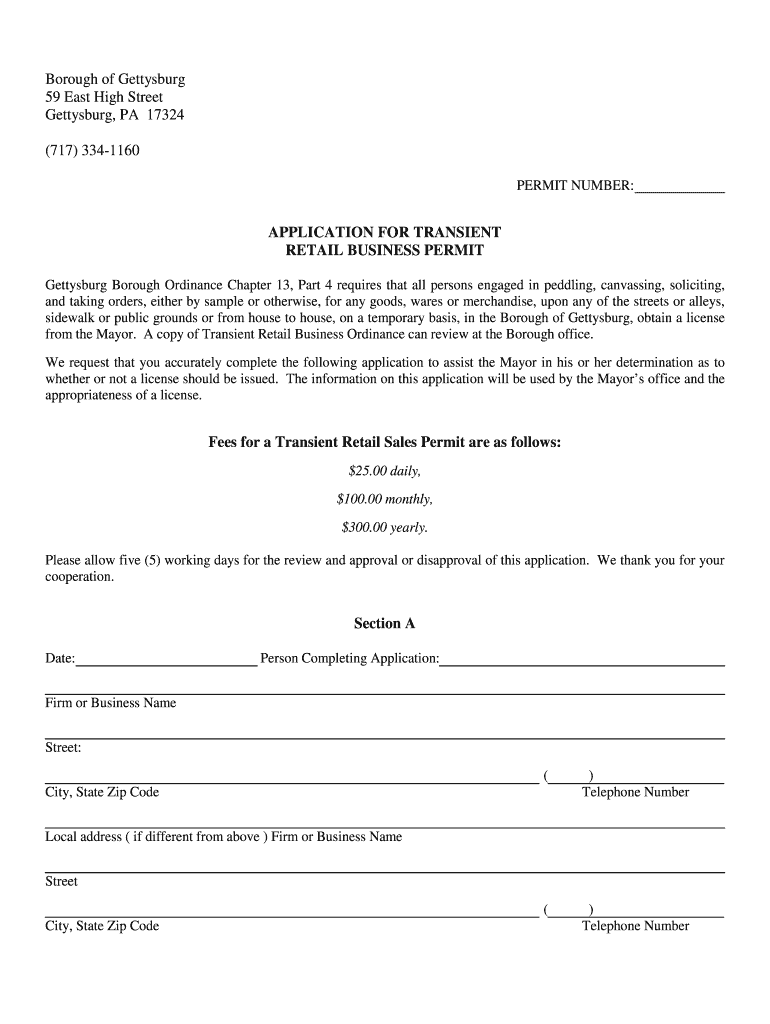
- Click ‘Get Form’ to open the Gettysburg Street Vendor Form in the editor.
- In Section A, enter the date and your name as the person completing the application. Fill in your firm or business name, street address, and telephone numbers. If you have a local address different from your main address, provide that information as well.
- Move to Section B and briefly describe your business's nature, sales methods, and the products or services offered. Include specific locations within Gettysburg where you plan to operate and any relevant event dates.
- In Section C, list areas or cities where you have recently conducted business or sales to provide context for your application.
- Section D requires details for each individual engaged in transient retail business under your firm. Provide names and addresses for all individuals needing permits.
- Finally, review Section E for permit approval signatures from the Mayor and Chief of Police. Ensure compliance with vendor requirements listed before submission.
Start filling out your Gettysburg Street Vendor Form online for free today!
It's free
Got questions?
How can I eSign my gettysburg street vendor form from Gmail?
With DocHub, it’s quite simple. The service offers users an add-on called DocHub for Gmail, which you can find in the Google Workspace Marketplace free of charge. Set it up and grant it access to your Google account. Open your email with your gettysburg street vendor form attached and click on the add-on button in the right-side panel. Sign in to your DocHub account, and upload the form to our editor, where you can fill it out and sign.
How do you get gettysburg street vendor form?
You can find the latest and most relevant version of the gettysburg street vendor form in our DocHub forms collection. Search it by categories or utilize the search field to find the exact template that suits your case. You may open this form for editing once you find it.
What is a vendor request?
What is a request form used for?
What is a new vendor request form?
Security and compliance
At DocHub, your data security is our priority. We follow HIPAA, SOC2, GDPR, and other standards, so you can work on your documents with confidence.
Learn more


