




Here's how it works



How to use or fill out Download a reference form - Frye Regional Medical Center with our platform

- Click ‘Get Form’ to open the Download a reference form - Frye Regional Medical Center in the editor.
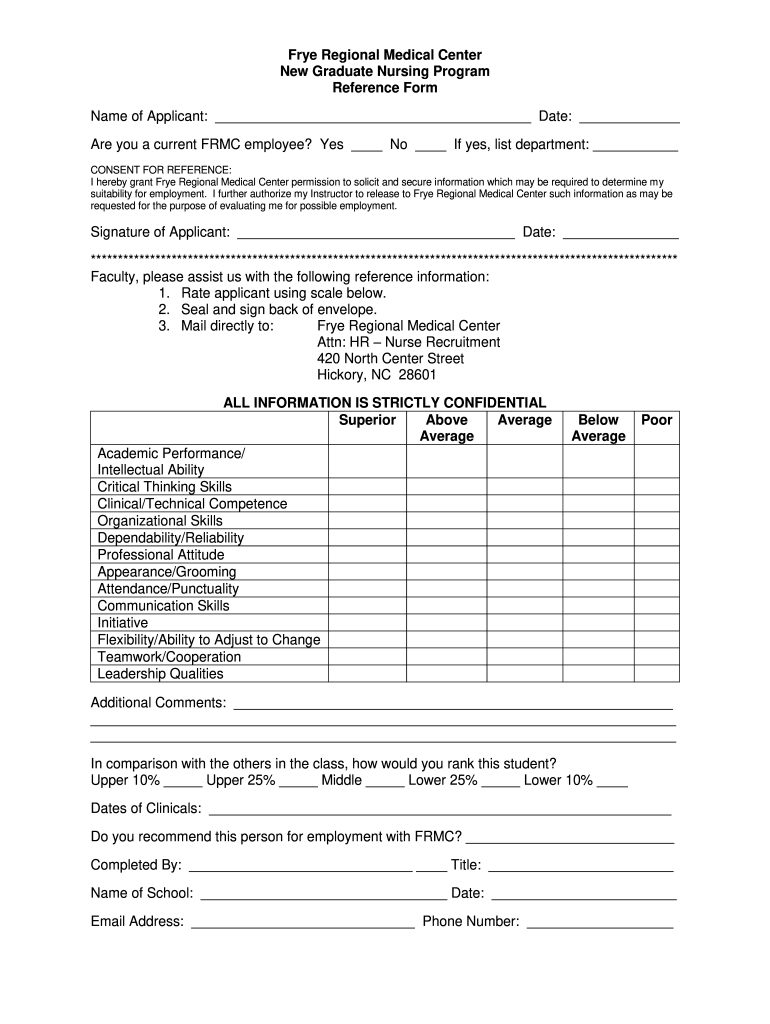
- Begin by entering the applicant's name and date at the top of the form. This information is crucial for identifying the candidate.
- Indicate whether you are a current FRMC employee by selecting 'Yes' or 'No.' If applicable, list your department for context.
- Review and complete the consent section, allowing FRMC to gather necessary information regarding the applicant's suitability for employment. Ensure you sign and date this section.
- As a faculty member, rate the applicant on various skills using the provided scale. Be honest and thorough in your evaluations.
- Provide additional comments if necessary, and rank the student compared to their peers using the options given.
- Complete your details at the bottom of the form, including your title, school name, email address, and phone number.
- Once completed, seal and sign the envelope as instructed and mail it directly to Frye Regional Medical Center’s HR department.
Start filling out your reference form today for free using our platform!
It's free
Got questions?
How can I sign my frye regional medical center directory without printing?
Electronic signatures are an excellent replacement for traditional signing, as they save time, effort, and costs people spend on printing, scanning, and paper delivery. You can electronically sign your frye regional medical center directory using a reliable and robust online document processing services like DocHub. It complies with primary eSignature standards (ESIGN and UETA), so all documents approved there are legally binding and have the same validity as manually signed ones.
How do you edit Download a reference form - Frye Regional Medical Center on Android?
Document editing with DocHub is equally convenient on desktop and mobile devices. You just need an internet browser to revise your Download a reference form - Frye Regional Medical Center on Android. Open our website and sign in to access the instruments you need. Add your file and introduce your intended changes. Next, you can keep your form in your file storage or send it out immediately.
Security and compliance
At DocHub, your data security is our priority. We follow HIPAA, SOC2, GDPR, and other standards, so you can work on your documents with confidence.
Learn more


