Type text, add images, blackout confidential details, add comments, highlights and more.
02. Sign it in a few clicks
Draw your signature, type it, upload its image, or use your mobile device as a signature pad.
03. Share your form with others
Send it via email, link, or fax. You can also download it, export it or print it out.
How to use or fill out nz motor claim form with DocHub
Ease of Setup
DocHub User Ratings on G2
Ease of Use
DocHub User Ratings on G2
Click ‘Get Form’ to open the nz motor claim form in our platform's editor.
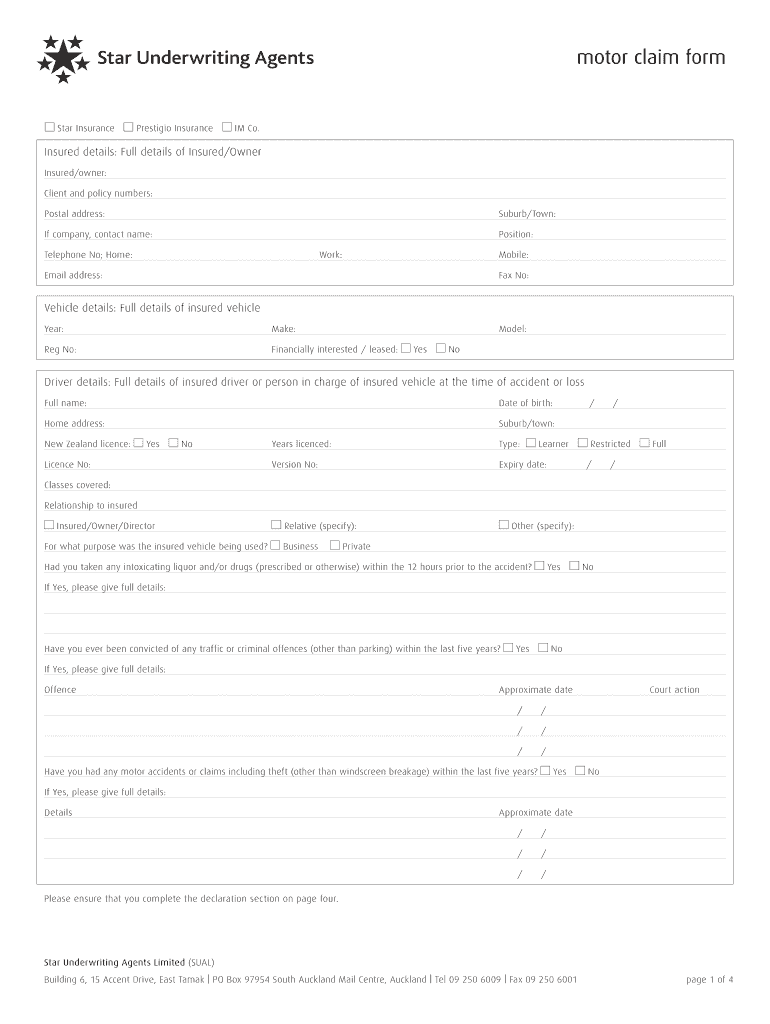
Begin by filling in the 'Insured details' section. Provide your full name, client and policy numbers, postal address, and contact information including telephone and email.
Next, move to the 'Vehicle details' section. Enter the year, make, model, registration number of your vehicle, and indicate if it is leased or financially interested.
In the 'Driver details' section, provide information about the driver at the time of the accident. Include their full name, date of birth, home address, license status, and any relevant history regarding alcohol or drug use.
Proceed to fill out the 'Accident/Loss details'. Describe where and when the accident occurred, including weather conditions and any other vehicles involved.
Complete the declaration section on page four to confirm that all provided information is accurate before submitting your claim.
Start using our platform today for free to streamline your nz motor claim form completion!
Nz motor claim form pdfPrintable nz motor claim formNz motor claim form templateNz motor claim form pdf downloadNz motor claim form onlineMotor Vehicle claim formNzi carriers liability renewal declarationNzi broadform liability policy wording brd0318
Security and compliance
At DocHub, your data security is our priority. We follow HIPAA, SOC2, GDPR, and other standards, so you can work on your documents with confidence.
A notice of claim must be filed in writing. All claim forms are available in PDF format in the Electronic Filing and Filing by Personal Delivery or Mail pages.
Nov 6, 2017 Complete a claim form if we require it. Provide information in support of your claim, including letters or notices given to you by another party
New Zealands No-Fault Accident Compensation Scheme
by EK Solender 1993 Cited by 5 If the claim is reasonable, even though denied, the claimants are entitled to costs up to $500. UNINTENTIONAL INJURY, supra note 14, at 63. 51. N.Z. Stat. Legal
Cookie consent notice
This site uses cookies to enhance site navigation and personalize your experience.
By using this site you agree to our use of cookies as described in our Privacy Notice.
You can modify your selections by visiting our Cookie and Advertising Notice.