




Here's how it works

01. Edit your texas liability insurance card online
Type text, add images, blackout confidential details, add comments, highlights and more.

02. Sign it in a few clicks
Draw your signature, type it, upload its image, or use your mobile device as a signature pad.

03. Share your form with others
Send texas insurance card template via email, link, or fax. You can also download it, export it or print it out.
How to use or fill out Texas Liability Insurance with our platform

- Click ‘Get Form’ to open the Texas Liability Insurance document in the editor.
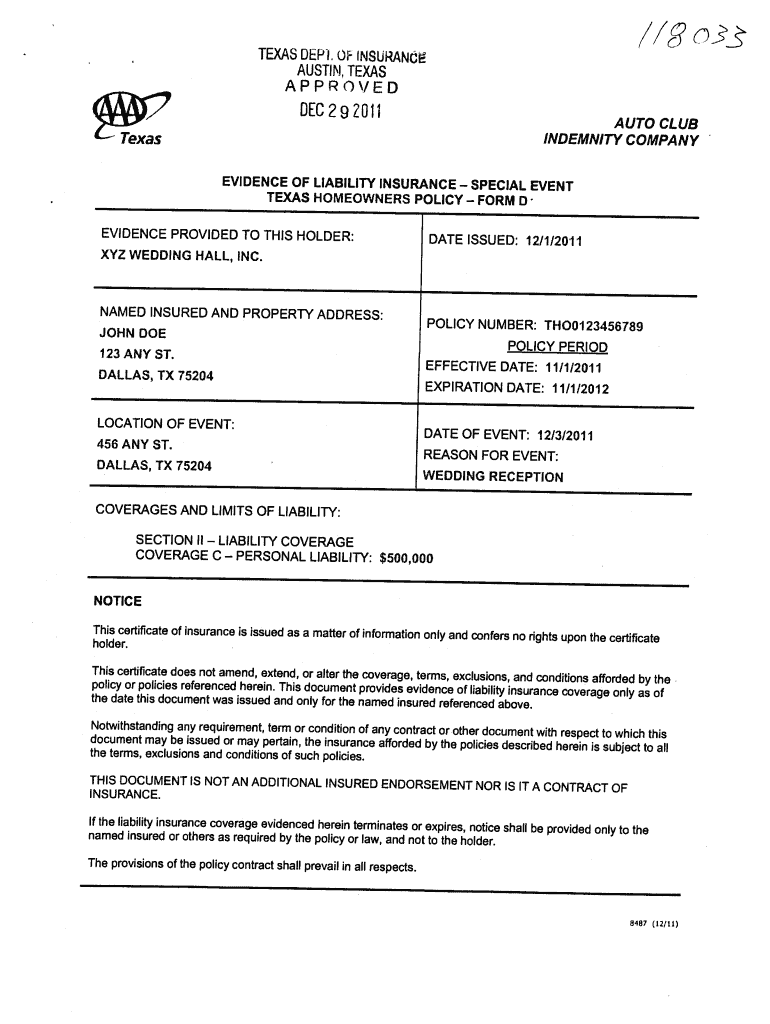
- Begin by filling in the 'Named Insured and Property Address' section. Enter the name of the insured party, such as 'John Doe', along with their address, e.g., '123 Any St., Dallas, TX 75204'.
- Next, locate the 'Policy Number' field and input the relevant policy number, for instance, 'TH00123456789'. This is crucial for identifying your insurance coverage.
- In the 'Policy Period' section, enter both the effective date (e.g., '11/1/2011') and expiration date (e.g., '11/1/2012') to indicate the duration of coverage.
- Fill out the 'Location of Event' and 'Date of Event' fields with details about where and when your event will take place. For example, use '456 Any St., Dallas, TX 75204' and '12/3/2011'.
- Lastly, specify the reason for the event in its designated field (e.g., 'Wedding Reception') and review all entries for accuracy before saving or sharing your completed form.
Start using our platform today to easily fill out your Texas Liability Insurance form online for free!
Fill out texas liability insurance online
It's free
It's free
Security and compliance
At DocHub, your data security is our priority. We follow HIPAA, SOC2, GDPR, and other standards, so you can work on your documents with confidence.
Learn more


