




Here's how it works



How to use or fill out tuscaloosa ophthalmology healthcare with our platform

- Click ‘Get Form’ to open the tuscaloosa ophthalmology healthcare document in the editor.
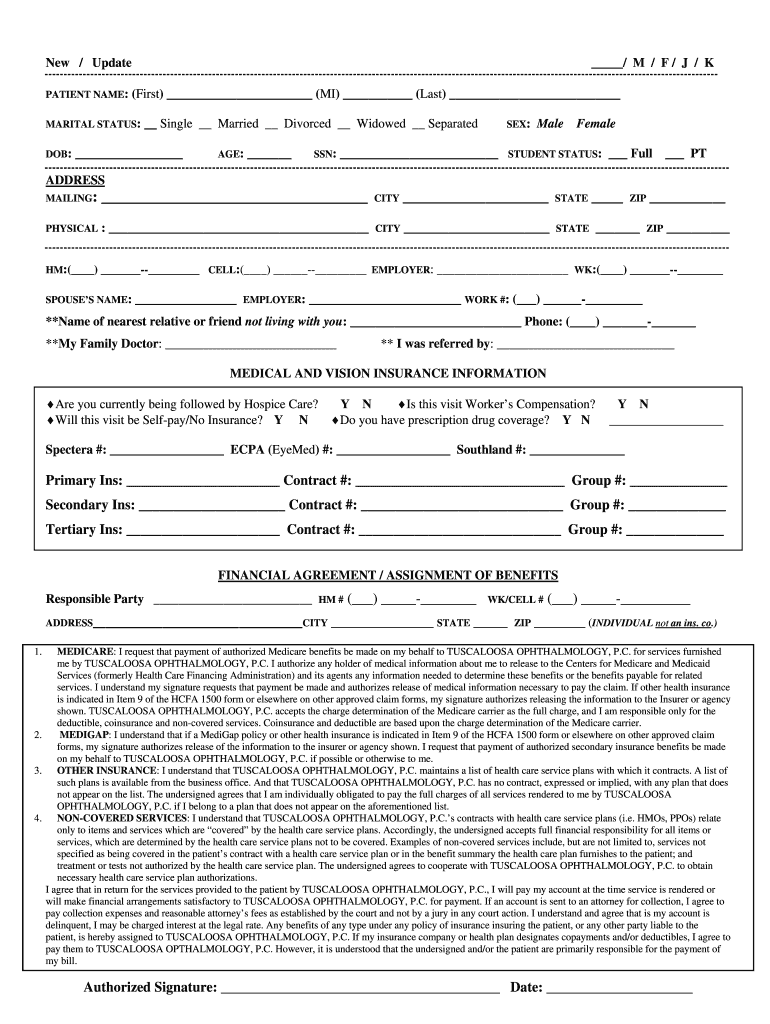
- Begin by entering your personal information in the 'PATIENT NAME' section. Fill in your first name, middle initial, and last name accurately.
- Indicate your marital status and date of birth by selecting the appropriate options and filling in the date.
- Complete the 'ADDRESS' section with your mailing address, including city, state, and ZIP code. Ensure all details are correct for effective communication.
- Provide your contact numbers under 'HM' (Home) and 'CELL'. Include your employer's information as well.
- Fill out the insurance information carefully. Indicate if you have primary, secondary, or tertiary insurance coverage and provide relevant policy numbers.
- Review the financial agreement section thoroughly before signing. Make sure you understand your responsibilities regarding payment.
- Finally, complete the HIPAA amendments and patient consent sections by providing necessary signatures and dates to authorize information sharing.
Start using our platform today to easily fill out your tuscaloosa ophthalmology healthcare form online for free!
It's free
Got questions?
Can I type my electronic signature on my tuscaloosa ophthalmologist?
Yes, a typed name is recognized as a legitimate electronic signature when you create it on your paperwork utilizing a compliant solution like DocHub. Simply add your tuscaloosa ophthalmologist to our editor, click Sign in the top tool pane → Create your signature → Type your name in the proper tab, and choose how it will look on your document.
How do you edit tuscaloosa ophthalmology from Google Drive?
If you store your files in Google Drive, there is no need to download your tuscaloosa ophthalmology on the computer and upload it back to our editor. A significantly easier way is to set up a browser extension developed by DocHub to streamline this flow. The extension allows editing PDFs in your internet browser. Alternatively, you may integrate your DocHub and Gmail accounts for more efficient editing.
What is the number one eye hospital in the US?
What does OD stand for?
What is the best hospital for ophthalmology?
Security and compliance
At DocHub, your data security is our priority. We follow HIPAA, SOC2, GDPR, and other standards, so you can work on your documents with confidence.
Learn more


