Igg declaration form 2021-2026

Get Form
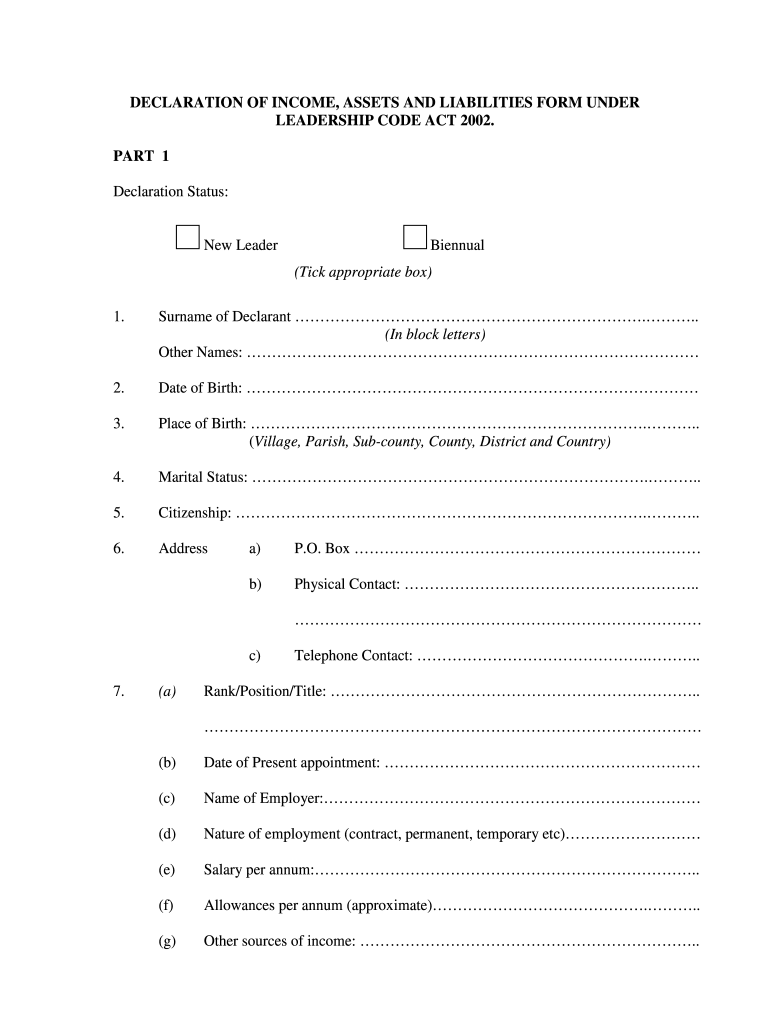
asset liabilities form Preview on Page 1

Here's how it works

01. Edit your asset liabilities form online
Type text, add images, blackout confidential details, add comments, highlights and more.
02. Sign it in a few clicks
Draw your signature, type it, upload its image, or use your mobile device as a signature pad.
03. Share your form with others
Send declaration of wealth form via email, link, or fax. You can also download it, export it or print it out.

How to use or fill out igg declaration form 2021 with our platform

Form edit decoration
9.5
Ease of Setup
DocHub User Ratings on G2
9.0
Ease of Use
DocHub User Ratings on G2
  1. Click ‘Get Form’ to open the igg declaration form 2021 in the editor.
  2. Begin by filling out your Declaration Status at the top of the form, selecting either 'New Leader' or 'Biennual'.
  3. In Part 1, provide your personal details including Surname, Other Names, Date of Birth, Place of Birth, Marital Status, and Citizenship. Ensure all information is accurate.
  4. Complete your Address section with P.O. Box and Physical Contact details. Include your Telephone Contact for further communication.
  5. Detail your employment information including Rank/Position/Title, Date of Present Appointment, Name of Employer, Nature of Employment, Salary per annum, and other sources of income.
  6. In the DETAILS OF INCOME section, list all cash holdings in banks both within and outside Uganda. Provide account details as required.
  7. For DETAILS OF ASSETS, specify properties such as undeveloped land and vehicles. Include acquisition values and current market values.
  8. Finally, review all sections for completeness before submitting the form electronically through our platform for a seamless experience.

Start using our platform today to fill out your igg declaration form 2021 easily and for free!

be ready to get more

Complete this form in 5 minutes or less

Get form

Got questions?

We have answers to the most popular questions from our customers. If you can't find an answer to your question, please contact us.
Contact us

Managing your documents with DocHub this way is extremely straightforward after you have downloaded its extension for Google Chrome. Go to the Chrome Web Store and install DocHub - Sign PDF from Gmail to obtain it. Give our tool access to your Google account, and then open an email with the asset declaration forms attached and point to the file with your cursor - the DocHub extension button will automatically show up there. Click on it to open your document in our editor. Make any required modifications, fill out the blanks, and click Sign to create your legally-binding electronic signature.

As a comprehensive document editing platform, DocHub is accessible on smart phones. Open DocHub in your choice of mobile internet browser and use our intelligent mobile-friendly toolset to complete your declaration of wealth.

A declaration form is a formal document that is used to confirm that information given by a person or organisation is true and accurate.
I hereby declare that the information given above and in the enclosed documents is true to the best of my knowledge and belief and nothing has been concealed therein. I understand that if the information given by me is proved false/not true, I will have to face the punishment as per the law.
Visit the Inspectorate of Government website (.igg.go.ug). 2. On the right hand of the screen, under action center, click the declaration link, as shown in the figure. INFORMATION SUBMITTED Your information has been successfully submitted, and will be considered upon verification by your Accounting Officer.

Security and compliance

At DocHub, your data security is our priority. We follow HIPAA, SOC2, GDPR, and other standards, so you can work on your documents with confidence.

Learn more
ccpa2
pci-dss
gdpr-compliance
hipaa
soc-compliance

People also ask

The Inspectorate of Government developed the online declaration system (IG-ODS) for leaders to declare their income, assets and liabilities online, to the Inspector General of Government. Since then, upgrade of the existing system with new features have made the IG-ODS easier and faster to use.
You can access the Online Declaration System in two ways: a) Through the email Invitation to declare to the IGG sent by the IG: Click the IG-ODS link to access the system. b) Through the IG website: .igg.go.ug: Click on the Declaration button to access the online declaration system.
Inspector General of Government (IGG)
How to Reset Password for Igg Have you forgotten your password on Igg? Navigate to []() Click Forgot your password? Click this field and type your email or username. Click this button to reset your password.

declaration of assets form