



Here's how it works



How to use or fill out baseball score sheet pdf with our platform

- Click ‘Get Form’ to open the baseball score sheet PDF in the editor.
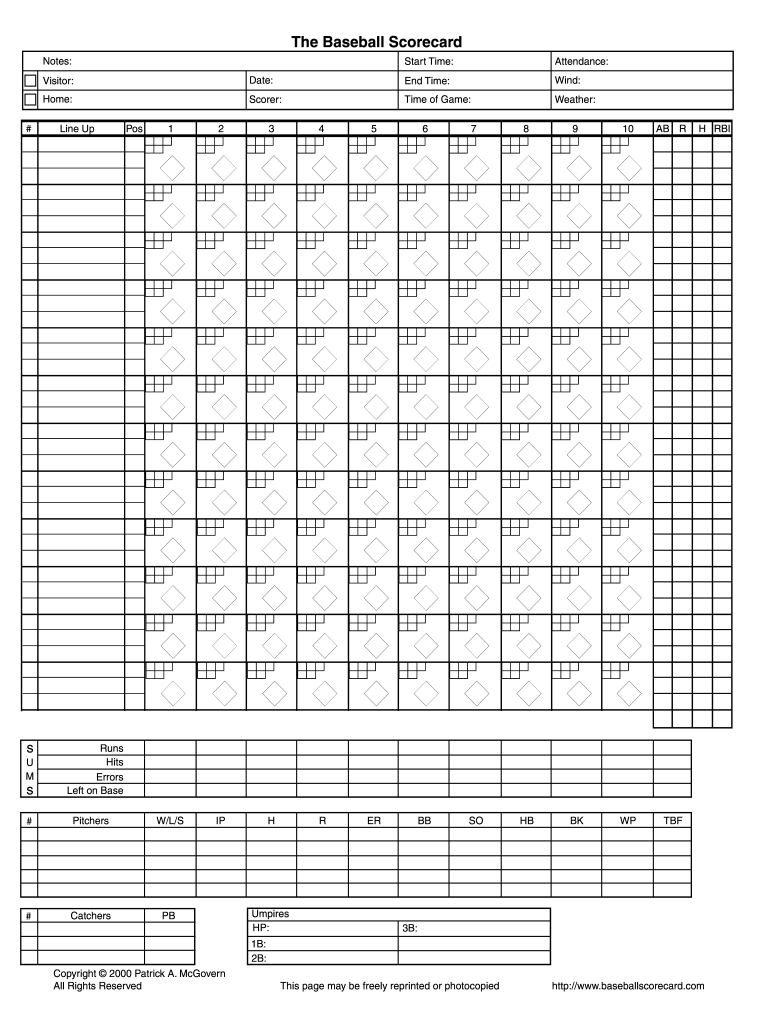
- Begin by filling in the 'Start Time', 'Date', and 'Attendance' fields at the top of the score sheet. This information sets the context for your game.
- Next, enter details for 'Visitor' and 'Home' teams, along with the 'Scorer' name. These sections help identify which teams are playing.
- In the 'Line Up' section, input player positions and their corresponding numbers. Fill in each player's statistics as the game progresses, including At Bats (AB), Runs (R), Hits (H), and more.
- Record pitching statistics under 'Pitchers', noting Wins/Losses/Saves (W/L/S) and other relevant metrics like Earned Runs (ER) and Strikeouts (SO).
- Finally, complete any additional notes such as weather conditions or umpires involved in the game to ensure a comprehensive record.
Start using our platform today to effortlessly manage your baseball score sheets online for free!
It's free
Got questions?
Can I use DocHub to create legal eSignatures on my baseball score sheets pdf?
Yes, you can utilize DocHub for signing any business and personal documentation, including your baseball score sheets pdf. All eSignatures you create with our service are legally binding and court-admissible, as DocHub complies with criteria required by ESIGN and UETA. Save your completed paperwork with a detailed Audit Trail if needed.
How do you get baseball score sheet printable for my state?
If you are looking for a state-specific baseball score sheet printable sample, you will find it in our DocHub Forms & Templates catalog. Use the search field, enter your form’s name, and search through the results for your state. You may also filter out irrelevant results while browsing our catalog by groups.
What is a l7 in baseball?
What does P5 mean in baseball?
What is a F9 in baseball?
Security and compliance
At DocHub, your data security is our priority. We follow HIPAA, SOC2, GDPR, and other standards, so you can work on your documents with confidence.
Learn more


Related forms