




Here's how it works



How to use or fill out driver application for employment with our platform

- Click ‘Get Form’ to open the driver application for employment in the editor.
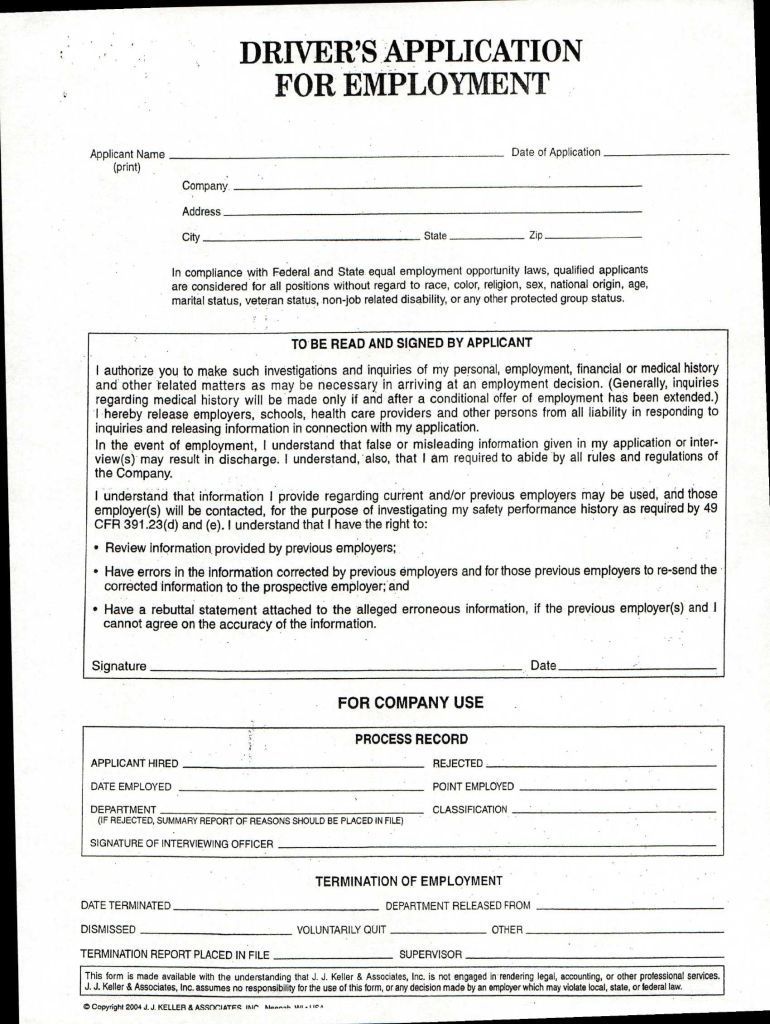
- Begin by entering the 'Date of Application' at the top of the form. This helps track when you submitted your application.
- Fill in your 'Applicant Name' clearly in print, followed by your 'Company', 'Address', 'City', 'State', and 'Zip'. Ensure all information is accurate to avoid delays.
- Review the equal employment opportunity statement and ensure you understand your rights as an applicant.
- In the authorization section, read carefully before signing. This grants permission for background checks related to your application.
- Complete the 'Employment History' section by providing details about previous employers, including dates, positions held, and reasons for leaving.
- Finally, sign and date the application at the bottom to confirm that all information provided is true and complete.
Start filling out your driver application for employment today using our platform for free!
It's free
Got questions?
What is the optimum way to electronically sign my driver application for employment?
Many software applications are available on the market for document editing and signing. DocHub is one of the most widely used online solutions that comply with all security and compliance requirements and guarantees your electronically signed documentation is legally enforceable. All you need to try it out is to create an account, upload your driver application for employment, fill out the necessary details, and click Sign. Generate your electronic signature by typing, drawing it, uploading its image to your document, or scanning a unique QR code.
What browser do I need to edit driver application for employment online?
If you want to edit your driver application for employment on the internet swiftly, it does not matter what internet browser you employ. DocHub’s straightforward editing tools are available using any internet browser. Just open the appropriate tab in the editor, add your file, and fill it out without stress.
How do I find drivers for work?
How do I write an application for the post of a driver?
How do I write an application for the post of a driver?
Security and compliance
At DocHub, your data security is our priority. We follow HIPAA, SOC2, GDPR, and other standards, so you can work on your documents with confidence.
Learn more


