
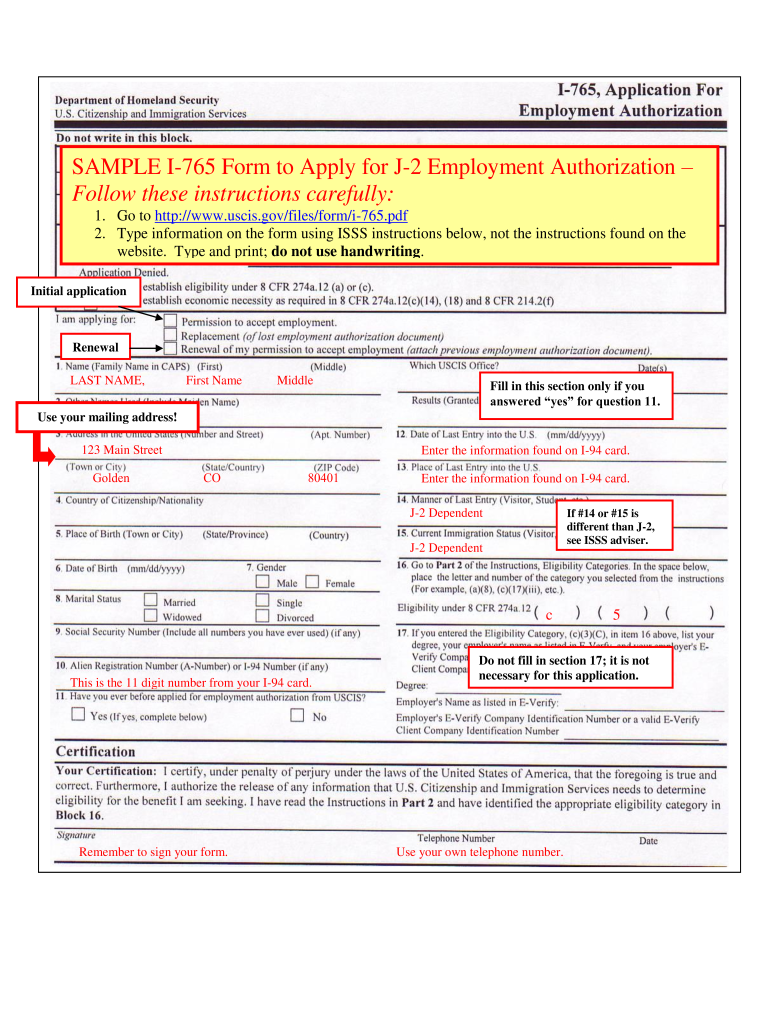







Definition and Purpose of the I-765 Form Sample
The I-765 form, also known as the Application for Employment Authorization, is a critical document for noncitizens in the United States seeking permission to work. It is primarily used by individuals currently eligible for employment based on their immigration status, including but not limited to those with Temporary Protected Status (TPS), asylum applicants, and spouses of H1-B visa holders applying for an H-4 Employment Authorization Document (EAD). Understanding the I-765 form sample provides insight into how to apply for various employment authorizations effectively.
Types of Applicants
- Asylum Seekers: Individuals who have applied for asylum and are awaiting a decision.
- Students: Students under F-1 status who are seeking optional practical training (OPT) or curricular practical training (CPT).
- H-4 Visa Holders: Spouses of H-1B visa holders can apply for work authorization through the I-765 form.
By examining the I-765 form sample, applicants can better navigate the completion of their own forms, ensuring they include accurate information and adhere to submission requirements.
How to Obtain the I-765 Form Sample
Obtaining the I-765 form is a straightforward process. The form can be accessed through the official website of the United States Citizenship and Immigration Services (USCIS). The I-765 form sample is typically available in both PDF format for download and online fillable format, allowing users to complete the document digitally.
Steps to Access the Form
- Visit the USCIS website.
- Navigate to the "Forms" section.
- Search for "I-765" or locate it on the list of forms.
- Download the PDF version or utilize the online filling tool to complete the form directly.
This accessibility ensures that all applicants can retrieve the necessary documentation to legally apply for employment authorization.
Steps to Complete the I-765 Form Sample
Completing the I-765 form correctly is essential for a successful application. The process requires careful attention to detail across several sections of the form. Here’s a breakdown of the steps for completion:
-
Personal Information: Section one requires applicants to provide their personal details, including full name, address, and date of birth.
-
Eligibility Category: Applicants must select the appropriate eligibility category from the provided list. This section is crucial, as it determines the basis on which work authorization is being sought.
-
Filing Information: Applicants must decide whether they are applying for a new EAD or renewing an existing one. Additionally, they should indicate if they have previously been issued an EAD.
-
Signature and Date: After completing all sections, the applicant must sign and date the form. An unsigned application may be rejected.
-
Submission: The completed form must be mailed or submitted electronically, depending on the applicant's location and the specific filing instructions from USCIS.
Following these steps diligently ensures that the application is complete and reduces the likelihood of delays or rejections.
Important Terms Related to the I-765 Form Sample
When working with the I-765 form and the associated processes, understanding key terminology can enhance clarity. Some important terms include:
- Employment Authorization Document (EAD): The card issued to individuals who have been granted permission to work in the U.S.
- Nonimmigrant Status: Temporary immigration status granted to individuals for a specific purpose.
- USCIS: The government agency responsible for overseeing lawful immigration to the United States.
Familiarity with these terms aids applicants in navigating the application process and responding effectively to any additional requests from USCIS.
Required Documents for the I-765 Application
When submitting the I-765 form, certain documents must accompany the application to verify eligibility and establish identity. The list of required documents typically includes:
- Copy of Current Immigration Status: This could be a visa, I-94 arrival/departure record, or other documentation that confirms the applicant's legal status in the U.S.
- Two Passport-Style Photos: Photos must adhere to specific guidelines regarding size and background.
- Payment: Payment of the applicable filing fee, unless exempted due to eligibility criteria.
Gathering these documents in advance streamlines the submission process and minimizes the chances of interference due to incomplete applications.
Common Mistakes When Completing the I-765 Form Sample
Several common mistakes can lead to application delays or denials. Awareness and avoidance of these issues enhance overall success rates. Key pitfalls include:
- Incorrect Eligibility Category: Failing to select the correct eligibility category may result in immediate rejection.
- Inaccurate Personal Information: Typos or incorrect information can lead to complications during processing.
- Missing Signatures: Neglecting to sign the form, particularly in the designated areas, is a common oversight.
Addressing these common errors before submission can significantly improve the odds of a successful application outcome.




