




Here's how it works



How to use or fill out Pentz Health Services LLC dba Nevy Health with our platform

- Click ‘Get Form’ to open the New Patient Intake Form in the editor.
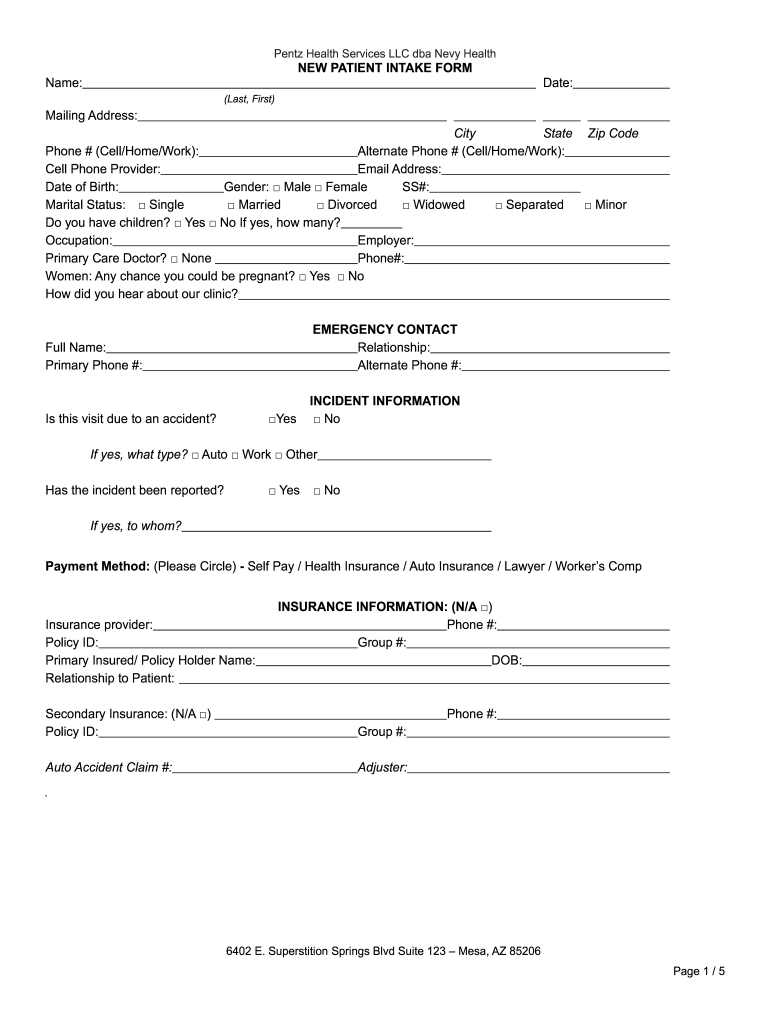
- Begin by entering your name, date, and mailing address. Ensure all fields are filled accurately for effective communication.
- Provide your contact information, including phone numbers and email address. This is crucial for appointment confirmations and follow-ups.
- Fill in your date of birth, gender, and social security number. This information helps us understand your medical history better.
- Complete the emergency contact section with a full name and relationship. Include their primary phone number for urgent situations.
- Indicate if this visit is due to an accident and provide incident details if applicable. This assists in proper documentation.
- In the insurance information section, provide details about your primary and secondary insurance providers as needed.
- Review the symptoms section carefully. Circle any that apply to you today to help us tailor your care effectively.
- Finally, ensure you sign and date the form at the bottom before submitting it through our platform for processing.
Start filling out your form today for free using our editor!
It's free
Got questions?
How do I sign my Pentz Health Services LLC dba Nevy Health on iOS?
With DocHub, you can quickly approve your Pentz Health Services LLC dba Nevy Health or any other document on iOS, even without installing additional programs. You can access your DocHub account from any web-connected browser and complete and sign your form in any preferred method with just a couple of clicks.
Do I need to set up software to modify my Pentz Health Services LLC dba Nevy Health?
When you edit your Pentz Health Services LLC dba Nevy Health with DocHub, you merely require a steady web connection and virtually any browser installed on your device. No need to set up any third-party software or study guides. Just open a tab with DocHub, drag and drop your file, and edit it immediately.
Security and compliance
At DocHub, your data security is our priority. We follow HIPAA, SOC2, GDPR, and other standards, so you can work on your documents with confidence.
Learn more


