Type text, add images, blackout confidential details, add comments, highlights and more.
02. Sign it in a few clicks
Draw your signature, type it, upload its image, or use your mobile device as a signature pad.
03. Share your form with others
Send it via email, link, or fax. You can also download it, export it or print it out.
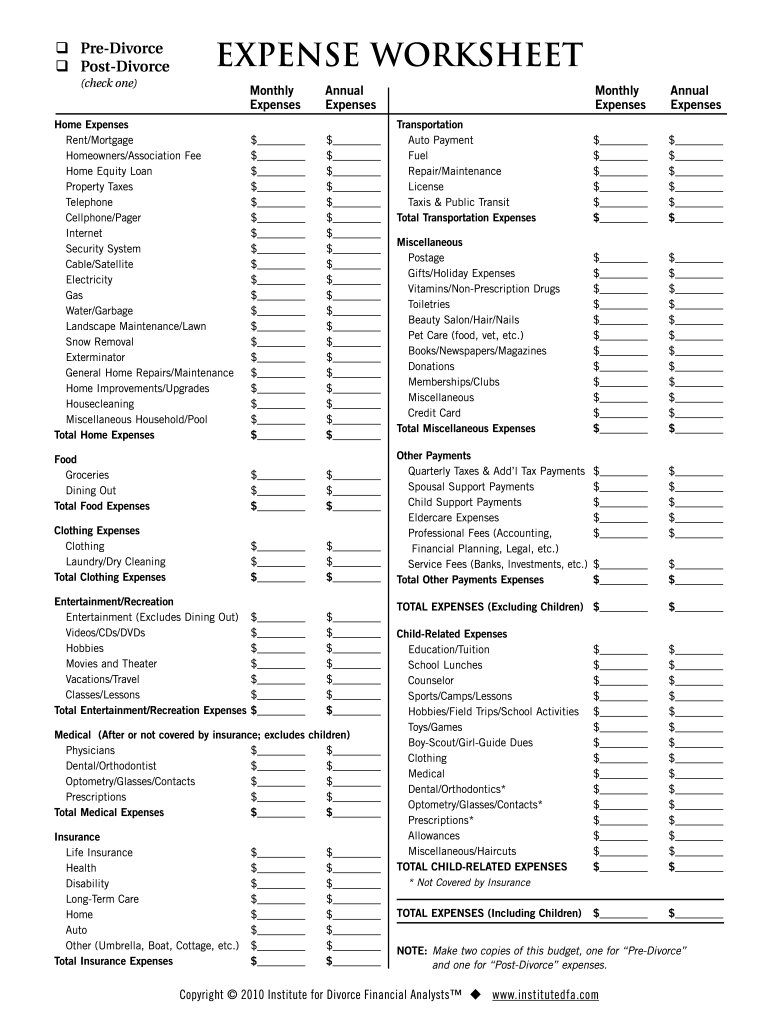
How to use or fill out IDFA Simple Budget - Smarter Divorce Solutions
Ease of Setup
DocHub User Ratings on G2
Ease of Use
DocHub User Ratings on G2
Click ‘Get Form’ to open it in the editor.
Begin by selecting either 'Pre-Divorce' or 'Post-Divorce' at the top of the form. This will help you categorize your expenses accurately.
Fill in the 'Home Expenses' section by entering your monthly and annual costs for items such as rent, utilities, and maintenance. Ensure all fields are completed for a comprehensive overview.
Proceed to the 'Food Expenses' section. Input your grocery and dining out costs, ensuring you capture both monthly and annual totals.
Continue with 'Clothing Expenses', 'Entertainment/Recreation', and 'Medical Expenses'. For each category, enter your expenses in the designated fields.
Complete the sections on 'Transportation', 'Miscellaneous', and any child-related expenses if applicable. Be thorough to ensure no costs are overlooked.
Finally, review your entries for accuracy before saving or exporting your completed budget document.
Start using our platform today to streamline your budgeting process for free!
Fill out IDFA Simple Budget - Smarter Divorce Solutions online It's free
THROUGH A LENS: - Jackson School of International Studies
mission to get her sham divorce overturned so that she can re-divorce her cheating for this melancholy story, brought to life in simple, grey images, simple.Read more
Cookie consent notice
This site uses cookies to enhance site navigation and personalize your experience.
By using this site you agree to our use of cookies as described in our Privacy Notice.
You can modify your selections by visiting our Cookie and Advertising Notice.