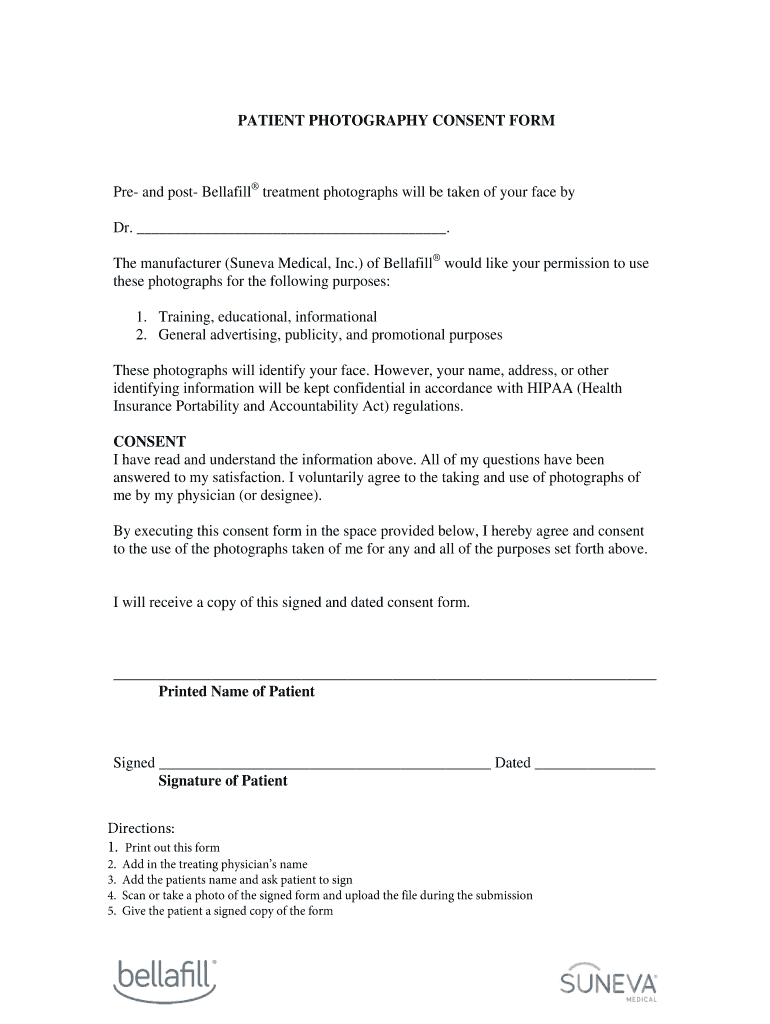
Consent form for bellafill 2026

Get Form
bellafill reviews Preview on Page 1

Here's how it works

01. Edit your bellafill reviews online
Type text, add images, blackout confidential details, add comments, highlights and more.
02. Sign it in a few clicks
Draw your signature, type it, upload its image, or use your mobile device as a signature pad.
03. Share your form with others
Send it via email, link, or fax. You can also download it, export it or print it out.

How to use or fill out consent form for bellafill with our platform

Form edit decoration
9.5
Ease of Setup
DocHub User Ratings on G2
9.0
Ease of Use
DocHub User Ratings on G2
  1. Click ‘Get Form’ to open the consent form for bellafill in the editor.
  2. Begin by entering the treating physician’s name in the designated field at the top of the form.
  3. Next, provide your printed name in the space labeled 'Printed Name of Patient'.
  4. Sign the form in the area marked 'Signature of Patient' and include today's date.
  5. Once completed, scan or take a photo of the signed form and upload it during your submission process.
  6. Ensure that you give yourself a copy of this signed and dated consent form for your records.

Start using our platform today to easily complete your bellafill consent form online, for free!

be ready to get more

Complete this form in 5 minutes or less

Get form

Got questions?

We have answers to the most popular questions from our customers. If you can't find an answer to your question, please contact us.
Contact us

A lot of software applications are available out there for document modifying and signing. DocHub is one of the most in-demand online solutions that comply with all data protection and compliance standards and ensures your electronically signed paperwork is legally enforceable. All you need to give it a try is to create an account, upload your consent form for bellafill, fill out the required details, and click Sign. Create your eSignature by typing, drawing it, uploading its picture to your form, or scanning a unique QR code.

If your go-to electronic mail service is Gmail, it is simple to incorporate your DocHub editor into your work. Modify your consent form for bellafill with DocHub instruments and attach it to your drafts in Gmail. See how effortless it can be to exchange files and work together having a swift PDF editing solution at hand.

In some cases, you may be able to write your own parental consent forms like if your child needs permission to miss class for a dentist appointment. In this case, you can compose a short letter of permission sharing the applicable dates and information, as well as your name and signature.
This type of consent form requires the client to disclose their skincare routine, medication use, and other relevant background info. It also requires the clients signature, which confirms their understanding and acceptance of the associated risks.
That is, the patient must have capacity to consent, the consent must be freely given and be sufficiently specific to the treatment, and the patient must be informed about the procedure and any material risks.

Security and compliance

At DocHub, your data security is our priority. We follow HIPAA, SOC2, GDPR, and other standards, so you can work on your documents with confidence.

Learn more
ccpa2
pci-dss
gdpr-compliance
hipaa
soc-compliance
be ready to get more

Complete this form in 5 minutes or less

Get form

People also ask

U.S. Customs and Border Protection (CBP) recommends carrying a docHubd letter of consent, especially when a child is traveling internationally with one parent, another adult, or alone, to prevent misunderstandings related to custody or abduction.
1) I have read and understood the information contained here; 2) I have been informed about the Procedure and the potential risks, benefits, alternatives and the risk of those alternatives; 3) I authorize and consent to the performance of the Procedure as described; and 4) I authorize and direct that any Specimen
Consent form 1 is for adults and those patients having anaesthetic Consent form 2 is for paediatrics Consent form 3 is for procedures without sedation Consent form 4 should be used when the patients lack capacity and should be completed by the professional doing the procedure.

Related links