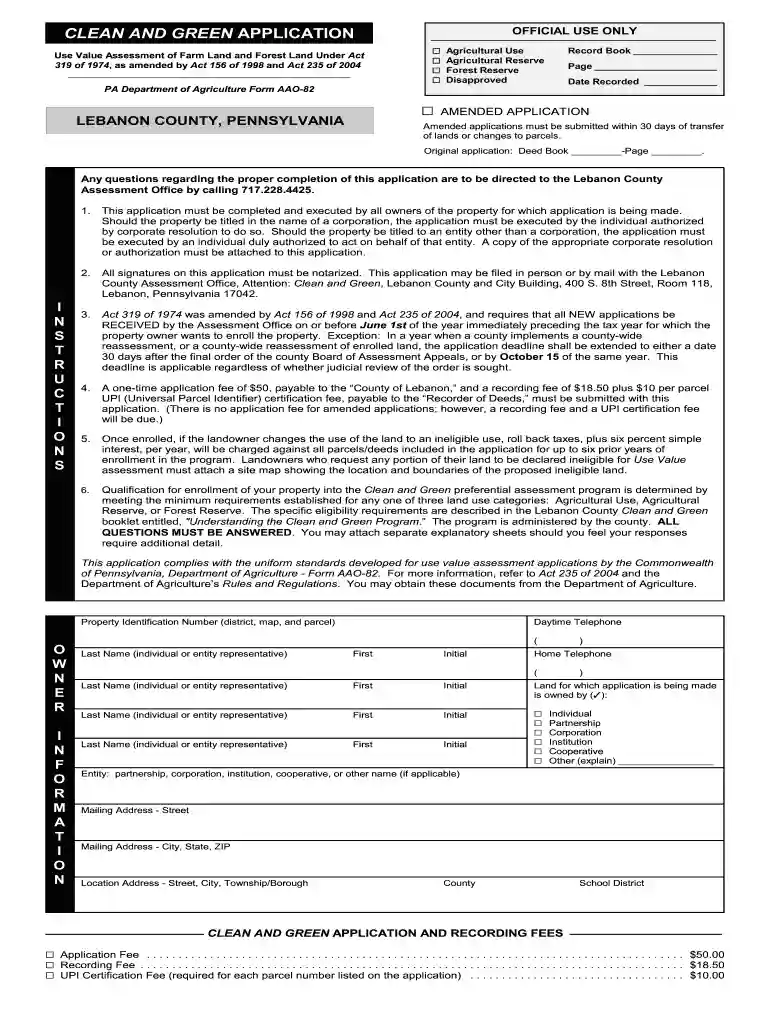
Pa green app 2026

Get Form
clean and green application Preview on Page 1

Here's how it works

01. Edit your clean and green application online
Type text, add images, blackout confidential details, add comments, highlights and more.

02. Sign it in a few clicks
Draw your signature, type it, upload its image, or use your mobile device as a signature pad.

03. Share your form with others
Send it via email, link, or fax. You can also download it, export it or print it out.

How to use or fill out pa green app with our platform

Form edit decoration
9.5
Ease of Setup
DocHub User Ratings on G2
9.0
Ease of Use
DocHub User Ratings on G2
  1. Click ‘Get Form’ to open the pa green app in the editor.
  2. Begin by entering your Property Identification Number, which includes district, map, and parcel details.
  3. Fill in the Owner Information section with the names and contact details of all property owners. Ensure that all owners sign the application in front of a notary.
  4. Indicate the land category you are applying for by checking the appropriate boxes: Agricultural Use, Agricultural Reserve, or Forest Reserve. Review eligibility requirements for each category carefully.
  5. Complete any additional questions regarding land use and provide supporting documentation if available. Attach any necessary explanatory sheets for detailed responses.
  6. Review your application thoroughly before submitting it. Ensure all required fees are included and that you have notarized signatures.

Start using our platform today to easily complete your pa green app for free!

be ready to get more

Complete this form in 5 minutes or less

Get form

Got questions?

We have answers to the most popular questions from our customers. If you can't find an answer to your question, please contact us.
Contact us
Defining Green App Development We focus on: Minimizing Energy Consumption: We create apps that use less battery power on user devices and require less energy from data centers. Optimizing Resource Usage: We efficiently manage CPU, memory, and network bandwidth.
Green apps help reduce digital carbon footprints. How? These apps help reduce server energy consumption, optimize resource usage, and extend device battery life.
Usage Information: We gather data on how you interact with our app, such as the pages visited, features used, and preferences. Device Information: We may collect information about your device, including its unique device identifier, IP address, operating system, and browser type.
Meta says its made WhatsApp green to: bring a modern, new experience to WhatsApp and make it more accessible and easy to use. Like it or not, the new green hue is designed to be softer on the eyes, fostering a more comfortable and engaging messaging experience.
How it works Download the app. Download the app from the Google Play or App Store. Enter location number. In the app, enter the location number of where you have parked, which you can find on parking signage. Enter parking duration. Next, add how long you wish to park for. Extend your parking session anytime.
be ready to get more

Complete this form in 5 minutes or less

Get form

People also ask

With green application, you can plan your travelling including hotel booking and online ticketing over buses in our panel, courier (pickup + delivery) in 140+ cities, Centralized education facilitation of Schools, Teaching / Non-Teaching staff, students and parents communication, Social media, V-logs, Health care
The 7 best free green screen apps for iPhone Android Chromavid Best for Chroma Keying. Power Director Best for Comprehensive Editing Tools. Kine Master Best for Layer-Based Editing. Veescope Live Best for Live Chroma Keying. We Video Best for Cloud-Based Editing. iMovie Best for User-Friendly Interface.
With the BERMAD GreenApp, you can connect to a free (Android and iOS) user-friendly app, and manage your irrigation from your smart-phone or tablet.

Related links