Beneficiary gabelli number pdf 2026

Get Form
beneficiary gabelli number pdf Preview on Page 1

Here's how it works

01. Edit your form online
Type text, add images, blackout confidential details, add comments, highlights and more.
02. Sign it in a few clicks
Draw your signature, type it, upload its image, or use your mobile device as a signature pad.
03. Share your form with others
Send it via email, link, or fax. You can also download it, export it or print it out.

How to use or fill out beneficiary gabelli number pdf with our platform

Form edit decoration
9.5
Ease of Setup
DocHub User Ratings on G2
9.0
Ease of Use
DocHub User Ratings on G2
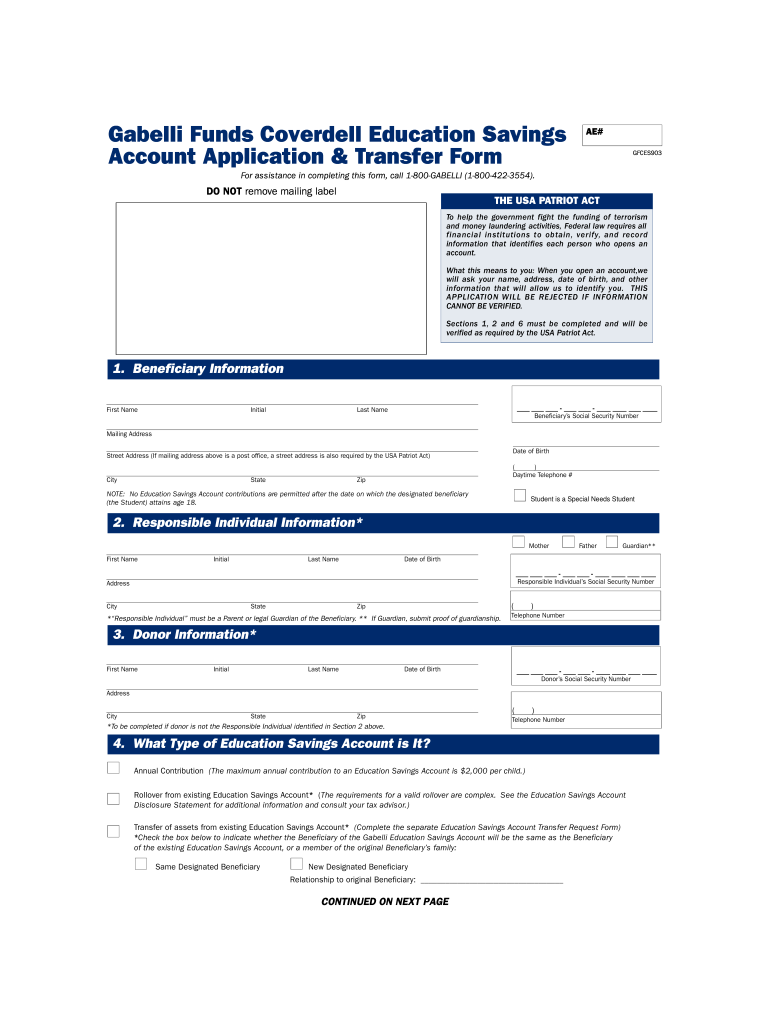
  1. Click ‘Get Form’ to open the beneficiary gabelli number PDF in the editor.
  2. Begin with Section 1, 'Beneficiary Information.' Fill in the first name, middle initial, last name, and Social Security Number of the beneficiary. Provide a complete mailing address including street, city, state, and zip code. Don't forget to include the date of birth and daytime telephone number.
  3. Move to Section 2 for 'Responsible Individual Information.' Indicate whether this is a parent or guardian. Enter their details including name, date of birth, Social Security Number, address, and contact information.
  4. In Section 3, provide 'Donor Information' if applicable. This section requires similar details as the previous sections.
  5. Proceed to Section 4 to specify the type of Education Savings Account you are applying for. Choose between annual contributions or rollovers and indicate if the beneficiary is the same as an existing account.
  6. In Section 5, list any Gabelli Funds you wish to invest in along with their respective amounts.
  7. Finally, complete Section 6 by signing and dating where required. Ensure all information is accurate before submission.

Start filling out your beneficiary gabelli number PDF today for free using our platform!

be ready to get more

Complete this form in 5 minutes or less

Get form

Got questions?

We have answers to the most popular questions from our customers. If you can't find an answer to your question, please contact us.
Contact us

Yes, and it’s really straightforward! DocHub is an online PDF editor with advanced document management capabilities that allow you rapidly edit your paperwork, complete blank fields and add new ones for other people to fill out, and create electronic signatures in several ways. Add your beneficiary gabelli number pdf, provide information as required, and select how you want to eSign your document - by typing your name, drawing your signature, uploading its image, or using a QR code.

With DocHub, there are several convenient ways to edit your beneficiary gabelli number pdf online. You can drag and drop the form and edit it directly at the DocHub website or use our browser extension to fill out your form right away. On top of that, you can edit your PDF on your smartphone, as DocHub is compatible with all the accessible mobile platforms.

Banks use the beneficiary name as a key verification factor to process transactions securely. For example, if you are transferring money to a friend, you must enter their full name as per their bank records. A mismatch between the entered name and account details can lead to failed or delayed transactions.
Government employees can download the appropriate forms to designate a beneficiary who will receive unpaid earnings, retirement funds, or insurance in the event of the employees death. Beneficiary forms must be mailed to the appropriate address as noted on the form.
Most beneficiary designations will require you to provide a persons full legal name and their relationship to you (spouse, child, mother, etc.). Some beneficiary designations also include information like mailing address, email, phone number, date of birth and Social Security number.

Security and compliance

At DocHub, your data security is our priority. We follow HIPAA, SOC2, GDPR, and other standards, so you can work on your documents with confidence.

Learn more
ccpa2
pci-dss
gdpr-compliance
hipaa
soc-compliance
be ready to get more

Complete this form in 5 minutes or less

Get form

People also ask

Navigate to the Fund Transfer section, where you will typically find the option to add a new beneficiary. Select Add Payee and choose the type of their account (it can be own bank or other banks). Fill in the beneficiarys name, account number, bank name and IFSC accurately, and then click on Add and Confirm.
Typically, youll want to name your spouse, children, or other financial dependents as your beneficiaries. However, you may also consider naming siblings, other family members, a friend, or even a nonprofit organization, trust, or your estate to inherit your account.
How to fill out the Morgan Stanley Beneficiary Designation Form? Gather the necessary account and beneficiary information. Fill in the Account Owner Information section. Complete the Beneficiary Information for all beneficiaries. Review the information provided for accuracy. Sign and date the form before submission.
People usually name those who are closest to them as beneficiaries. Some examples of beneficiaries are: Close family members like a spouse or children. Other loved ones or friends.

Related links