




Here's how it works

01. Edit your ca admission circular 2024 online
Type text, add images, blackout confidential details, add comments, highlights and more.

02. Sign it in a few clicks
Draw your signature, type it, upload its image, or use your mobile device as a signature pad.

03. Share your form with others
Send ca admission circular 2023 via email, link, or fax. You can also download it, export it or print it out.
How to use or fill out ca admission with our platform

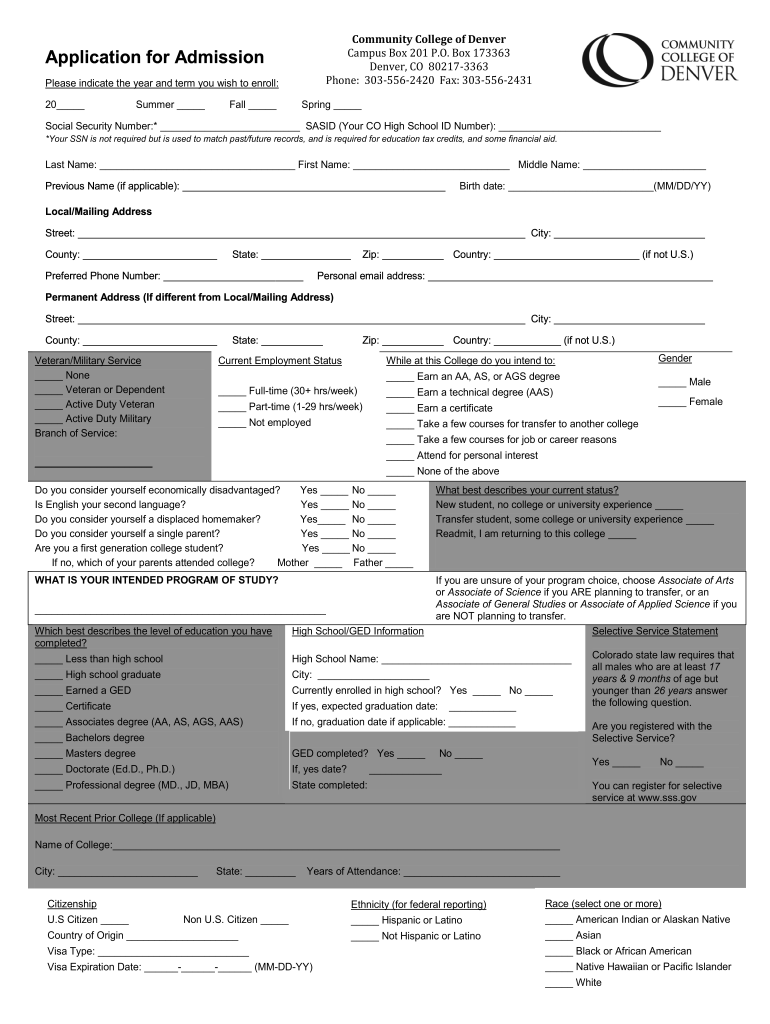
- Click ‘Get Form’ to open the ca admission application in the editor.
- Begin by indicating the year and term you wish to enroll in. Fill in the appropriate boxes for Summer, Fall, or Spring.
- Enter your Social Security Number and SASID if applicable. Note that while the SSN is not mandatory, it may be required for financial aid purposes.
- Complete your personal information including Last Name, First Name, Middle Name, and Previous Name if applicable.
- Fill out your birth date and local/mailing address details including street, city, county, state, zip code, and country.
- Provide your preferred phone number and personal email address for communication.
- If your permanent address differs from your local address, complete that section as well.
- Indicate your veteran/military service status and current employment status by selecting the appropriate options provided.
- Answer questions regarding your educational goals and whether you consider yourself economically disadvantaged or a first-generation college student.
- Finally, review all entered information for accuracy before submitting the form through our platform.
Start filling out your ca admission application today for free using our platform!
Fill out ca admission online
It's free
It's free
Security and compliance
At DocHub, your data security is our priority. We follow HIPAA, SOC2, GDPR, and other standards, so you can work on your documents with confidence.
Learn more


