Type text, add images, blackout confidential details, add comments, highlights and more.
02. Sign it in a few clicks
Draw your signature, type it, upload its image, or use your mobile device as a signature pad.
03. Share your form with others
Send paul mitchell the hub via email, link, or fax. You can also download it, export it or print it out.
How to use or fill out paul mitchell warranty with our platform
Ease of Setup
DocHub User Ratings on G2
Ease of Use
DocHub User Ratings on G2
Click ‘Get Form’ to open the paul mitchell warranty in the editor.
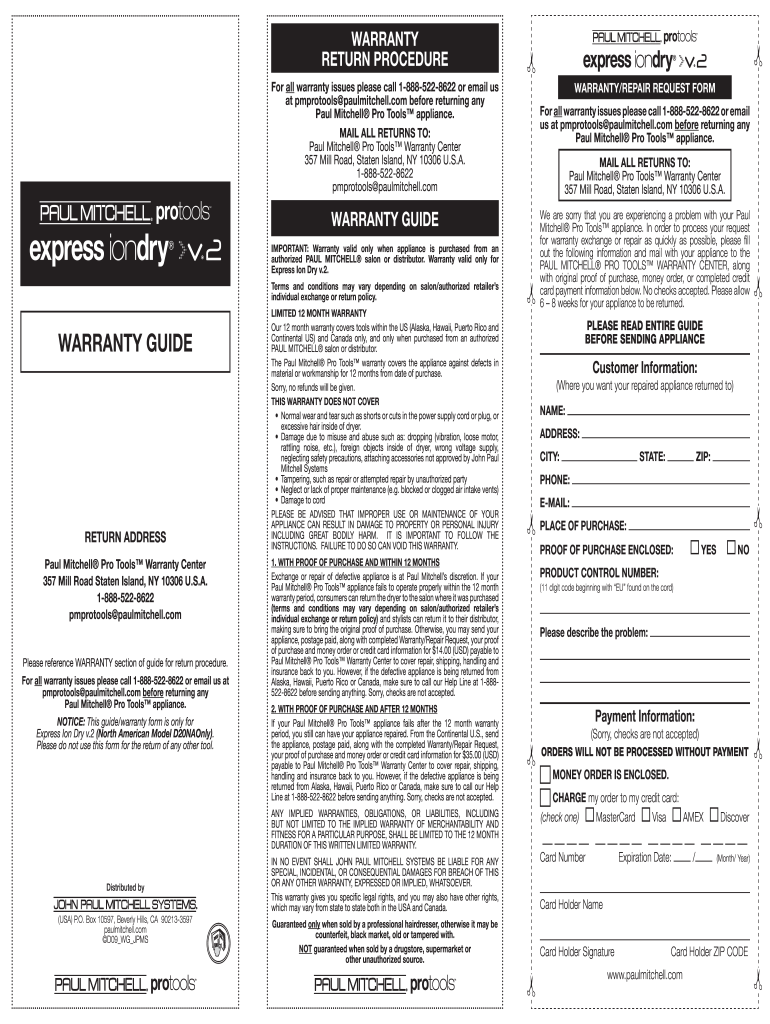
Begin by entering your personal information in the 'Customer Information' section. Fill in your name, address, city, state, zip code, phone number, and email address.
Indicate where you purchased the appliance by filling out the 'Place of Purchase' field. Ensure you have your proof of purchase ready.
In the 'Product Control Number' field, enter the 11-digit code starting with 'EU' found on the cord of your appliance.
Describe the problem you are experiencing with your appliance in the designated area to provide clarity for processing your request.
For payment information, select whether you are enclosing a money order or wish to charge it to your credit card. Fill in all required credit card details if applicable.
Review all entered information for accuracy before submitting. Once complete, print and mail it along with your appliance to the Warranty Center.
Start using our platform today for free to streamline your warranty process!
A warranty claim, Paul Mitchell argues, must allege that a specific product has fallen short of a specific promise. The complaint does just that, specifying theRead more
THE SOFTWARE IS PROVIDED AS-IS AND WITHOUT WARRANTY OF ANY KIND, EXPRESS, IMPLIED OR. OTHERWISE, INCLUDING WITHOUT LIMITATION, ANY WARRANTY OF MERCHANTABILITYRead more
Terms Conditions - Plugged In - Paul Mitchell Schools
TO THE MAXIMUM EXTENT PERMITTED BY APPLICABLE LAW, ALL SUCH INFORMATION, SOFTWARE, PRODUCTS, SERVICES AND RELATED GRAPHICS ARE PROVIDED AS IS WITHOUT WARRANTYRead more
Cookie consent notice
This site uses cookies to enhance site navigation and personalize your experience.
By using this site you agree to our use of cookies as described in our Privacy Notice.
You can modify your selections by visiting our Cookie and Advertising Notice.