




Here's how it works

01. Edit your controlled deer hunt ontario 2024 online
Type text, add images, blackout confidential details, add comments, highlights and more.

02. Sign it in a few clicks
Draw your signature, type it, upload its image, or use your mobile device as a signature pad.

03. Share your form with others
Send controlled deer hunt ontario 2023 via email, link, or fax. You can also download it, export it or print it out.
How to use or fill out Ontario Hunt Controlled with our platform

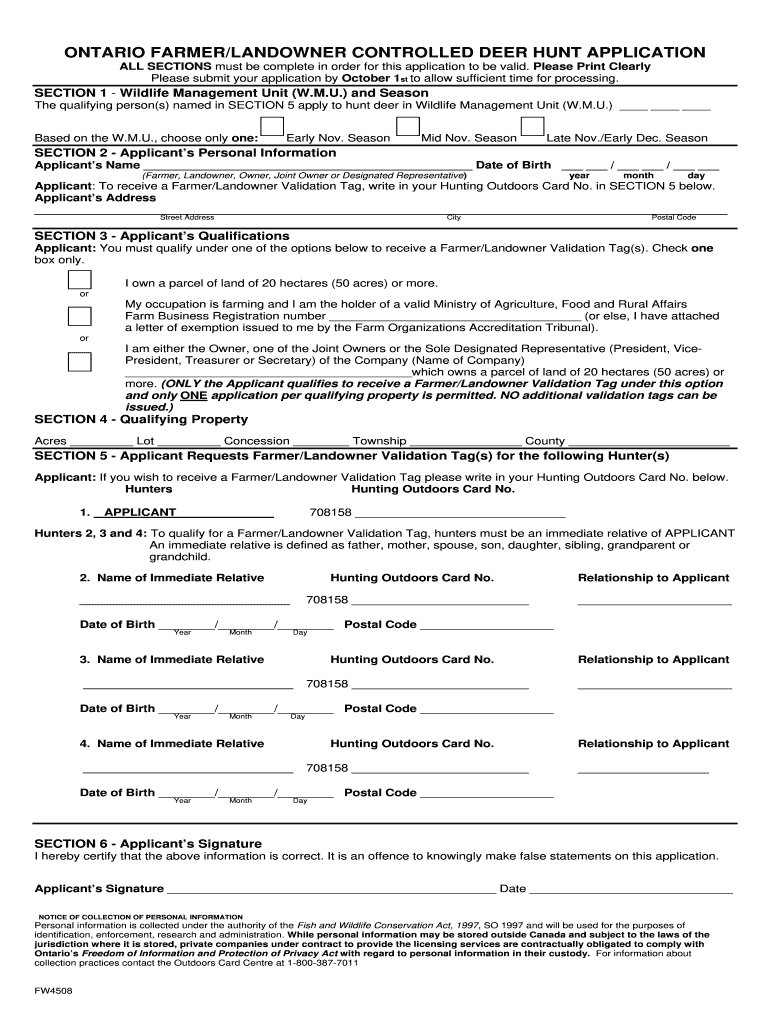
- Click ‘Get Form’ to open the Ontario Hunt Controlled application in the editor.
- Begin with SECTION 1, where you will select your Wildlife Management Unit (W.M.U.) and the hunting season you wish to apply for. Ensure you choose only one option.
- In SECTION 2, fill in your personal information clearly. Include your name, date of birth, and address. Remember to provide your Hunting Outdoors Card No. in SECTION 5 if you want a validation tag.
- Move to SECTION 3 and check the box that applies to your qualifications for receiving a Farmer/Landowner Validation Tag. Only one box should be checked.
- In SECTION 4, provide details about your qualifying property including acres, lot number, concession, township, and county.
- SECTION 5 requires you to list hunters who are immediate relatives. Fill in their names, Hunting Outdoors Card numbers, relationships to you, and their dates of birth.
- Finally, complete SECTION 6 by signing and dating the application to certify that all information is correct.
Start filling out your Ontario Hunt Controlled application online for free today!
Fill out ontario hunt controlled online
It's free
It's free
Security and compliance
At DocHub, your data security is our priority. We follow HIPAA, SOC2, GDPR, and other standards, so you can work on your documents with confidence.
Learn more


Related forms
Professional Leave Notification Form - Bvsd - bvsd
The document is a Professional Leave Notification form that must be completed and approved for teachers to take leave fr ...

Boulder County Nurse-Family Partnership Referral
The document is a referral form for the Boulder County Nurse-Family Partnership, aimed at expecting first-time mothers w ...
Physical Exam Record - Finalsite
The document is a Pre-Participation History and Physical Examination form for the Northshore School District, designed t ...
Parents' preferences for services for children with hearing loss
The document is an intake questionnaire for the Aural Habilitation Program at Seattle Children's Hospital, designed for ...

S-53259 11 15 Provider Post Service Appeal Form - Wellmark
The document is an Institutional Billing Summary Form for Blue Distinction® Centers for Transplant (BDCT), detailing the ...

Blue Cross and Blue Shield of Minnesota and Stella
The document is a Transplant Services Notification Form for Blue Distinction® Centers for Transplant (BDCT), detailing t ...
Owner Name: Arrival Date:
The Bay Animal Clinic Boarding Release Form outlines the terms and conditions for boarding pets, including liability rel ...